Switching platforms can feel overwhelming, but migrating from PrestaShop to Shopify doesn’t have to be complicated. If you’re ready to migrate PrestaShop to Shopify, you’re making a strategic decision that can streamline your operations and unlock powerful growth opportunities.
PrestaShop requires managing your own hosting, security updates, and technical infrastructure. Shopify, on the other hand, handles these complexities for you, letting you focus on growing your business rather than maintaining servers. With over 4.4 million live Shopify stores compared to PrestaShop’s 714,000, the platform’s popularity speaks to its ease of use and robust feature set.
This guide provides a complete roadmap for your PrestaShop to Shopify migration journey, covering preparation, execution, and optimization to help you transition smoothly.
Summary
Moving from PrestaShop to Shopify requires careful planning and execution to ensure a smooth transition. This comprehensive guide walks you through every step of the PrestaShop to Shopify migration process, from preparing your data to post-migration optimization. Key insights include:
- Pre-migration preparation: Understanding what data can be transferred and backing up your PrestaShop store
- Migration methods: Choosing between manual migration, automated tools like LitExtension or Cart2Cart, and professional migration services
- Step-by-step process: Detailed instructions for both automated and manual migration approaches
- Data preservation: How to maintain SEO rankings through 301 redirects and URL structure preservation
- Cost considerations: Understanding pricing for different migration methods and choosing the right option for your store size
- Post-migration tasks: Essential steps to ensure your new Shopify store is fully operational and optimized
Whether you’re managing a small catalog or migrating thousands of products, this guide provides the framework and best practices you need for a successful platform transition.
Why Migrate from PrestaShop to Shopify?
| Feature | PrestaShop | Shopify |
| Hosting | Self-managed (requires separate hosting) | Fully hosted and managed |
| Security | Manual SSL setup and security patches | Built-in SSL, PCI compliance, automatic updates |
| Payment Gateways | Limited built-in options | 100+ payment gateways, native Shopify Payments |
| Support | Community forums, limited official support | 24/7 customer support via chat, email, phone |
| App Ecosystem | ~4,000 modules | 8,000+ apps in Shopify App Store |
| Maintenance | Manual updates and patches required | Automatic platform updates |
Before you migrate from PrestaShop to Shopify, it’s worth understanding the key advantages driving this decision:
Simplified Store Management
Shopify eliminates the technical overhead of running an online store. No more worrying about server configurations, security patches, or platform updates. The platform handles hosting, security certificates, and compliance requirements automatically, giving you more time to focus on sales and marketing.
Superior Payment Processing
While PrestaShop offers payment gateway integrations, Shopify’s native Shopify Payments provides seamless processing with competitive rates. You’ll have access to over 100 payment providers worldwide, making it easier to serve international customers without complex integration work.
Robust Marketing and SEO Tools
Shopify’s SEO capabilities are built into the platform, with features like automatic sitemap generation, customizable URL structures, and mobile optimization. The extensive app ecosystem includes powerful marketing automation tools that integrate directly with your store data.
Now that we’ve covered the benefits, let’s move on to what you can actually transfer during your migration.
What Data Can You Migrate from PrestaShop to Shopify?
Understanding which data elements transfer during a PrestaShop to Shopify migration helps you plan effectively and set realistic expectations.
| Data Type | What Transfers | Important Notes |
| Products | Names, descriptions, SKUs, prices, images, variants, inventory, categories, tags, meta data | Variants limited to 99 per product, 3 options maximum |
| Categories | Category names, descriptions, images, meta data | Convert to Shopify collections; subcategories become tags |
| Customers | Names, emails, addresses, customer groups (as tags) | Passwords cannot be migrated for security |
| Orders | Order details, products, prices, customer info, shipping/billing addresses, order status | Historical order dates preserved; reports may need reconfiguration |
| Coupons | Discount codes, amounts, validity dates, usage limits | Review and recreate complex coupon rules |
| Reviews | Review text, ratings, dates, customer names | Requires Shopify review app installation |
| Pages | CMS pages, content, SEO metadata | May need formatting adjustments |
| Blog Posts | Posts, content, categories, tags, comments | Requires blog functionality setup on Shopify |
What Doesn’t Migrate
It’s equally important to know what won’t transfer:
- Store design and theme: Shopify uses different theme architecture, requiring a new theme selection
- Custom functionality: Third-party modules and custom code need to be rebuilt or replaced with Shopify apps
- Customer passwords: For security reasons, passwords must be reset by customers
- Payment gateway configurations: Payment methods need to be set up fresh in Shopify
- Shipping configurations: Shipping zones and rates require new setup
Understanding these limitations helps you prepare for post-migration work and set accurate timelines.
Pre-Migration Preparation Checklist
Proper preparation is the foundation of a successful PrestaShop to Shopify migration. Follow this checklist to ensure you’re ready:
1. Audit Your PrestaShop Store
Before migrating, take stock of what you have:
- Product count: How many products, variants, and SKUs?
- Customer database: Number of registered customers and their data quality
- Order history: Total orders and date range to migrate
- Content inventory: CMS pages, blog posts, and media files
- Third-party integrations: List current modules and their equivalents on Shopify
This audit helps you estimate migration time and costs while identifying what needs special attention.
2. Clean Your Data
Migration is the perfect opportunity to remove outdated or duplicate information:
- Delete discontinued products and obsolete variants
- Remove inactive customer accounts (check local regulations first)
- Archive old orders that don’t need migration
- Eliminate duplicate categories and redundant tags
- Update product information with accurate descriptions and pricing
Clean data migrates faster and reduces errors during the transfer process.
3. Set Up Your Shopify Store
Don’t wait until after migration to prepare your target platform:
- Create your Shopify account and select a plan
- Choose and customize a Shopify theme that matches your brand
- Configure basic store settings (currency, taxes, shipping zones)
- Set up essential apps (reviews, email marketing, analytics)
- Create necessary pages (About Us, Privacy Policy, Terms of Service)
Having your Shopify store ready ensures you can switch over immediately after migration completes.
4. Back Up Everything
Create comprehensive backups before starting any migration:
- Database backup: Export your PrestaShop database via phpMyAdmin
- File backup: Download all product images, documents, and custom files
- Configuration backup: Document current settings, payment methods, and shipping rules
- Code backup: If you have custom modifications, save all code changes
Store these backups securely offline. You’ll need them if anything goes wrong during migration.
With preparation complete, you’re ready to choose your migration method.
PrestaShop to Shopify Migration Methods
You have several approaches for migrating PrestaShop to Shopify, each with different trade-offs between cost, time, and technical complexity.
| Method | Best For | Pros | Cons | Estimated Cost |
| Manual CSV Import | Small stores (<100 products), tight budgets | Complete control, no additional cost | Time-consuming, error-prone, no order history | Free |
| Automated Migration Apps | Most stores (100-10,000+ items) | Fast, accurate, preserves relationships | Requires payment, some learning curve | $59-$499+ |
| Professional Migration Service | Large stores, complex requirements | Expert handling, customization, support | Higher cost, less control | $500-$5,000+ |
| Shopify Plus Migration | Enterprise stores | Dedicated support, custom solutions | Highest cost, requires Shopify Plus | Custom pricing |
Method 1: Manual CSV Migration
Manual migration works for smaller catalogs but becomes impractical at scale.
When to choose this:
- You have fewer than 100 products
- You want maximum control over the process
- You have time to invest in the migration
- Your budget is extremely limited
Process overview:
- Export products from PrestaShop as CSV
- Format data to match Shopify’s CSV template requirements
- Import products to Shopify
- Manually recreate customers and orders (if needed)
- Rebuild category structure as collections
Limitations:
- No order history preservation
- Customer data requires separate handling
- Tedious for large inventories
- High risk of formatting errors
Method 2: Automated Migration Tools
Migration apps like LitExtension, Cart2Cart, and Matrixify offer the best balance of cost and efficiency for most merchants.
When to choose this:
- You have 100+ products to migrate
- You want to preserve order history and customer data
- You need to maintain SEO through URL redirects
- You want a faster, more reliable process
Popular migration tools:
- LitExtension
- Free for stores under 100 entities (products, customers, orders)
- Pricing scales with store size
- Preserves order IDs and customer groups
- Automated 301 redirect creation
- Cart2Cart
- User-friendly wizard interface
- Free demo migration
- 24/7 support
- Extensive data mapping options
- Matrixify
- Powerful for complex migrations
- Advanced customization options
- Handles large datasets efficiently
- Steeper learning curve
We’ll cover the automated migration process in detail in the next section.
Method 3: Professional Migration Services
For complex stores or when you prefer hands-off migration, professional services provide peace of mind.
When to choose this:
- Your store has custom functionality or complex data structures
- You’re migrating 10,000+ products
- You need custom data transformation
- You want guaranteed results with expert support
What’s included:
- Pre-migration consultation and planning
- Data mapping and transformation
- Migration execution and monitoring
- Post-migration testing and validation
- Support for issue resolution
Professional Shopify development services can handle everything from data migration to custom theme development, ensuring a complete platform transition.
How to Migrate from PrestaShop to Shopify: Step-by-Step Guide
This detailed guide walks you through automated migration using a tool like LitExtension, which offers the best balance of ease and functionality for most stores.
Step 1: Choose and Install Your Migration Tool
Start by selecting your preferred migration tool. For this guide, we’ll use LitExtension as an example.
- Visit the LitExtension website and create an account
- Install the Cart2Cart Connector on your PrestaShop store:
- Download the connector file
- Extract and upload to your PrestaShop root directory via FTP
- Verify the connection is active
- Install the migration app on Shopify:
- Visit the Shopify App Store
- Search for your chosen migration tool
- Click “Add app” and authorize the installation
Step 2: Connect Your Source and Target Stores
Configure the connection between PrestaShop and Shopify:
PrestaShop Setup:
- Select “PrestaShop” as your source cart
- Enter your PrestaShop store URL
- Provide your admin credentials or API access
- Verify the connection is successful
Shopify Setup:
- Select “Shopify” as your target cart
- Enter your Shopify store URL
- Authorize API access through the installed app
- Confirm the connection
Step 3: Select Data Entities to Migrate
Choose what information you want to transfer:
Essential entities:
- ✓ Products (including variants and images)
- ✓ Product categories (migrated as collections)
- ✓ Customers
- ✓ Orders and order history
- ✓ Coupons and discount codes
Optional entities:
- CMS pages
- Blog posts and categories
- Product reviews (requires Shopify review app)
- Customer groups (migrated as tags)
Most migration tools let you select all entities or pick specific ones based on your needs.
Step 4: Configure Migration Options
Fine-tune your migration with these critical settings:
SEO Preservation:
- ☑ Create 301 redirects from old PrestaShop URLs to new Shopify URLs
- ☑ Migrate SEO meta titles and descriptions
- ☑ Preserve product and category URL structures when possible
- ☑ Transfer image alt text for SEO continuity
Data Handling:
- ☑ Preserve order IDs to maintain consistency
- ☑ Clear existing Shopify data before migration (recommended for clean start)
- ☑ Migrate images from product descriptions
- ☑ Convert customer groups to Shopify customer tags
Additional Options:
- Migrate manufacturer/brand information
- Transfer product reviews to compatible Shopify app
- Import blog posts and maintain category structure
- Preserve product sorting and featured status
These options ensure you maintain SEO value and customer experience during the transition.
Step 5: Run a Demo Migration
Never skip the demo migration—it’s your chance to catch issues before full migration:
- Start the free demo migration (usually transfers 10-20 items per entity)
- Wait for completion (typically 10-30 minutes)
- Review migrated data on your Shopify store:
- Check product details, prices, and images
- Verify customer information and addresses
- Inspect order data for accuracy
- Test category structure (collections)
- Identify any formatting issues or missing data
- Adjust migration settings if needed
- Run another demo if you made significant changes
The demo helps you perfect your migration settings before committing to the full transfer.
Step 6: Perform Full Migration
Once you’re satisfied with demo results, proceed with the full migration:
- Review your final migration settings
- Consider purchasing migration insurance if offered (allows free re-migrations)
- Choose your migration timing:
- Schedule during low-traffic hours
- Avoid peak shopping periods
- Consider weekend timing for B2B stores
- Start the full migration
- Monitor progress through the migration dashboard
- The migration continues even if you close your browser
Migration timing estimates:
| Store Size | Estimated Duration |
| Small (100-500 products) | 1-3 hours |
| Medium (500-2,000 products) | 3-8 hours |
| Large (2,000-10,000 products) | 8-24 hours |
| Very Large (10,000+ products) | 24-72 hours |
Step 7: Handle Recent Data
If you continued selling on PrestaShop during migration, you’ll have new orders and customers to transfer:
- Use the “Recent Data Migration” feature offered by most tools
- This transfers only new data created since your original migration
- Schedule this for immediately before your store launch
- Verify all recent orders and customers are present
This ensures no customer information or sales data falls through the cracks.
Manual PrestaShop to Shopify Migration Process
For merchants who prefer complete control or have very small catalogs, here’s how to manually migrate PrestaShop to Shopify using CSV files.
Exporting Products from PrestaShop
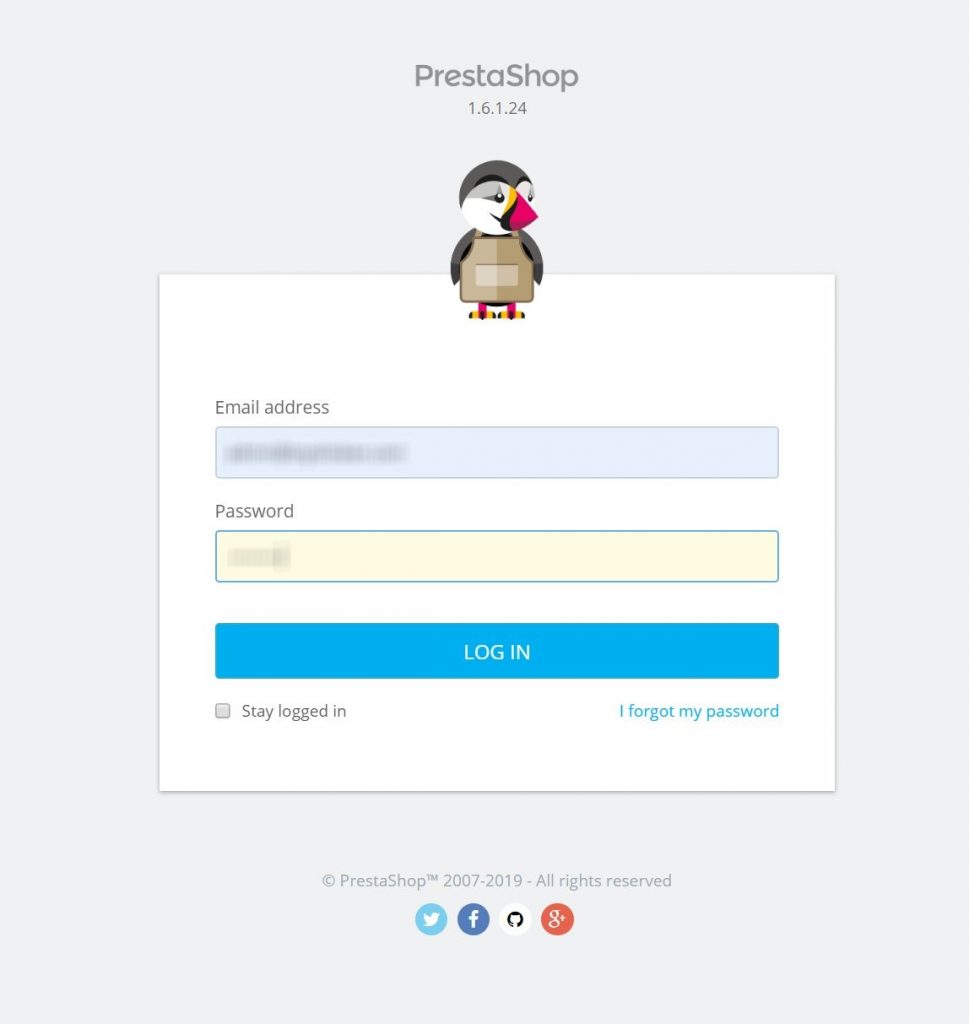
- Log into your PrestaShop admin panel
2. Navigate to Catalog > Products
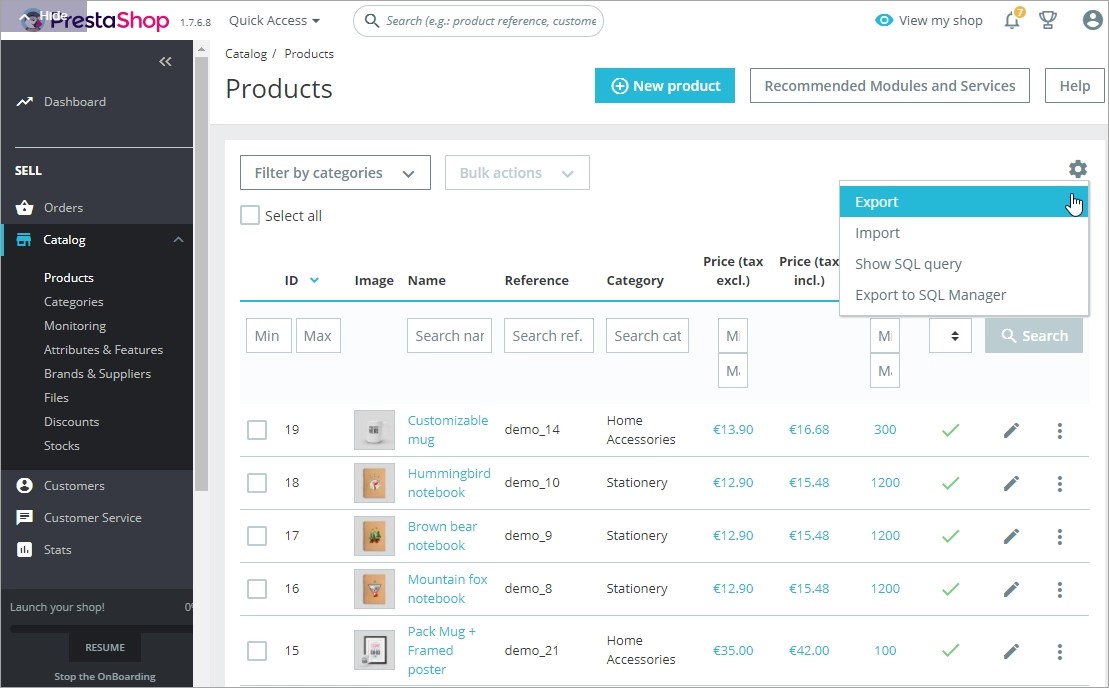
3. Click the gear icon in the top right
4. Select Export and choose CSV format
5. Save the file to your computer
Formatting Product Data for Shopify
Shopify requires specific CSV formatting. Here’s how to convert your PrestaShop export:
- Download Shopify’s product CSV template
- Open both files in Excel or Google Sheets
- Map your PrestaShop columns to Shopify’s format:
| PrestaShop Column | Shopify Column |
| Name | Title |
| Reference | SKU |
| Description | Body (HTML) |
| Price | Variant Price |
| Wholesale price | Variant Compare At Price |
| Quantity | Variant Inventory Qty |
| Category | Type and Tags |
- Remove any HTML tags from product names if present
- Format images as URLs (upload to Shopify first or use existing URLs)
- Save as a new CSV file
Importing Products to Shopify
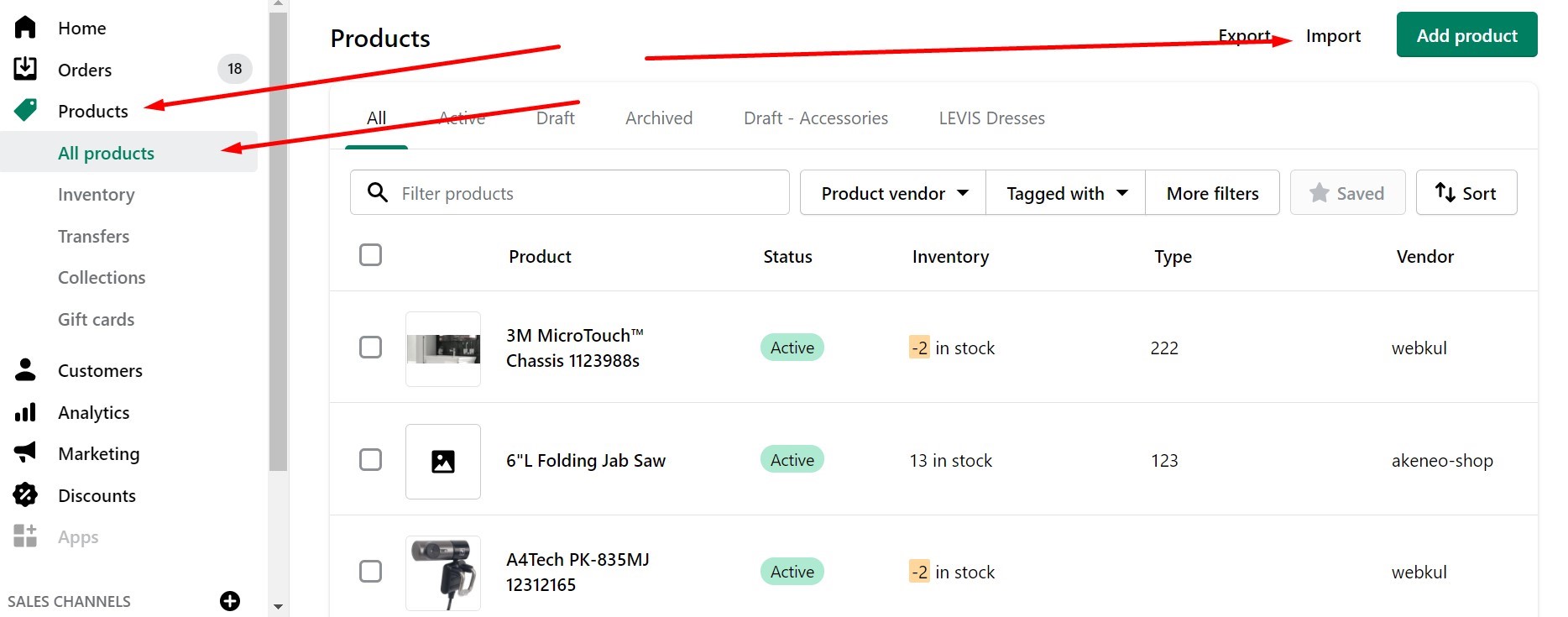
- In Shopify admin, go to Products > Import
- Click Add file and select your formatted CSV
- Uncheck “Publish new products to all sales channels” (review products first)
- Click Upload and preview
- Review the preview for any errors
- Click Import products
- Wait for the confirmation email
Migrating Customers
PrestaShop customer export requires a third-party tool like Store Manager:
- Export customers from PrestaShop with required fields:
- First Name, Last Name
- Company
- Address fields
- Phone
- Format to match Shopify’s customer CSV template
- Import via Customers > Import customers in Shopify
Transferring Orders
Order migration is complex manually. Consider using an automated tool for orders, or:
- Export order data from PrestaShop
- Use a Shopify app like LitExtension or Matrixify to import historical orders
- Manually recreate critical recent orders if necessary
Manual migration works for small stores but becomes impractical beyond 100-200 products due to time investment and error potential.
Preserving SEO During Migration
Maintaining your search engine rankings is critical during any platform migration. Here’s how to protect your SEO when you migrate PrestaShop to Shopify.
Understanding URL Structure Changes
PrestaShop and Shopify use different URL patterns:
PrestaShop:
- /product/my-product-name
- /category/my-category-name
- Custom URL structures possible
Shopify:
- /products/my-product-handle
- /collections/my-collection-handle
- Standardized structure with some customization
These differences mean your URLs will change, potentially breaking incoming links and search engine indexes.
Implementing 301 Redirects
301 redirects tell search engines that pages have permanently moved, transferring link equity to new URLs:
- Use migration tool redirect features:
- Most automated migration tools include 301 redirect creation
- This is typically an add-on option worth purchasing
- Redirects are automatically created based on old URLs
- Manual redirect creation in Shopify:
- Navigate to Online Store > Navigation > URL Redirects
- Add each old URL and its new Shopify equivalent
- Use CSV bulk import for large redirect lists
- Redirect patterns:
- Old URL: yourdomain.com/product/blue-widget
- Redirects to: yourdomain.com/products/blue-widget
- Old URL: yourdomain.com/category/widgets
- Redirects to: yourdomain.com/collections/widgets
- Essential redirects to create:
- All product pages
- Category/collection pages
- Blog posts and articles
- Important content pages (About, Contact)
- Any pages with backlinks
Optimizing Meta Data
Transfer and improve your meta information:
- Product meta data:
- Ensure titles are under 60 characters
- Keep descriptions under 160 characters
- Include target keywords naturally
- Add structured data when possible
- Collection meta data:
- Write unique descriptions for each collection
- Optimize collection titles for search
- Use keyword-rich but natural language
- Image optimization:
- Transfer alt text from PrestaShop
- Add descriptive alt text to new images
- Compress images for faster loading
- Use descriptive filenames
Monitoring SEO Performance
After migration, track your SEO metrics:
- Submit new sitemap to Google Search Console
- Monitor crawl errors and fix broken links
- Track keyword rankings for changes
- Watch organic traffic patterns in Google Analytics
- Set up alerts for sudden traffic drops
Most stores see temporary ranking fluctuations for 2-4 weeks post-migration before stabilizing or improving.
Prestify Method – PrestaShop to Shopify Migration APP
Prestify is a third-party app that can be used to migrate Prestashop to Shopify. To use the Prestify app to migrate your store, follow these steps:
Step Number 1: Log in/Sign up
Log in or Sign up to your Shopify store
Step Number 2: Install the Prestify app
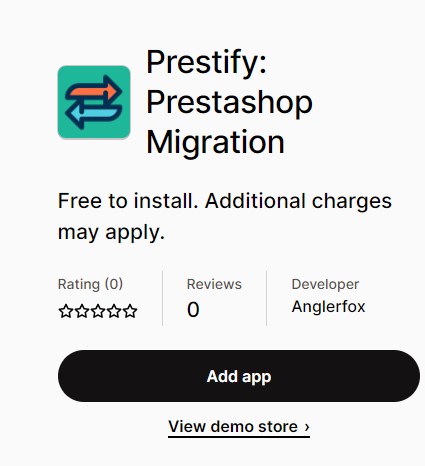
In your Shopify backend, go to “Apps” and search for “Prestify”. Click “Add app” to install the Prestify app.
Step Number 3: Connect your Prestashop store
In the Prestify app, click “Connect store” and follow the prompts to connect your Prestashop store.
Step Number 4: Select the data you want to migrate
Choose the data you want to migrate from Prestashop to Shopify, such as products, customers, and orders.

Step Number 5: Start the migration
Click “Start migration” to begin the process of transferring your data from Prestashop to Shopify. The app will handle the migration process for you, but you may need to make some manual adjustments to your store once the migration is complete.
Your Prestashop and Shopify migration is complete now. Now that you know how to migrate Shopify with Prestashop, keep in mind that using a third-party app like Prestify to migrate your store from Prestashop to Shopify can make the process easier, but it is still recommended that you Shopify theme development company for custom shopify plugin development if you want to migrate a huge amount of data.
Post-Migration Checklist
After migration completes, these critical tasks ensure your Shopify store is ready for customers.
Immediate Post-Migration Tasks
Complete these within 24 hours of migration:
Data Verification:
- ☐ Review 10-20 random products for accuracy
- ☐ Check product variants, prices, and inventory levels
- ☐ Verify all product images loaded correctly
- ☐ Test customer data and order history
- ☐ Confirm collection/category organization
Store Configuration:
- ☐ Set up payment gateways (Shopify Payments, PayPal, etc.)
- ☐ Configure shipping zones and rates
- ☐ Set up tax rules for your regions
- ☐ Enable customer accounts and preferences
- ☐ Configure notification emails
Essential Apps:
- ☐ Install and configure review app (if migrating reviews)
- ☐ Set up email marketing integration
- ☐ Add analytics and tracking tools
- ☐ Install SEO optimization apps if needed
- ☐ Configure backup and recovery tools
Testing Phase
Before launching publicly, thoroughly test your store:
Functionality Testing:
- Place test orders from different locations
- Test various payment methods
- Verify shipping calculation accuracy
- Check email notifications (order confirmations, shipping updates)
- Test customer account creation and login
- Verify discount codes and coupons work
- Test mobile responsiveness on various devices
SEO Testing:
- Verify 301 redirects are functioning
- Check that meta titles and descriptions appear correctly
- Test internal linking structure
- Confirm sitemap is accessible and updated
- Review page loading speeds
Customer Experience:
- Navigate through your store as a customer would
- Test search functionality
- Verify product filtering and sorting
- Check shopping cart and checkout flow
- Test customer service integrations (chat, email forms)
Launch Preparation
When you’re ready to go live:
- DNS Configuration:
- Point your domain to Shopify
- Remove PrestaShop DNS records
- Allow 24-48 hours for propagation
- Keep PrestaShop accessible at a subdomain temporarily
- Customer Communication:
- Email customers about the new platform
- Explain any changes to their accounts
- Provide password reset instructions
- Highlight improved features or benefits
- Monitoring Setup:
- Configure Google Analytics tracking
- Set up conversion tracking
- Enable error monitoring
- Create uptime monitoring alerts
- Support Preparation:
- Train support staff on Shopify admin
- Prepare FAQs for common migration questions
- Have a rollback plan ready if needed
First Week After Launch
Monitor these metrics closely:
- Website traffic patterns and sources
- Conversion rate compared to PrestaShop baseline
- Average order value changes
- Customer service inquiries and issues
- Cart abandonment rates
- Page load speeds and performance
- Search engine crawl activity
Don’t panic if metrics fluctuate initially—most stores stabilize within 2-4 weeks as search engines re-index and customers adjust.
Common Migration Challenges and Solutions
Even with careful planning, you may encounter these common issues during PrestaShop to Shopify migration:
Challenge 1: Variant Limitations
Problem: Shopify limits products to 99 variants and 3 option sets (size, color, material), while PrestaShop is more flexible.
Solution:
- Consolidate similar variants where possible
- Split complex products into multiple product listings
- Use metafields for additional product attributes
- Consider Shopify Plus for increased variant limits
Challenge 2: Missing Customer Passwords
Problem: Customer passwords cannot be migrated for security reasons.
Solution:
- Send mass email to customers before migration
- Explain they’ll need to reset passwords
- Provide direct password reset links
- Consider using customer import apps that enable automatic password reset emails
Challenge 3: Custom Functionality
Problem: PrestaShop modules and custom code don’t transfer to Shopify.
Solution:
- Research Shopify apps that replicate functionality
- Hire Shopify developers for custom features
- Use Shopify’s Script Editor for complex pricing rules
- Leverage Shopify Flow for automation
Challenge 4: Complex Product Options
Problem: Products with extensive configuration options or dependencies.
Solution:
- Use product customization apps like Infinite Options
- Implement custom pricing with apps or scripts
- Simplify option structures where possible
- Consider building custom product configurators
Challenge 5: Multistore Setup
Problem: PrestaShop multistore doesn’t directly map to Shopify’s structure.
Solution:
- Create separate Shopify stores for each market
- Use Shopify Markets for international selling
- Consider Shopify Plus for multi-store management
- Implement currency and language apps for single-store approach
Cost Breakdown: PrestaShop to Shopify Migration
Understanding the total cost of migration helps you budget appropriately.
| Cost Component | Range | Details |
| Migration Tool | $0 – $999 | Free for small stores, $69-$999 for larger catalogs |
| Additional Options | $0 – $300 | SEO redirects, ID preservation, and recent data migration |
| Shopify Plan | $39 – $399/month | Basic to Advanced plans (first 3 days free, then $1/month for 3 months) |
| Theme | $0 – $350 | Free themes or one-time theme purchase |
| Apps | $0 – $300/month | Essential apps for functionality |
| Professional Services | $500 – $5,000+ | If hiring experts for migration or custom development |
| Domain Transfer | $0 – $20 | If transferring domain to Shopify |
Total estimated cost for typical migrations:
- Small store (100 products): $100 – $500
- Medium store (500-2,000 products): $300 – $1,500
- Large store (2,000-10,000 products): $800 – $3,000
- Enterprise store (10,000+ products): $2,000 – $10,000+
These costs are one-time expenses. Factor in ongoing Shopify subscription and app costs for your total cost of ownership comparison.
Key Takeaways
- Choose the right migration method based on your store size, budget, and technical comfort level—automated tools offer the best balance for most merchants.
- Prepare thoroughly by auditing your data, cleaning up unnecessary information, and setting up your Shopify store before migrating.
- Protect your SEO through careful 301 redirect implementation, meta data preservation, and maintaining URL structure where possible.
- Test extensively using demo migrations before committing to full data transfer, then verify all critical functions before launching.
- Plan for post-migration work including payment setup, app configuration, customer communication, and performance monitoring.
Ready to make the switch? Start by setting up your Shopify store and preparing your PrestaShop data for migration.
Conclusion
Migrating from PrestaShop to Shopify represents a significant upgrade in platform simplicity, features, and growth potential. While the process requires careful planning and execution, the benefits—reduced technical overhead, better support, extensive app ecosystem, and streamlined management—make it worthwhile for most merchants.
Whether you choose automated migration tools like LitExtension, manual CSV import, or professional migration services, this guide has provided the framework you need for success. Remember to back up everything, test thoroughly, and maintain your SEO value through proper redirects.
If you need expert assistance with your PrestaShop to Shopify migration, our team specializes in seamless platform transitions. Contact our migration experts to discuss your specific requirements and get a customized migration plan.
Frequently Asked Questions
How Long Does It Take to Migrate from PrestaShop to Shopify?
Migration duration depends on your store size and method. Automated migrations using tools like LitExtension typically take 1-24 hours for the actual data transfer. However, the complete process including preparation, testing, and launch can take 1-4 weeks for most stores. Larger enterprise migrations may require 2-3 months of planning and execution.
Can I Migrate Customer Passwords from PrestaShop to Shopify?
No, customer passwords cannot be migrated directly due to security protocols and different encryption methods between platforms. Customers will need to reset their passwords using Shopify’s password reset functionality. Best practice is to send customers an email before migration explaining they’ll need to create new passwords on your updated store.
Will My PrestaShop Store Rankings Drop After Migrating to Shopify?
If you implement proper 301 redirects and maintain your SEO elements (meta titles, descriptions, image alt text), most stores maintain or improve their rankings within 4-6 weeks. Temporary ranking fluctuations are normal as search engines re-index your site. The key is preserving your URL structure through redirects and maintaining content quality.
How Much Does PrestaShop to Shopify Migration Cost?
Migration costs range from $0 to $5,000+ depending on store size and method. Automated migration tools cost $69-$999 for most stores, with additional options adding $50-$300. Manual CSV migration is free but time-intensive. Professional migration services start at $500 and can exceed $5,000 for complex enterprise stores. Don’t forget ongoing Shopify subscription costs ($39-$399/month).
Can I Keep My PrestaShop Store Running During Migration?
Yes, your PrestaShop store remains fully operational throughout the migration process. The migration happens on Shopify’s servers and doesn’t affect your live PrestaShop site. This allows you to continue selling without interruption. You can use recent data migration features to transfer any new orders or customers created between your initial migration and launch.
Do I Need Technical Skills to Migrate from PrestaShop to Shopify?
Automated migration tools require minimal technical knowledge—most merchants can complete the process following step-by-step guides. However, some technical understanding helps with CSV formatting for manual migrations, configuring apps, and troubleshooting issues. If you’re not comfortable with these tasks, consider using professional Shopify migration services for expert assistance.
What Happens to My PrestaShop Store After Migration?
Your PrestaShop store continues to exist independently after migration—nothing is automatically deleted. Many merchants keep their old store accessible as a backup for 30-90 days after launching on Shopify, then redirect the domain and cancel PrestaShop hosting. You can also maintain both stores if you want to compare performance before fully committing to Shopify.
Can I Migrate Product Reviews to Shopify?
Yes, but reviews require a Shopify review app like Loox, Judge.me, or Yotpo. Most migration tools can transfer reviews if you have the appropriate app installed. Review apps typically offer free plans or trials. The migration tool will match reviews to corresponding products in your Shopify store during the transfer process.