The shift to shopify checkout extensibility gives Plus merchants the ability to create faster, more secure checkout experiences. This modern framework replaces checkout.liquid with app-based customizations that deliver better performance without sacrificing brand control.
Checkout.liquid’s limitations around security, Shop Pay compatibility, and maintenance made the transition necessary. Now, checkout extensibility shopify plus features enable powerful customization while automatically staying current with platform updates.
Summary
- What checkout extensibility is and why checkout.liquid was deprecated
- Core benefits including enhanced security, performance, and customization
- Migration steps from checkout.liquid to the extensibility framework
- Implementation best practices for improving conversion rates
What Is Shopify Checkout Extensibility?
Shopify checkout extensibility is a framework enabling Plus merchants to customize checkout using apps and APIs instead of editing code directly. The system includes Checkout UI extensions for adding custom elements, Shopify Functions for modifying backend logic, the Branding API for visual customization, and web pixels for analytics tracking.
Unlike checkout.liquid’s manual code edits, shopify extensibility runs in a sandboxed environment with automatic platform updates. This architecture delivers better security, faster performance, and seamless compatibility with new Shopify features.
Key Differences Between Checkout.liquid and Extensibility
| Feature | Checkout.liquid | Checkout Extensibility |
| Customization Method | Direct code editing | App-based extensions |
| Security | Limited sandbox protection | Fully sandboxed environment |
| Shop Pay Compatibility | Not compatible | Fully integrated |
| Maintenance | Manual updates required | Automatic platform updates |
| Performance | Can slow down checkout | Optimized for speed |
| Analytics Tracking | Limited to custom scripts | Native web pixels support |
Now that you understand the fundamental architecture, let’s explore why this upgrade matters for your business.
Why Shopify Deprecated Checkout.liquid
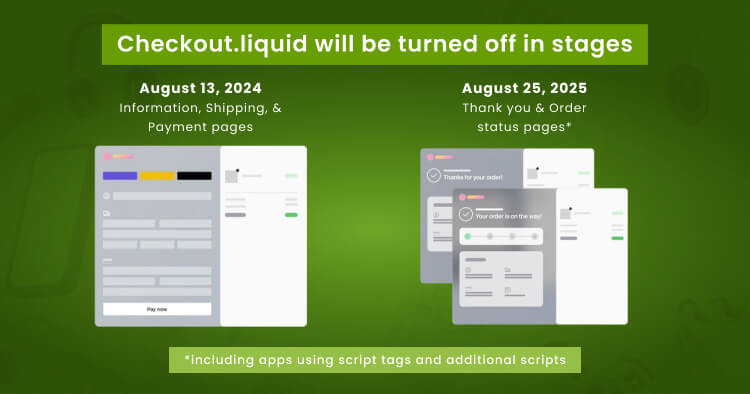
Shopify deprecated checkout.liquid due to security vulnerabilities, performance limitations, and Shop Pay incompatibility. The platform discontinued support for information, shipping, and payment pages on August 13, 2024, with thank you and order status pages following on August 28, 2025.
Security concerns included lack of PCI DSS v4 compliance and risks from custom code modifications. Performance issues arose from slow-loading customizations that increased cart abandonment. Perhaps most significantly, checkout.liquid modifications broke Shop Pay integration, preventing merchants from offering customers a checkout option that converts up to 50% better than standard processes.
The new framework addresses these limitations through sandboxed architecture, optimized performance, and seamless Shop Pay compatibility. Merchants who completed early migration reported improved conversion rates and simplified maintenance.
Core Benefits of Checkout Extensibility for Plus Merchants
Upgrading to shopify checkout extensibility documentation standards delivers measurable improvements across security, performance, and customization capabilities.
Enhanced Security and Compliance
Sandboxed architecture protects customer data through isolated environments with controlled checkout access. This design meets PCI DSS v4 requirements while preparing stores for future security standards. Shopify manages core security updates automatically, eliminating manual code reviews and reducing data breach risks.
Improved Conversion Rates and Performance
Stores using checkout extensibility see average conversion improvements of 1% or more through 2x faster checkout interactions. Shop Pay integration amplifies gains with conversions up to 50% higher than standard checkout.
| Performance Metric | Checkout.liquid | Extensibility | Improvement |
| Load Time | 3.2 seconds | 1.6 seconds | 50% faster |
| Shop Pay | Broken | Fully compatible | Seamless |
| Mobile Conv. | Baseline | 91% higher | Significant |
| Interactions | Standard | 2x faster | Doubled |
Future-Proof Customization
The app-based approach eliminates major checkout upgrades. New features become available automatically with customizations remaining functional through platform updates. This modular architecture scales with business needs.
Understanding Checkout Extensibility Components
The shopify checkout extensibility documentation outlines four main components working together to create comprehensive checkout experiences.
Checkout UI Extensions
UI extensions add custom elements at designated checkout flow points including banners, custom fields, product recommendations, and trust badges. Extensions automatically inherit store branding settings and can be placed at static targets (tied to features like contact information) or block targets (appearing anywhere in checkout).
Applications include upsell modules, gift message fields, delivery date selectors, address validators, and loyalty program integrations.
Shopify Functions
Functions modify backend logic for discounts, payments, and delivery options. Create tiered discounts based on customer segments, hide or show payment methods by cart contents, and rename shipping options to match brand voice. This capability extends far beyond checkout.liquid’s limitations.
Branding API and Checkout Editor
The editor handles basic visual changes like colors and fonts, while the Branding API enables deep customization including corner radius, custom fonts, and fine-grained design control. Both automatically apply across Shop Pay and standard checkout for consistent branding.
Web Pixels for Analytics
Web pixels track customer behavior across the entire purchase journey with events including checkout started, payment information added, and purchase completed. This integrates with Google Analytics, Facebook Pixel, TikTok Pixel, and custom platforms, addressing major checkout.liquid tracking limitations.
Migration Process: From Checkout.liquid to Extensibility
The transition requires careful planning but delivers significant long-term benefits when approached systematically.
Step 1: Audit Your Current Customizations
Access your personalized upgrade report through Settings > Checkout in Shopify admin, then click “View customized report.” This documents every modification made to your checkout with migration guidance for each feature. Review installed apps that modify checkout and contact developers for compatibility information.
Step 2: Develop Your Migration Strategy
Prioritize customizations based on business impact and complexity. Create a testing environment to develop new extensions without affecting your live store. Set realistic timelines considering your customization complexity.
| Migration Phase | Timeline | Key Activities |
| Audit | 1-2 weeks | Document customizations, review apps |
| Planning | 1-2 weeks | Prioritize features, create strategy |
| Development | 4-12 weeks | Build extensions and functions |
| Testing | 2-4 weeks | Verify functionality, test edge cases |
| Deployment | 1 week | Publish new checkout, monitor performance |
Step 3: Rebuild Customizations Using Extensibility
Begin with analytics migration using web pixels, as this can happen before publishing the new checkout. Develop Shopify Functions for custom discount logic, payment rules, or delivery customizations. Create UI extensions for visual customizations, starting with simpler extensions. Finally, apply branding using the checkout editor and Branding API.
Step 4: Test Everything Thoroughly
Use checkout preview mode to verify extensions before going live. Test all user flows including guest checkout, logged-in customers, and Shop Pay. Check mobile responsiveness and run test transactions through the complete flow to verify analytics and data capture.
Step 5: Publish and Monitor
When testing confirms proper functionality, publish your new checkout and monitor performance during the first few days. Watch conversion rates, completion times, and error reports. Have a rollback plan ready and continue optimizing based on real-world data.
Best Practices for Checkout Extensibility Implementation
Following proven strategies maximizes benefits while avoiding common pitfalls.
Keep checkout focused on conversion. While extensibility enables many features, restraint produces better results. Each additional element increases cognitive load and potentially reduces completion rates. Prioritize elements that drive purchases or solve customer problems.
Test extensions with real customer data before launching. Edge cases often reveal issues not apparent during initial development. Monitor performance metrics continuously and track how each extension impacts completion rates, average order value, and customer satisfaction.
Leverage the app ecosystem strategically. Many everyday checkout needs have well-built solutions available. Building custom extensions makes sense for unique requirements, but pre-built apps often provide faster implementation for standard features.
Common Challenges and Solutions
Most merchants encounter similar obstacles during migration.
Legacy script conflicts occur when apps use deprecated script tags. Contact app developers for updated versions or find alternative apps with native extensibility support. Temporarily run certain functionality outside checkout if immediate replacements aren’t available.
Custom styling limitations exist since sandboxed environments restrict CSS modifications. Work within the Branding API’s parameters or redesign customizations to fit available components. This limitation benefits most stores by ensuring consistent, accessible styling.
Function development complexity requires backend skills not all teams possess. Consider hiring experienced Shopify developers or using pre-built function apps for common scenarios.
Maximizing ROI From Checkout Extensibility
Strategic implementation turns extensibility features into measurable business results.
Implement intelligent upselling through product recommendation extensions based on cart contents. Add social proof elements like trust badges and customer reviews near payment sections to reduce purchase anxiety. Optimize for mobile commerce by testing all extensions on various devices, as mobile conversion optimization often delivers the highest returns.
Personalize checkout experiences using customer data to show loyalty program status, relevant shipping options, and tailored discount messaging. This personalization increases average order values and strengthens customer relationships.
Key Takeaways
Shopify checkout extensibility fundamentally improves how Plus merchants customize stores, delivering better security, improved performance, and more powerful customization options than checkout.liquid. Migration requires careful planning, but long-term benefits including higher conversion rates and easier maintenance far outweigh the investment.
The modular architecture enables continuous checkout improvement without major overhauls. Start your migration soon if you haven’t already to access conversion improvements and avoid potential platform evolution issues.
Conclusion
Mastering shopify checkout extensibility gives Plus merchants unprecedented checkout control while maintaining security and performance. Whether building custom extensions, implementing pre-built apps, or customizing branding, the framework provides tools to create exactly the checkout experience your business needs.
Ready to optimize your Shopify Plus checkout? Partner with our Shopify experts who specialize in checkout extensibility implementation. We’ll help you migrate smoothly, build custom extensions, and maximize your checkout’s conversion potential.
Frequently Asked Questions
What Is Shopify Checkout Extensibility?
Checkout extensibility is Shopify’s modern framework for customizing Plus store checkouts using apps, extensions, and APIs instead of direct code editing. It provides secure, upgrade-safe customizations that work with Shop Pay.
When Did Shopify Deprecate Checkout.liquid?
Shopify deprecated checkout.liquid for information, shipping, and payment pages on August 13, 2024. Thank you and order status pages followed on August 28, 2025.
Is Checkout Extensibility Available for All Shopify Plans?
Core checkout extensibility features including UI extensions and Functions are exclusive to Shopify Plus merchants. However, some extensibility-powered apps work on lower-tier plans for limited checkout customizations.
How Long Does Migration From Checkout.liquid Take?
Migration timelines vary based on customization complexity. Simple stores complete the process in 2-4 weeks, while stores with extensive custom functionality may need 8-12 weeks including testing.
Will My Current Checkout Apps Work With Extensibility?
Many apps have been updated for extensibility compatibility, but some older apps may require updates or replacement. Check with app developers for specific compatibility information before migrating.
Does Checkout Extensibility Improve Conversion Rates?
Yes, stores typically see conversion improvements of 1% or more after migration. Combined with Shop Pay integration, conversion rates can increase by up to 50% compared to standard checkout.
Can I Customize Shop Pay Checkout With Extensibility?
Yes, all extensibility customizations automatically work with Shop Pay. This integration was impossible with checkout.liquid, making extensibility a significant upgrade for stores using Shop Pay.
What Happens if I Don’t Upgrade to Checkout Extensibility?
Stores that didn’t upgrade before the deadline face limitations including locked checkout customizations, delayed Shopify Payments payouts, and disabled risk indicators. All stores will eventually be migrated automatically.
How Do Shopify Functions Differ From Checkout.liquid Scripts?
Functions run on Shopify’s servers in a sandboxed environment, providing better performance and security than client-side scripts. They enable backend logic customization that wasn’t possible with checkout.liquid.
Where Can I Find Apps Built for Checkout Extensibility?
The Shopify App Store includes a growing collection of extensibility-powered checkout apps. Filter for “Checkout” category to find apps compatible with the new framework.