BigCommerce introduced its BigCommerce multi storefront feature in March 2022, transforming how businesses manage multiple online stores. This powerful capability allows you to operate distinct storefronts from a single backend while serving different customer segments, markets, or brands.
As ecommerce continues expanding globally, businesses need scalable solutions to reach diverse audiences. The BigCommerce multi store functionality enables you to target different regions, demographics, or product lines without the complexity of managing separate platforms. Whether you’re selling wholesale and retail simultaneously or expanding into new geographic markets, this feature simplifies operations while maintaining flexibility.
Summary
- Unified Management: Control multiple storefronts from a single BigCommerce dashboard, streamlining inventory, orders, and customer data across all stores
- Customization Flexibility: Each BigCommerce storefront can have unique branding, pricing, currencies, payment gateways, and product catalogs tailored to specific audiences
- Global Expansion: Create region-specific stores with localized content, currencies, tax settings, and shipping options for international growth
- B2B and B2C Capabilities: Run separate stores for business customers and consumers with different pricing structures and catalog access
- Cost-Effective Scaling: Launch new storefronts without building separate platforms, reducing operational overhead and technical complexity
- Advanced Features: Leverage Catalyst framework, BigAI integration, and real-time sync capabilities for enhanced performance
What Is BigCommerce Multi Storefront?
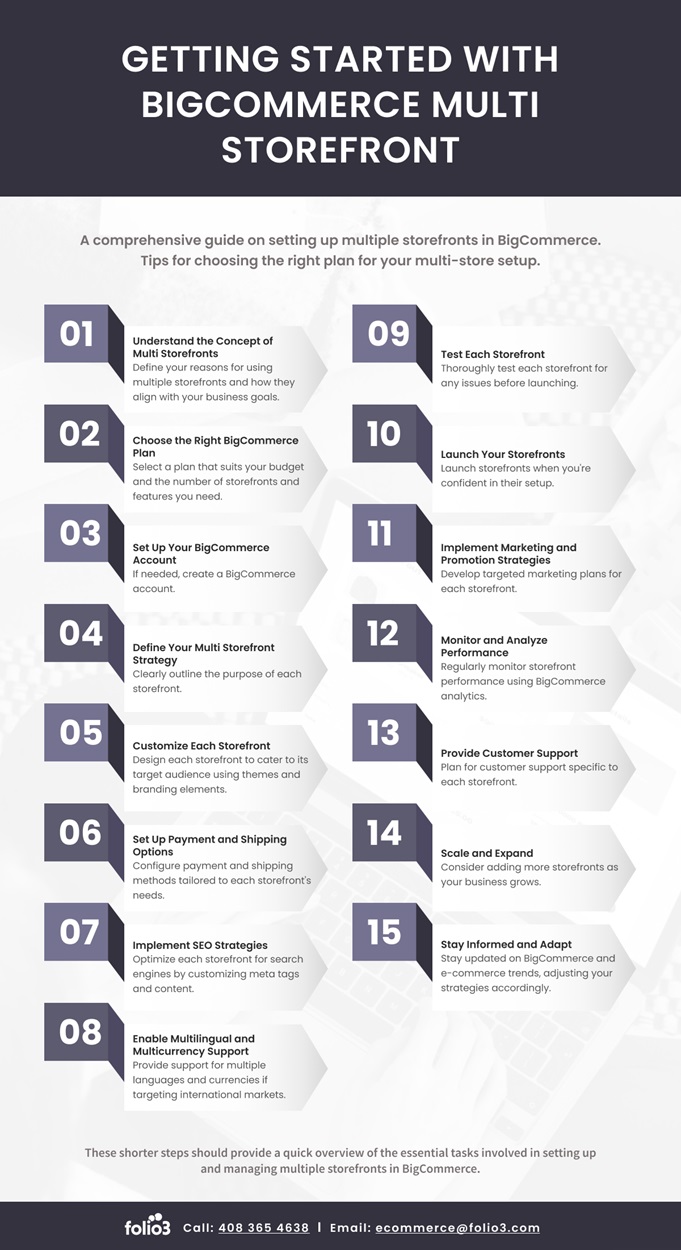
BigCommerce multi storefront is a native feature that allows merchants to create and manage multiple online stores from a single BigCommerce account. Each store operates as an independent entity with its own domain, branding, and customer experience, while sharing a centralized backend for product management, inventory, and order processing.
This architecture eliminates the need to maintain separate ecommerce platforms for different business segments. You can launch a store for European customers with EUR pricing while maintaining your US store with USD, or create distinct storefronts for different product categories—all managed from one control panel.
The BigCommerce multi-storefront feature works by allowing you to assign products from your master catalog to specific storefronts. This means you can control which products appear on which stores, set custom pricing per storefront, and even maintain storefront-specific inventory levels if needed.

Key Benefits of BigCommerce Multiple Stores
The multi storefront BigCommerce capability delivers significant advantages for growing businesses looking to scale efficiently.
Centralized Operations and Reduced Overhead
With BigCommerce’s multiple stores, you gain a unified control panel to oversee inventory, process orders, and analyze performance across all storefronts. This consolidation reduces time spent on routine tasks and minimizes errors from switching between systems. Your team can update product information once and push changes to selected storefronts, significantly reducing operational costs compared to maintaining separate ecommerce platforms.
Market-Specific Customization
Each BigCommerce storefront can be fully tailored to resonate with specific audiences through customized themes, checkout flows, payment options, and shipping methods. For international expansion, your UK store can offer GBP pricing with Klarna. In contrast, your Australian store displays AUD with region-appropriate carriers, driving higher conversion rates by meeting local market expectations.
Flexible Pricing Strategies
The BigCommerce multi store setup enables sophisticated pricing across storefronts. Set wholesale pricing for B2B stores while maintaining retail prices on consumer sites. Price lists integrate seamlessly, allowing you to assign different pricing tiers to customer groups or entire storefronts without custom development.
Enhanced SEO Opportunities
Multiple storefronts multiply your organic search presence. Each store can target region-specific keywords and market-relevant content. The BigCommerce multi-storefront documentation confirms each store maintains its own SEO settings, meta tags, and URL structures for different geographic markets.
Streamlined International Growth
BigCommerce multi storefront simplifies global expansion by handling multiple currencies, tax regulations, and shipping logistics through region-specific settings. Each storefront can have its own tax rules, shipping zones, and fulfillment processes. The BigCommerce custom payment gateway capabilities enhance flexibility with region-specific payment integrations.
B2B and B2C Separation
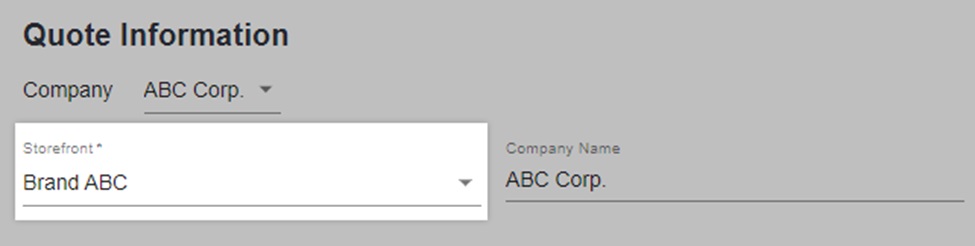
Create separate B2B and B2C stores with distinct catalog access, pricing, and account features. Your B2B store offers bulk pricing and custom catalogs, while your consumer store focuses on simplified individual purchases, improving experience for both customer types.
Core Features of BigCommerce Multi Storefront
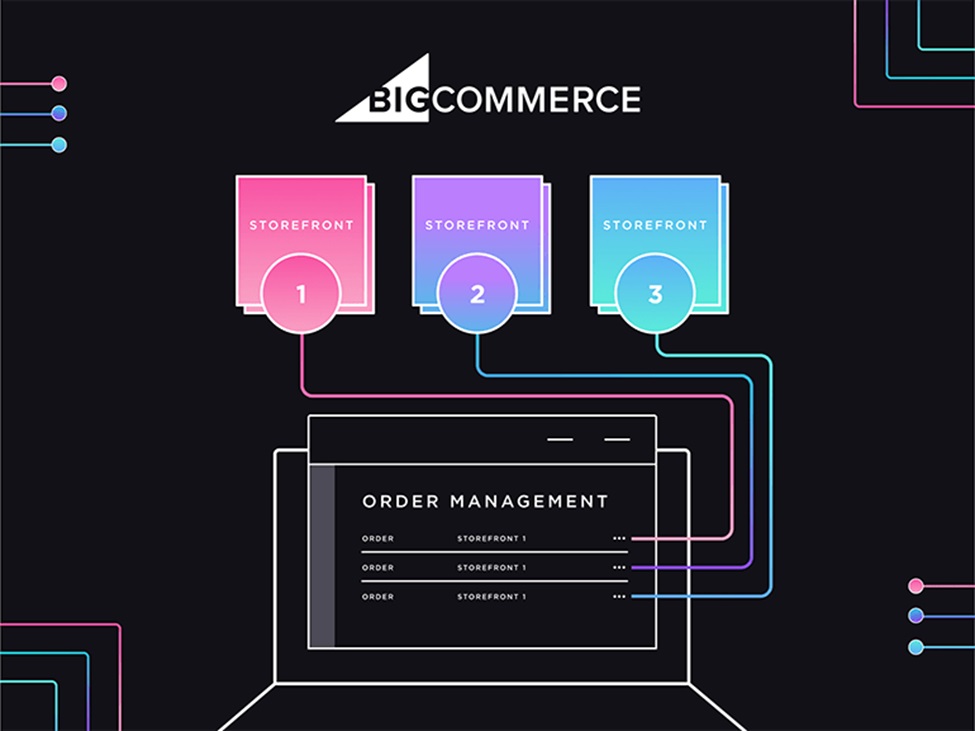
Understanding the BigCommerce multi-storefront feature capabilities helps you leverage them effectively.
Shared Product Catalog with Selective Assignment
Your product catalog exists centrally, and you choose which products appear on which storefronts. Offer your complete catalog on one store while showing only specific categories on another. This selective assignment is ideal for businesses with diverse product lines or those testing new markets with limited inventory.
Independent Design and Branding
Each BigCommerce storefront supports completely independent themes and designs—not just color variations. Use different theme families, layouts, and UI elements to maintain distinct brand identities or tailor designs to cultural preferences across markets.
Storefront-Specific Settings
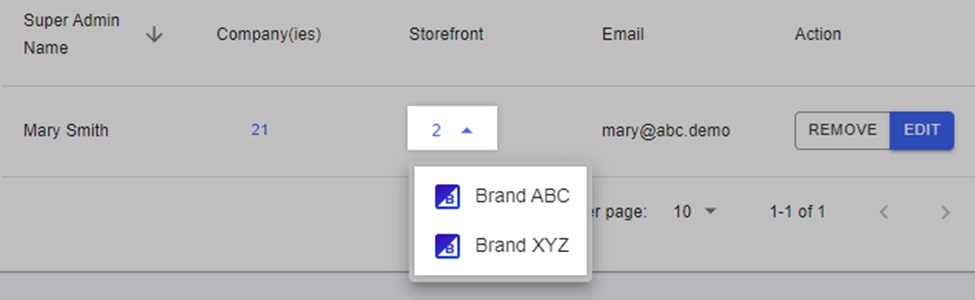
Each store maintains independent configurations for currency, payment gateways, shipping methods, tax rules, customer groups, promotions, email templates, and social media integrations. These granular controls ensure each storefront operates independently while benefiting from centralized product management.
Unified Reporting and Analytics
Your reporting dashboard consolidates data across storefronts, showing aggregate performance or individual store metrics, including revenue, customer acquisition, product performance, and conversion rates. This unified view provides insights to optimize each store while understanding overall business health.
Advanced Inventory Management
Inventory management offers flexibility to match your business model. Maintain a shared inventory pool across stores or allocate specific quantities to individual storefronts. This supports various fulfillment strategies from centralized warehousing to regional distribution.
Channel-Specific Order Management
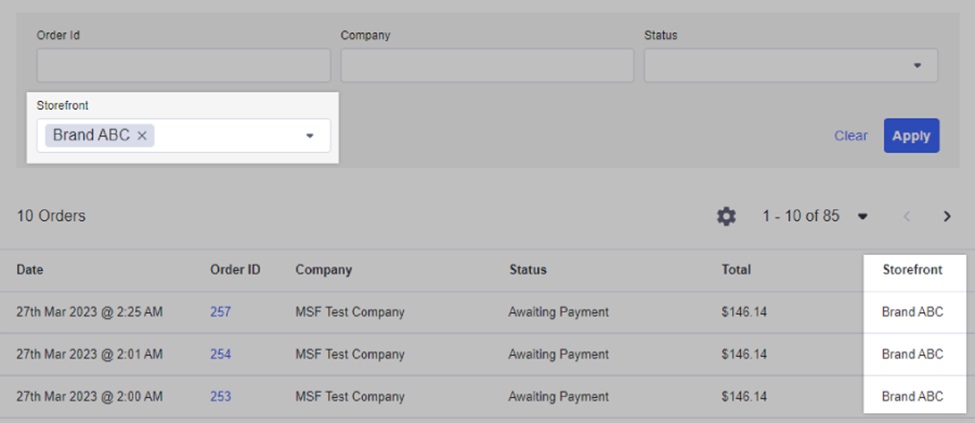
Orders from each storefront are tagged with their origin for efficient filtering and processing. This organization is crucial when different storefronts have different shipping origins, fulfillment partners, or service level expectations.
Everyday Use Cases for Multi Storefront BigCommerce
The BigCommerce multi store capability serves various business models and expansion strategies.
Geographic Market Expansion
Launch dedicated storefronts for each geographic region with local domain extensions, native currencies, region-specific product selection, localized content, and market-appropriate shipping options to compete effectively in local markets.
Multi-Brand Operations
Companies managing multiple brands create distinct storefronts for each brand identity while leveraging shared backend resources. Each brand maintains its unique voice and positioning without separate platform overhead. BigCommerce development services can help implement advanced multi-brand configurations.
B2B and B2C Segregation
Separate storefronts for wholesale and retail customers allow tailored experiences—B2C stores offer standard retail pricing and individual purchases, while B2B stores provide wholesale pricing, bulk ordering, quote requests, and account-based access.
Seasonal or Campaign-Specific Stores
Launch temporary storefronts for specific events, seasons, or marketing campaigns. Create focused stores highly optimized for conversion around specific themes or product sets without disrupting your main storefront.
Product Category Specialization
Large retailers create specialized storefronts for major product categories, offering curated experiences for different customer interests with targeted branding and merchandising for each category.
Test Market Stores
Before committing to major market expansions, create test storefronts for new regions or customer segments to validate demand, refine offerings, and gather feedback with minimal investment.

How to Set Up BigCommerce Multi Storefront
Setting up your BigCommerce multi-storefront requires planning and systematic configuration.
Prerequisites and Plan Requirements
The bigcommerce multi-storefront feature is available on BigCommerce’s Enterprise plans. Verify your plan includes multi-storefront capabilities and consider expected traffic, international requirements, and technical resources needed.
Step 1: Access Channel Manager
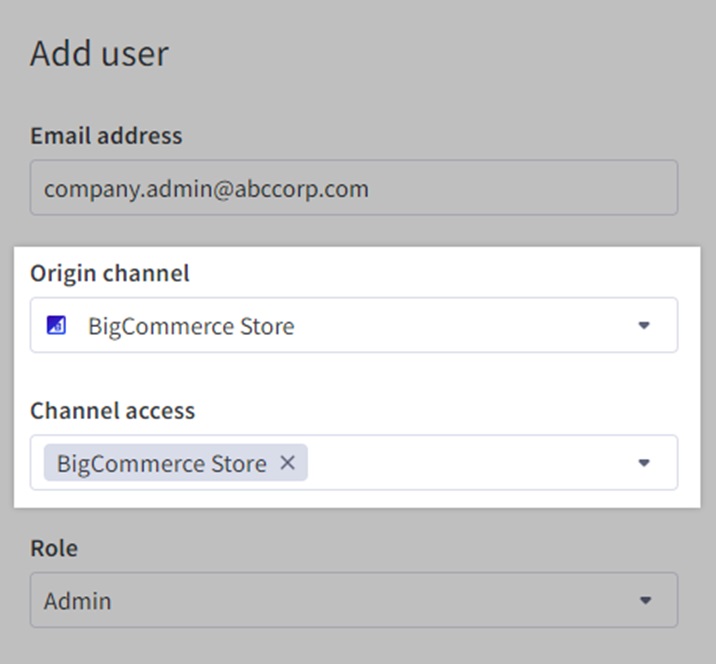
Log into your BigCommerce control panel and navigate to Channel Manager to manage all storefronts and integrations from this centralized hub.
Step 2: Create Your Additional Storefront
Click “Add Storefront” and provide storefront name, domain, default language, currency, and target market.
Step 3: Configure Storefront Settings
Configure domain and SSL, currency and localization, tax rules, and payment gateways appropriate for your market. Different storefronts can use different payment providers. Learn more about BigCommerce Amazon integration for expanded payment options.
Step 4: Assign Products to Your Storefront
Select which products appear on your new storefront through individual assignment, category assignment, bulk editing, or visibility rules.
Step 5: Configure Pricing (If Different)
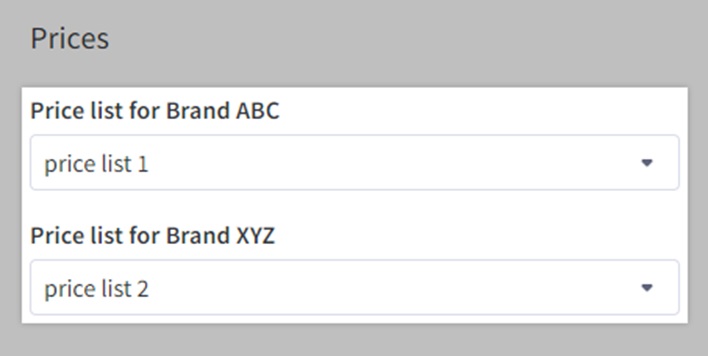
Create price lists and assign them to the storefront for separate pricing strategies without creating duplicate products.
Step 6: Select and Customize Your Theme
Choose a theme and customize colors, fonts, layouts, and design elements to match your storefront’s branding and target audience.
Step 7: Configure Shipping Settings
Set up shipping methods, zones, rates, carriers, handling times, and delivery expectations appropriate for your storefront’s market.
Step 8: Set Up Customer Groups (Optional)
Create customer groups with appropriate access permissions and pricing tiers, beneficial for B2B storefronts or wholesale operations.
Step 9: Test Your Storefront
Complete test purchases, verify tax and shipping calculations, check mobile responsiveness, and confirm email notifications trigger correctly.
Step 10: Launch and Monitor
Activate your storefront and monitor key metrics closely during the initial launch period to identify and address issues quickly.
BigCommerce Multi-Storefront Pricing Considerations
Plan Requirements
BigCommerce multi storefront is available exclusively on Enterprise plans with customized pricing based on annual sales volume, number of storefronts needed, required features, and support level. Contact BigCommerce sales for specific pricing.
Additional Costs to Consider
Factor in domain registration for each storefront, SSL certificates if using custom options, premium theme licenses, third-party app fees based on storefronts connected, and custom development resources.
Return on Investment
Enterprise pricing delivers value through reduced operational overhead, lower developer costs, improved efficiency, faster time-to-market for new storefronts, and scalability without infrastructure changes.
Limitations and Considerations
Product Customization Limitations
Products assigned to multiple storefronts share core information like descriptions and images. While you can set storefront-specific pricing and availability, customizing product descriptions per storefront requires workarounds or custom development.
Additional Domain Costs
Each storefront typically requires its own domain, incurring registration and renewal costs that add up with many storefronts.
Integration Complexity
Some third-party integrations may not fully support multi-storefront configurations. Verify that critical integrations (ERP, CRM, marketing automation) can handle multiple storefronts before committing.
Resource Allocation Challenges
Managing multiple storefronts requires dedicated resources for content management, customer service, marketing campaigns, and performance monitoring across stores.
Learning Curve
Teams face a learning curve when adopting multi-storefront operations. Understanding BigCommerce website design best practices helps ensure consistency across storefronts.
Latest BigCommerce Multi-Storefront Enhancements
BigCommerce continues evolving its multi storefront bigcommerce capabilities with powerful new features.
Catalyst Framework
The Catalyst composable architecture framework, launched in 2024, streamlines building high-performing storefronts. This framework provides:
- Modern development stack with Next.js and React
- Optimized GraphQL API client for efficient data fetching
- Built-in SEO optimization
- Faster storefront creation and deployment
Catalyst makes launching new storefronts faster and ensures they deliver excellent performance from day one.
BigAI Integration
BigCommerce’s BigAI suite brings artificial intelligence to multi-storefront operations:
- BigAI Copywriter: Generate SEO-optimized product descriptions tailored for each storefront’s audience, saving time while maintaining quality content across all stores.
- Predictive Analytics: Machine learning forecasts customer lifetime value, helping you optimize marketing spend and inventory allocation across storefronts.
These AI-powered tools help scale operations efficiently as you add more storefronts.
Real-Time Sync with Feedonomics
Feedonomics integration provides real-time inventory and pricing synchronization across all sales channels and storefronts. This event-driven update system prevents:
- Listing disapprovals from outdated information
- Overselling from delayed inventory updates
- Customer disappointment from inaccurate pricing
Real-time synchronization becomes increasingly critical as you operate more storefronts and sales channels simultaneously.
Best Practices for Managing Multiple BigCommerce Storefronts
Establish Clear Naming Conventions
Develop consistent naming systems for products, categories, price lists, and customer groups to reduce errors and confusion when identifying assets for specific storefronts.
Document Storefront-Specific Settings
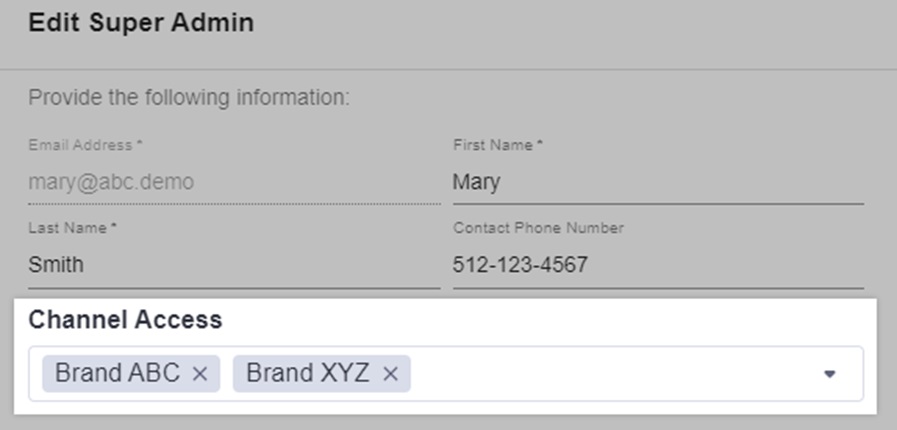
Maintain detailed documentation of each storefront’s configuration including currency, payment, tax, shipping, promotions, and customer groups for easier troubleshooting and team onboarding.
Implement Robust Testing Procedures
Test thoroughly on a single store before making changes affecting multiple storefronts. Develop checklists for common tasks to ensure consistency.
Monitor Performance Metrics Separately
Track each storefront’s KPIs individually since different markets or audiences may require different optimization strategies.
Plan for Scalability
Design processes and systems with growth in mind. Consider BigCommerce integration services to connect your multi-storefront setup with essential business systems.
Regular Security Audits
Conduct regular security reviews, ensure SSL certificates remain current, and monitor for unusual activity across all stores.
Key Takeaways
- BigCommerce multi storefront enables efficient management of multiple online stores from one platform, reducing operational complexity while maintaining flexibility for market-specific customization.
- The feature supports diverse business models including international expansion, multi-brand operations, B2B/B2C separation, and seasonal campaigns through centralized inventory and order management.
- Each BigCommerce storefront can be fully customized with unique branding, pricing, payment gateways, shipping options, and product selections to optimize for specific audiences.
- Latest enhancements like Catalyst framework and BigAI integration make launching and managing multiple storefronts faster and more effective than ever.
- Success requires careful planning around resource allocation, integration compatibility, and scalable processes as your storefront portfolio grows.
Conclusion
The BigCommerce multi storefront feature represents a powerful solution for businesses looking to expand their reach without multiplying operational complexity. Whether you’re targeting new geographic markets, serving different customer segments, or managing multiple brands, BigCommerce’s multiple stores provide the flexibility and control needed for sustainable growth.
The platform’s centralized management reduces overhead while allowing each storefront to deliver tailored experiences for its specific audience. Combined with recent innovations like Catalyst and BigAI, BigCommerce continues advancing its multi-storefront capabilities to meet evolving business needs.
Ready to launch your multi-storefront strategy?
Contact Folio3 to discuss how our BigCommerce expertise can help you design, implement, and optimize multiple storefronts for maximum business impact.

Frequently Asked Questions
Can I Use BigCommerce Multi Storefront for International Expansion?
Yes, BigCommerce multi storefront is ideal for international expansion. You can create region-specific storefronts with local currencies, payment gateways, shipping methods, and tax configurations. Each store can have its own domain extension (like .co.uk or .de) and fully localized content to serve international markets effectively.
How Many Storefronts Can I Create with BigCommerce?
The number of storefronts available depends on your Enterprise plan agreement with BigCommerce. Most Enterprise plans support multiple storefronts, but the specific limit varies based on your contract and business needs. Contact BigCommerce sales to discuss requirements for your particular use case.
Is It Difficult to Manage Multiple BigCommerce Storefronts?
BigCommerce’s centralized dashboard simplifies multi-storefront management significantly. You control inventory, products, and orders from one location, filtering by storefront when needed. The initial setup requires planning and configuration, but ongoing management becomes streamlined once your processes are established.
Can Each Storefront Have Different Products?
Yes, you can assign products selectively to different storefronts. Products exist in your master catalog, and you choose which stores display each product. This flexibility allows you to offer complete catalogs on some stores while showing only specific categories or products on others.
Does BigCommerce Multi Storefront Support B2B and B2C?
Absolutely. The BigCommerce multi-storefront feature is commonly used to separate B2B and B2C operations. Create distinct storefronts with different pricing structures, product catalogs, and customer access controls. B2B stores can offer wholesale pricing and bulk ordering while B2C stores focus on retail experiences.
Can I Set Different Pricing for Each Storefront?
Yes, BigCommerce’s price lists integrate with multi-storefront functionality, allowing you to set custom pricing for each store. This enables sophisticated pricing strategies across different markets, customer segments, or business models without duplicating products.
What Plan Do I Need for BigCommerce Multi Storefront?
BigCommerce multi storefront is available exclusively on Enterprise plans. These plans are customized based on your business needs, sales volume, and required features. Contact BigCommerce directly for pricing information tailored to your specific requirements.
Can I Use Different Themes for Each Storefront?
Yes, each BigCommerce storefront can use a completely different theme or design. You’re not limited to variations of a single theme—you can select different theme families, implement custom designs, or use a mix of approaches across your storefronts to match each store’s branding and audience.