


Executive Summary
A cold chain merchant needed its Shopify Plus checkout to reflect how its warehouses actually operated. Carrier rates alone did not account for transit limits, local cutoffs, holidays, service restrictions, or daily capacity.
We connected those rules to a delivery calendar, stored the selected shipping information with the order, and provided a guided correction flow for customer service. The solution gives the business greater control over the dates and methods it offers while keeping checkout, fulfillment, and support aligned.
Problem
The business faced eight connected challenges that a general shipping estimate could not resolve:
- Unsafe transit windows. Weekends and holidays could extend time in transit beyond the permitted window, exposing perishable orders to spoilage, replacements, and refunds.
- Inconsistent warehouse cutoffs. Locations in different US time zones needed different dispatch calculations. A single cutoff could create inaccurate arrival expectations.
- Unsupported shipping methods. A carrier service available from one warehouse might be unsuitable or unavailable from another origin.
- Seasonal and temporary interruptions. Weather, holidays, and operational closures could invalidate dates that a static calendar continued to display.
- Destination restrictions. ZIP codes and states could restrict particular services or lanes, creating orders that required manual correction after purchase.
- Daily capacity overruns. A carrier could support a delivery while the warehouse had already reached its processing limit for the required fulfillment window.
- Manual date corrections. Customer requests to change a delivery date needed validation against the same constraints used during checkout.
- Limited visibility into decisions. Operations needed a reliable record of the selected shipping information and visibility into changes to rules and location settings.
Solution
We implemented a delivery calendar supported by location settings, carrier controls, and business rules. It evaluates the order in its fulfillment context and offers the dates and methods permitted by that configuration.
The final selection remains available on the order for operations and customer service.
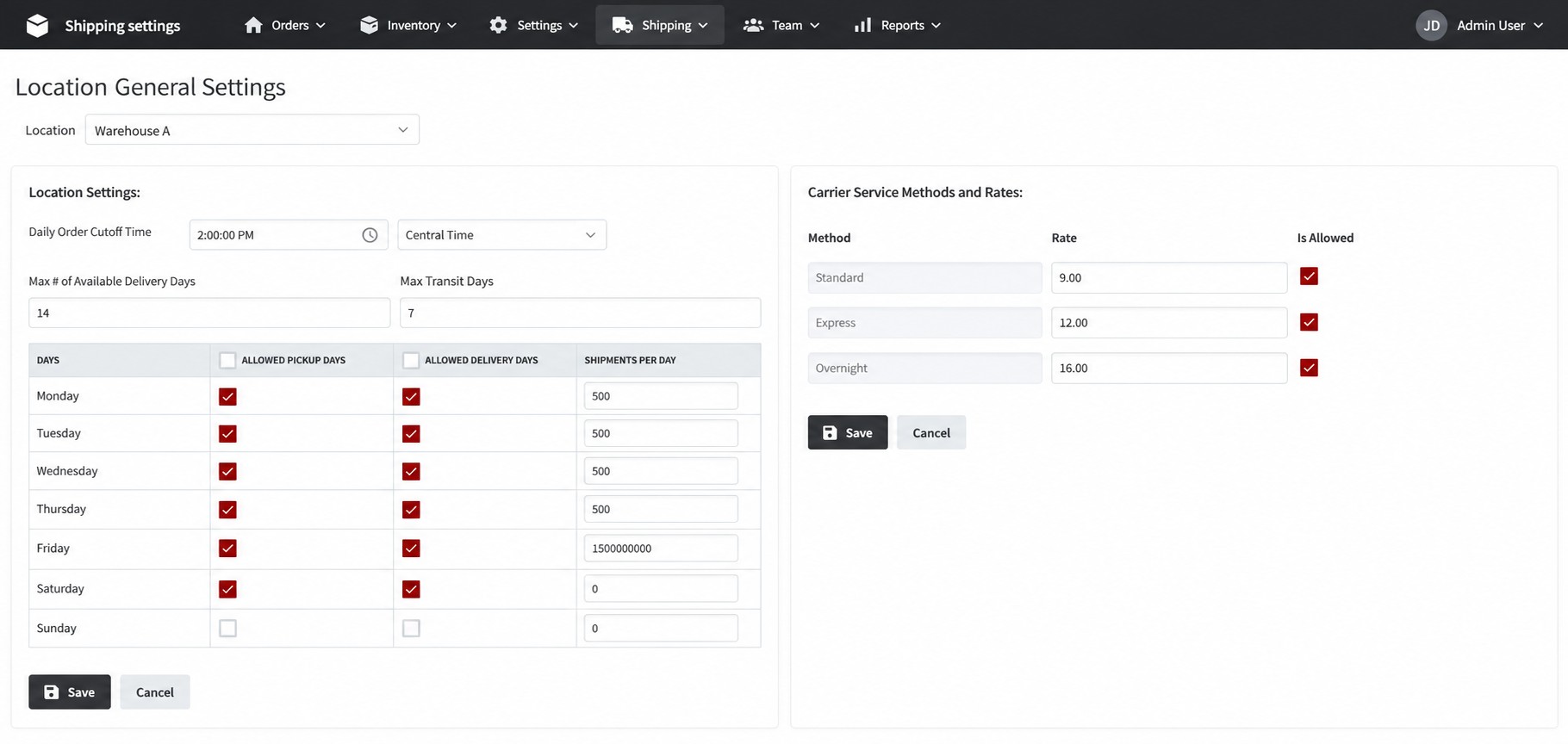
Location Settings
Each warehouse has an independent configuration. This allows the merchant to match checkout availability to the schedule, services, and throughput of the origin fulfilling the order.
|
Location setting |
What it controls |
|
Time zone and cutoff |
Applies the warehouse’s local cutoff when calculating its next available shipping window. |
|
Maximum transit days |
Limits the permitted time in transit when determining available delivery dates. |
|
Maximum future delivery date |
Controls how far ahead the calendar can offer a delivery date; this is separate from transit time. |
|
Allowed shipping dates |
Defines the days on which the warehouse can dispatch orders. |
|
Allowed delivery dates |
Defines the days on which deliveries can be offered under the location’s rules. |
|
Daily order limit |
Closes affected dates when the configured fulfillment capacity has been reached. |
|
Carrier activation |
Enables or disables carriers and supported service methods for each location. |
|
Service method rates |
Maintains the rates associated with the carrier methods available from that warehouse. |
Carrier and Business Rules
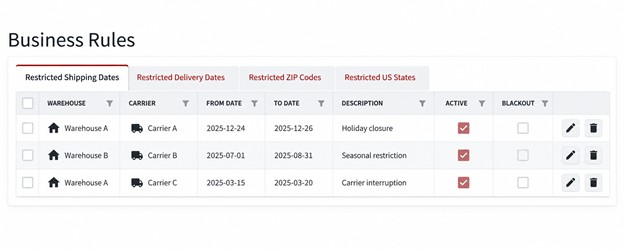
Global service types map to service names used across locations and rules. The merchant can restrict shipping dates, delivery dates, postal codes, and US states by location and carrier.
Rules support date ranges or full blackouts, allowing the team to respond to a holiday closure or temporary service interruption through configuration.
Checkout and Order Workflow
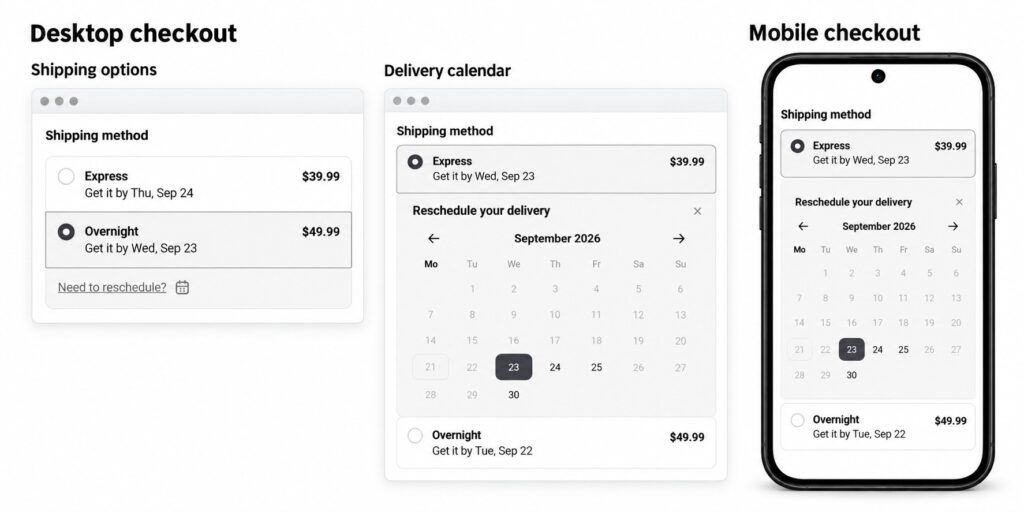
The Checkout UI Extension places the delivery calendar near the shipping methods. Dates are evaluated per location, carrier, and method, so shoppers select from options that pass the applicable rules. Delivery option customization supports which services are shown at checkout.
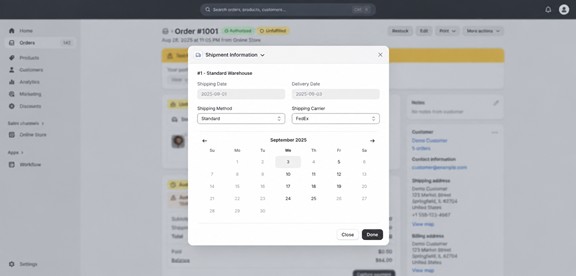
Selected shipping information is persisted using order metafields or metaobjects. The customer service team can open the Admin Order Extension, review the shipment details, and use a guided calendar to correct the date under the same business rules.
An activity log for rule and location setting changes supports configuration auditability. The stored order information gives operations and support visibility into the current delivery selection.
For example, an order submitted after a local cutoff moves to the next valid dispatch window. If that change conflicts with a transit limit or blackout, the affected arrival date is excluded from the calendar.
Customer Benefits
The solution gives the merchant practical controls at the points where cold chain delivery decisions are made. These capabilities benefit shoppers, warehouse teams, and customer service.
A Clearer Promise for Shoppers
Customers choose from dates that satisfy the configured fulfillment rules. They do not need to interpret warehouse schedules, time zones, or blackout policies themselves.
Lower Exposure to Unsuitable Transit Windows
Cutoffs, allowed days, and maximum transit rules help exclude choices that would place a shipment outside the merchant’s defined delivery window. This addresses a known cause of avoidable spoilage and replacement risk.
Consistent Behavior Across Warehouses
Each origin applies its own schedule, carriers, and limits within one customer-facing flow. The business can accommodate different warehouse operating models without relying on one global calendar.
Better Use of Available Capacity
Daily limits prevent the calendar from continuing to offer affected dates after the configured workload is reached. This helps operations manage demand within the capacity allocated to a fulfillment window.
Greater Control During Disruptions
Date ranges and blackout rules let the team restrict affected locations, carriers, or destinations during holidays, seasonal changes, or operational interruptions.
Fewer Unsupported Service Selections
Carrier and method controls keep unavailable options from being offered for the relevant origin. Geographic restrictions address service limitations before an order requires an exception review.
More Consistent Customer Service Corrections
Representatives use a guided calendar in the order admin to amend dates. Applying the same rules after purchase reduces reliance on manual interpretation or separate reference lists.
A Clearer Handoff to Fulfillment
Structured shipping information stays with the Shopify order, giving operations and support teams a shared record of the delivery selection to use in their workflows.
Better Visibility Into Configuration Changes
Activity logging for rules and location settings helps the team review how operational configuration has changed. It supports investigation when checkout availability needs to be explained.
Commercial impact can be assessed through the merchant’s own data on missed delivery dates, exceptions, support contacts, refunds, and spoilage claims.
FAQs
Can Every Warehouse Use Different Settings?
Yes. Time zone, cutoff, transit limit, future date horizon, shipping and delivery days, order capacity, carrier activation, and service method rates are configured per location.
What Is the Difference Between Maximum Transit Days and the Future Delivery Horizon?
Transit days limit how long a shipment may travel. The future delivery horizon controls how far ahead a shopper can choose an arrival date in the calendar.
Why Are Shipping Dates and Delivery Dates Configured Separately?
A warehouse’s dispatch schedule can differ from its permitted arrival days. Separating the two lets the solution apply the correct rules to both ends of the shipment.
What Happens When an Order Is Placed After the Warehouse Cutoff?
The next valid dispatch window is used. Delivery dates that relied on the earlier window are no longer offered if they fail the applicable rules.
Can a Carrier or Service Be Disabled for Only One Warehouse?
Yes. Location-level activation and method settings allow one origin to offer a service that another origin does not support.
Can Restrictions Apply Only to Selected ZIP Codes or States?
Yes. Postal code and US state restrictions can be scoped by location and carrier, using a date range or full blackout as required.
How Can the Team Respond to Holidays or Weather Interruptions?
The team can configure shipping or delivery blackout dates for affected locations and carriers. ZIP code and state restrictions can narrow the impact to specific destinations when needed.
What Happens When a Warehouse Reaches Its Daily Order Limit?
The affected dates stop being offered when the configured capacity is reached, helping prevent additional selections for that fulfillment window.
Can Customer Service Change the Delivery Date After Checkout?
Yes. The Admin Order Extension provides a guided calendar for corrections using the same business rules, and the selected information is retained with the order.
Where Are the Delivery Selection and Configuration Changes Visible?
The selection is saved in order metafields or metaobjects. An activity log covers rule and location setting changes, supporting review of the operational configuration.
