Is your WooCommerce business struggling to automate all the inventory workflow? If yes, then you must be wondering about the best warehouse management system for WooCommerce. Well, your search ends here!
In this blog post, we are going to talk about the 5 absolute best WooCommerce warehouse management plugin. We’ll also discuss the benefits of integrating WooCommerce warehouse management for your business and its uses.
- Nearly 9% of the top million websites in the world use WooCommerce.
- The total number of websites that use WooCommerce totals up to 6.5 million.
- WooCommerce is the leading eCommerce platform with nearly 24% market share.
What is a Warehouse Management System Plugin?
A Warehouse Management System plugin, also known as a WMS plugin, is a piece of software that was developed as an application to streamline and improve the day-to-day operations of your WooCommerce store.
It is able to improve a company’s accuracy, efficiency, and overall supply chain management by integrating with the company’s already existing systems and processes.
Best Warehouse Management System For WooCommerce Plugins
Following is the list of the best WooCommerce warehouse management plugin:
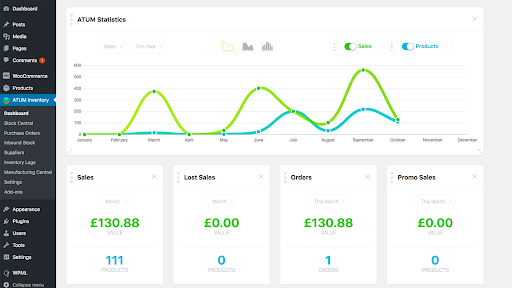
ATUM Inventory Management for WooCommerce
ATUM is the highest-rated inventory management for WooCommerce, making it an essential tool for businesses seeking reliable WooCommerce development services to optimize their operations.
ATUM inventory management for woocommerce keeps track of all the products, SKUs, prices, stock, and all the other things.
ATUM inventory management WooCommerce is the most powerful inventory management WooCommerce as it provides all the features which are provided separately in the WooCommerce, such as WooCommerce manage inventory, WooCommerce bulk stock management, and all others.
ATUM replaces the need for the WooCommerce order management plugin by providing everything in one place.
Features
- It is Compatible with WPML, which means it can support various languages.
- It allows businesses to export reports and inventory in PDF, CSV, and other formats using advanced order export for WooCommerce.
- ATUM inventory management WooCommerce provides the option to bulk edit.
Pricing
ATUM is free to install and use; however, an add-on costs around 20 dollars each on average.
Multi Inventory Management for WooCommerce
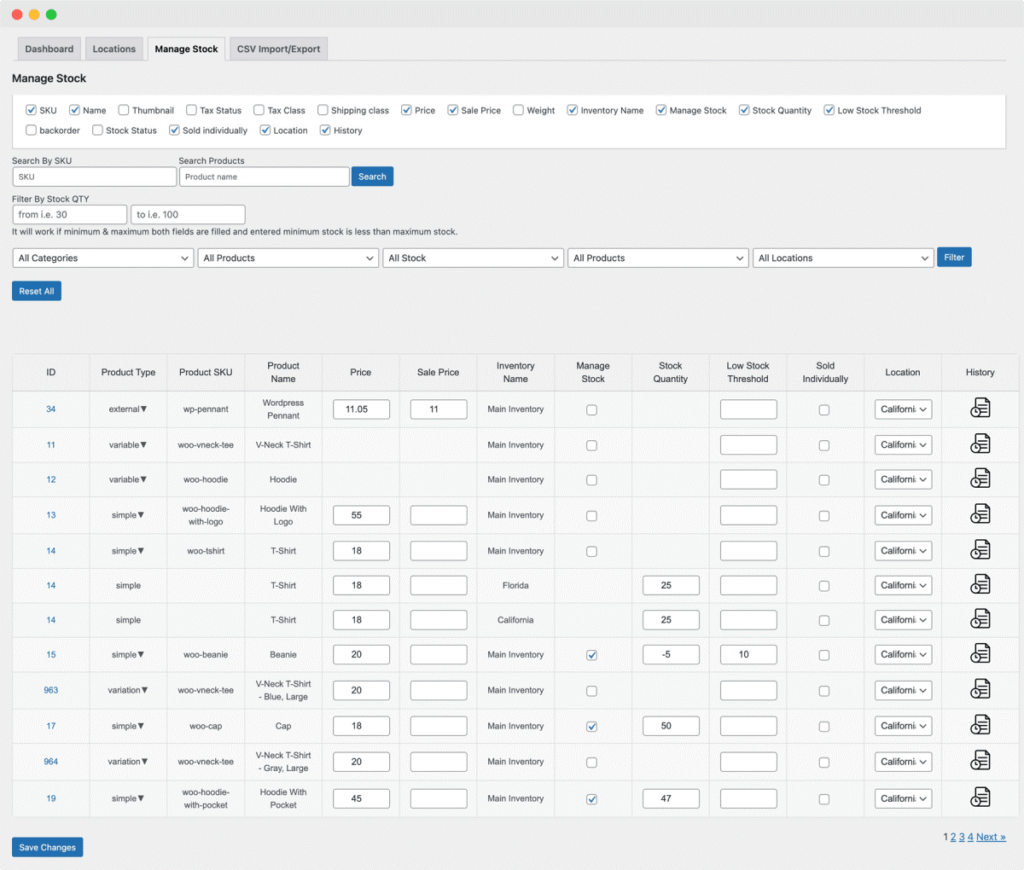
The WooCommerce Multi Inventory Management extension lets you efficiently manage inventories across locations, warehouses, and stores. You can set up multiple stocks for each product by type, location, or supplier, with options for unique pricing per inventory.
Customers can choose their preferred inventory when adding products to their cart, and bulk stock updates are easy with CSV import/export.
The extension includes a streamlined stock listing page and a dashboard overview of stock status, change history, and stock alerts.
Admin-only mode hides inventory locations from customers, allowing only admins to allocate orders to specific inventories.
Features of Inventory Management:
- Add multiple stock inventories based on locations or types and customize
- Warehouse/inventory description
- Parent location
- Contact & store manager details
- Shipping and payment method
- Shipping zones
- Ability to set up multi-inventory for selected products only
- Add inventory price, SKU, and start and end dates from the product level
- Assign specific shipping zones, methods, and WooCommerce payment gateways to locations
- Intelligent stock management page to quickly
- View current stock status
- Edit stock quantity and prices
- Manage stock options
- View stock change history
- Customize inventory display settings on the shop and product page
Pricing
$10.75 Per month, billed annually at $129.
Inventory Management for WooCommerce
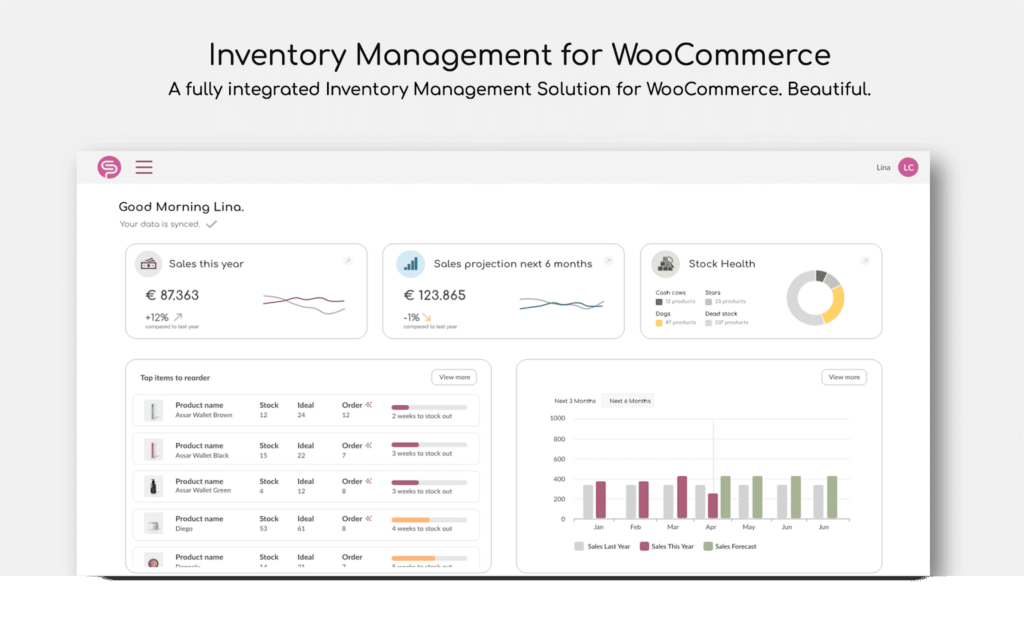
Shelf Planner’s Inventory Management for WooCommerce addresses retailers’ biggest challenge: accurately forecasting daily product demand.
This plug-and-play forecasting engine helps optimize inventory, boost margins, improve sell-through, and cut waste.
Analyzing your store’s performance generates live, daily order recommendations for each product. Independent retailers and manufacturers can access machine-learning forecasting algorithms like those used by enterprise companies.
As the only extension with advanced demand and sales forecasting for WooCommerce, it eliminates the need for spreadsheets, increases profits, and saves time on inventory management..
Features
- Inventory management
- Demand forecasting
- Automatic replenishment
- ABC Analysis
- Advanced performance reports
- Purchase order management
- Supplier management
- Net & Gross Profit Reports
- Cost of Goods Sold (COGS)
Pricing:
$12.42 Per month, billed annually at $149
Stock Sync for WooCommerce
This straightforward plugin provides an easy way to link multiple stores by synchronizing stock levels between two WooCommerce sites.
Stock Sync for WooCommerce enables seamless sharing of product quantities between stores, making multichannel inventory management effortless.
Using WooCommerce’s built-in API for communication, this plugin ensures security that is on par with WooCommerce.
Features:
- Share stock quantities between two WooCommerce stores
- Instantly sync stock changes when a product is purchased, refunded, or edited via admin
- Easily view which products are being synced in the report using the WooCommerce logger
- Push all stock quantities from one store to another
- Background processing prevents slowing the sites down. Learn more about speeding up your WooCommerce site
- Uses WooCommerce built-in REST API for secure communication between stores
- Compatible with WooCommerce 4.0 or above.
Pricing:
It has a free version available, but its have a pro version with some advanced features which costs $89.00
Central Stock for WooCommerce
With Central Stock for WooCommerce, product stock quantities are automatically synchronized across your Multisite shop network via their individual SKU (Stock Keeping Unit).
So, when a customer buys one of your products, all shops update the stock display accordingly.
Features:
- Automated Stock Synchronization
- Optimized for WooCommerce & WordPress Multisite
- Robust, Future-proof Architecture
- WooCommerce Backorders & Negative Stock
- Display Product Availability in the Frontend
- Elevate Your Shop Performance
Pricing:
It has different prices and plans starting from 99,00 € annually to 399,00 €
How Do Warehouse Management Plugins Work With WooCommerce? [Simplified]
When an order is placed on your WooCommerce store, the Warehouse Management System (WMS) will automatically update the inventory and generate a pick list for the warehouse staff. The warehouse staff will then use handheld devices to accurately pick up the items and get them ready for shipping. Hiring dedicated WooCommerce developer can help integrate WMS smoothly with your store.
The WMS is also responsible for tracking the shipment and providing updates to the customer regarding the delivery status. This helps to ensure that the fulfillment process is both smooth and effective. To keep operations even more organized, some businesses also use action tracking software to monitor tasks and ensure every step in the fulfillment workflow is completed on time.
A WMS can help businesses reduce costs, improve customer satisfaction, and increase overall productivity by streamlining and automating warehouse operations. The company as a whole can realize these benefits. Hence opting for a WooCommerce warehouse management system can really optimize your eCommerce store.
How Can WooCommerce Use A Warehouse Management System?
Following are the ways you can use the warehouse management system for WooCommerce after integrating it:
Barcode Scanning
This has the potential to automate processes like receiving, putting away, and picking, which will both increase efficiency and reduce the amount of manual labor required.
For instance, when items are received at the warehouse, the WMS can use barcode scanning to verify the accuracy of the shipment and update the inventory levels in real-time.
If you want to learn more about managing WooCommerce login for your customers, check out this blog.
This is possible thanks to the WMS’s ability to track the items. Because of this, the stock levels displayed in WooCommerce are guaranteed to be correct and up to date at all times.
Picking Optimization
A WMS that is integrated with WooCommerce can help optimize the picking process by providing real-time information on stock locations.
This information can be used to make more accurate selections. Because of this, the amount of time and effort required to find and pick items is reduced, resulting in increased productivity and improved accuracy when fulfilling orders.
For instance, when a picker receives a packing list from the WMS, they are able to use the real-time information on stock locations to find the items and fulfill the order quickly. This results in improved efficiency as well as accuracy.
Slotting Optimization
A warehouse management system (WMS) that is integrated with WooCommerce can assist in optimizing the layout of the warehouse by analyzing item usage and determining the best locations for each item.
This can make the process of picking items more efficient by cutting down on the amount of time and effort needed to locate and pick up items.
For instance, the WMS can examine the sales data provided by WooCommerce to determine which products are most frequently purchased and then determine the most appropriate storage location for those products based on their frequency of use.
Because of this, there is potential for increased productivity in the warehouse and improved precision in the fulfillment of orders.
Real-Time Reporting
A WMS that is integrated with WooCommerce is able to provide real-time reporting on a variety of aspects of warehouse operations. These aspects include inventory levels, order fulfillment, and performance metrics. Because of this, better decisions can be made, and continuous progress can be made.
For instance, the WMS can provide real-time reports on the inventory levels of each item. These reports provide the warehouse manager with the information necessary to make educated decisions regarding inventory management.
It can also provide reports on the performance of the order fulfillment process, which enables the manager to identify areas that could be improved and take the appropriate actions.
How to Implement WMS for WooCommerce
How to Implement WMS for WooCommerce
1- Choose a WMS
Find a WMS compatible with WooCommerce.
2- Install the WMS Plugin
Add the WMS plugin to your WooCommerce store.
3- Connect Your Store
Link WMS with your WooCommerce for data syncing.
4- Set Up Inventory
Enter product details and stock levels into the WMS.
5- Configure Settings
Adjust settings according to your warehouse needs, such as defining inventory levels, choosing warehouse priorities, or even deciding to hide a category for better user experience on your WooCommerce store
6- Train Your Team
Educate your staff on how to use the WMS.
7- Test the System
Run test orders to ensure proper function.
8- Go Live
Begin using the WMS for real orders.
9- Monitor and Adjust
Regularly check and tweak the system as needed.
Important Features of a Good Warehouse Management System for WooCommerce
- Easy Integration: Connects smoothly with your WooCommerce store.
- Real-Time Inventory Tracking: Shows up-to-date stock levels.
- Order Management: Handles and tracks orders efficiently.
- Barcode Scanning: Speeds up product scanning and checking.
- Automated Replenishment: Automatically reorders stock when it’s low, a feature especially beneficial for managing dropshipping operations.
- Shipping Management: Manages shipping and delivery processes.
- Reporting and Analytics: Provides insights into inventory and sales.
- Multi-Location Support: Manages inventory across different warehouses which is especially critical if you’re scaling into multiple sites after being matched with new 3PL partners through Warenous.
- User-Friendly Interface: Simple and easy to use for all team members.
Benefits Of A Warehouse Management System
The following are the benefits of a warehouse management system for WooCommerce:
Improved Inventory Accuracy
By monitoring and managing the quantities of inventory in real time, a WMS improves the accuracy of the inventory data. This eliminates the risk of making errors manually, such as when entering data or losing track of inventory.
A WMS can, for instance, update inventory levels automatically whenever items are received, picked, or shipped. This provides a real-time view of stock levels and reduces the risk of over or under-stocking.
Enhanced Efficiency In Operational Functioning
By automating previously labor-intensive manual processes and cutting down on the amount of time and effort needed to manage a warehouse, a WMS helps to streamline warehouse operations.
A warehouse management system (WMS) can create pick lists for the warehouse staff, eliminating the requirement for manually tracking orders and improving order fulfillment’s precision. Integrating warehouse security systems can further enhance operational control by safeguarding inventory and monitoring access points.
Better Visibility And Traceability
Companies can monitor inventory levels, order fulfillment processes, and shipping procedures with the help of a WMS that offers real-time visibility into warehouse operations.
For instance, a WMS can track the location of each item in the warehouse and provide information on its status. This enables businesses to locate and retrieve items as quickly as necessary.
Increased Productivity
A WMS improves overall productivity and reduces the amount of money spent on labor by automating previously manual tasks and streamlining processes.
For example, a WMS can automate the receiving process, which cuts down on the time and effort needed to process incoming shipments and frees up staff to concentrate on other tasks.
Improved Customer Satisfaction
A WMS enables businesses to fulfill orders in a timely and accurate manner, leading to increased levels of customer satisfaction while simultaneously lowering the likelihood of chargebacks and returns.
A WMS can provide customers with real-time tracking information, allowing them to monitor their orders’ status and receive timely delivery updates. This is made possible by the WMS’s ability to provide this information.
Conclusion
In conclusion, integrating a warehouse management system for WooCommerce can significantly impact your operations’ efficiency and accuracy. From improving inventory management and order fulfillment to providing real-time reporting and analysis, a WMS can help you streamline your processes and grow your business.
Whether you’re a small business just starting out or an established enterprise, there is a WMS plugin for WooCommerce that is right for you.
We hope that this guide has provided you with useful information and insights on the best WMS plugins for WooCommerce and that it helps you make an informed decision. If you think we missed anything, please let us know below!