Your storefront looks fine on desktop, but the mobile experience lags, your marketing team can’t ship a landing page without a developer, and every new sales channel means another round of custom templating. That’s the wall most growing BigCommerce merchants hit eventually.
BigCommerce headless commerce solves this by separating your storefront (what shoppers see) from your commerce engine (product data, cart, checkout, orders).
Once the two are decoupled, you can build the frontend in React, Next.js, or any framework your team prefers, while BigCommerce keeps handling catalog, inventory, and transactions in the background.
This guide covers how the architecture works, what it actually costs in time and money, and how to tell if your store is ready for it.
Summary
- BigCommerce ships with native REST and GraphQL APIs, so going headless doesn’t require replatforming or losing existing product data
- Headless setups typically cut Largest Contentful Paint by 30-50% compared to templated Stencil themes, because the frontend only fetches what it needs
- Headless makes the most sense past roughly $2-3M in annual revenue, multi-brand catalogs, or when marketing needs to publish content faster than developers can template it
- Common CMS pairings include Contentful, Builder.io, and Sanity, each with different trade-offs for editorial teams versus developers
- A typical build runs 8-16 weeks depending on catalog complexity, integrations, and whether B2B pricing logic is involved
- Not every store benefits: sub-$1M merchants usually get more ROI from optimizing their existing Stencil theme first
What Is BigCommerce Headless Commerce
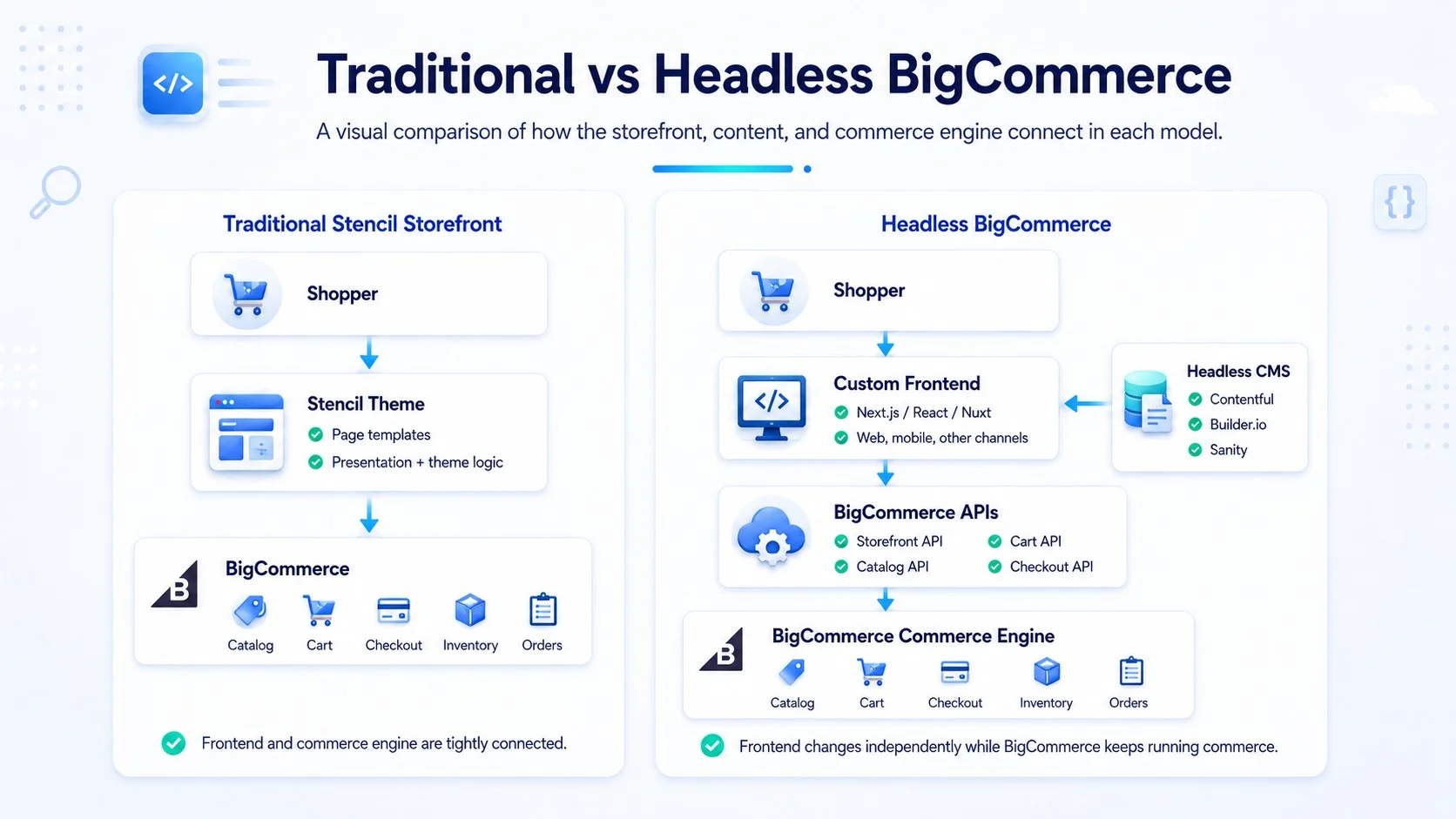
BigCommerce headless commerce means using BigCommerce purely as the backend, the system that stores products, processes orders, manages inventory, and handles payment logic, while a separate application renders the actual pages customers browse.
The two sides talk through APIs instead of a shared template system.
How the Architecture Differs from a Traditional Storefront
In BigCommerce’s default Stencil setup, the theme engine and the commerce engine live in the same system. Editing a product page template means touching Handlebars files that also control cart logic.
In a headless bigcommerce commerce setup, the frontend is its own codebase. It calls the BigCommerce Storefront API or Catalog API to pull product data, then renders it however the frontend framework dictates.
This matters because BigCommerce was built API-first from the start. Unlike platforms that bolted APIs onto an existing monolith, BigCommerce’s REST and GraphQL endpoints cover the same functionality the native storefront uses, so a headless build isn’t working with a stripped-down feature set.
If you’re still comparing platforms at this stage, our overview of BigCommerce development services breaks down what the platform supports before you commit to a headless rebuild.
Where BigCommerce Fits Compared to Composable-Only Platforms
BigCommerce occupies a middle position. Fully composable engines like commercetools have no native storefront at all; every frontend is custom from day one, and implementations routinely run several months.
BigCommerce gives you a working Stencil storefront out of the box and lets you decouple gradually, section by section if needed, rather than committing to a full rebuild upfront. That flexibility is why agencies frequently describe it as “headless-ready” rather than “headless-only.”
Key BigCommerce Headless Commerce Features
API Coverage and GraphQL Storefront API
BigCommerce’s GraphQL Storefront API returns product, cart, and checkout data in a single request instead of the multiple round-trips REST often requires. For a catalog with heavy variant counts, this cuts payload size and speeds up page hydration.
The Catalog API and Checkout API handle everything the native theme touches, so headless BigCommerce development doesn’t mean losing promotions, tax rules, or shipping logic.
BigCommerce Headless CMS Options
BigCommerce doesn’t ship its own headless CMS, so most implementations pair it with a third party. Contentful suits teams that need strict content modeling and multi-language support.
Builder.io works well when marketing wants visual, drag-and-drop page building without developer involvement for every landing page. Sanity fits teams that want structured content with real-time collaboration.
The choice affects how much your content team can do independently after launch, so it deserves as much evaluation time as the frontend framework itself.
Multi-Channel and Multi-Storefront Support
BigCommerce’s Multi-Storefront feature lets one backend power several distinct frontends, useful for brands running separate B2B and B2C experiences, or regional sites with different currencies and languages, off a single product catalog.
This is one of the more concrete BigCommerce headless commerce features that differentiates it from platforms requiring separate backend instances per brand.
BigCommerce Headless Development: The Build Process
Planning and API Mapping
Before any frontend code gets written, map which BigCommerce endpoints your build needs: Catalog, Cart, Checkout, Customer, and any B2B Edition APIs if wholesale pricing applies.
Skipping this step is the most common reason budgets balloon mid-project, teams discover late that a required data point (like customer group-specific pricing) needs a workaround.
Frontend Framework Selection
Next.js is the most common choice for headless BigCommerce developers because of built-in server-side rendering, which matters for SEO since headless frontends can otherwise struggle with crawlability if pages render entirely client-side.
Vue/Nuxt and Remix are viable alternatives depending on your team’s existing skill set. Most BigCommerce headless developers default to Next.js for this reason unless the team already has deep Vue expertise.
Checkout Integration
You have two paths: use BigCommerce’s hosted checkout (faster to launch, PCI compliance handled by BigCommerce) or build a fully custom checkout via the Checkout SDK for a seamless branded experience.
Custom checkout adds 3-4 weeks of development but removes the visual handoff between your custom frontend and BigCommerce’s checkout page.
Whichever route you choose, the gateways you support still need to be configured separately; see our breakdown of BigCommerce payment gateway options for how that piece fits into checkout.
Testing and Performance Validation
Before launch, test Core Web Vitals against your Stencil baseline.
Headless builds should show measurable Largest Contentful Paint improvement; if they don’t, something in the frontend architecture (usually unoptimized image delivery or an oversized JavaScript bundle) is canceling out the gains headless is supposed to deliver.
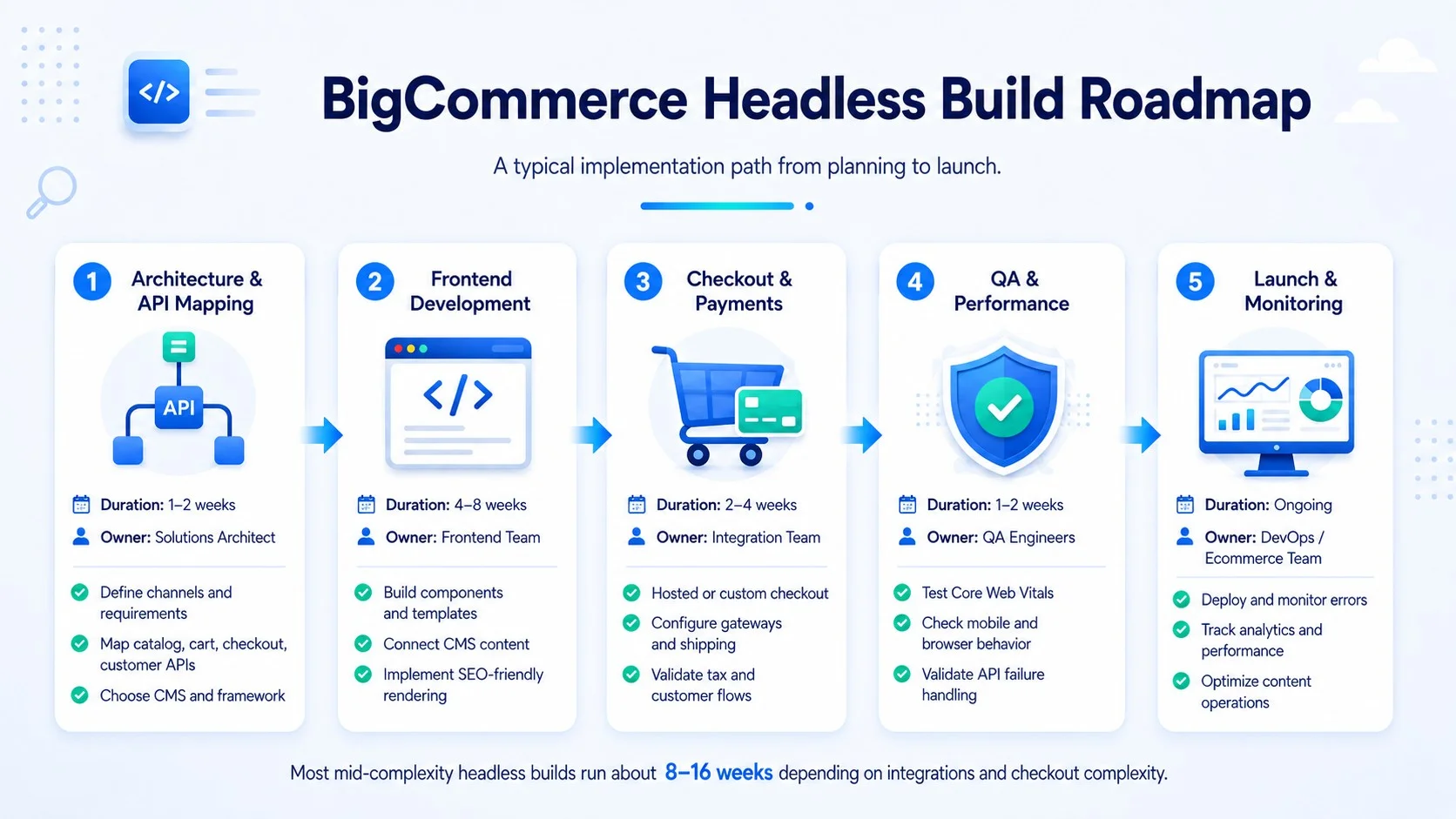
| Build Phase | Typical Duration | Primary Owner |
| API mapping and architecture planning | 1-2 weeks | Solutions architect |
| Frontend development | 4-8 weeks | Frontend developers |
| Checkout and payment integration | 2-4 weeks | Backend/integration team |
| QA and performance testing | 1-2 weeks | QA engineers |
| Launch and monitoring | Ongoing | DevOps |
Is BigCommerce Headless Commerce Right for Your Store
Signals You’re Ready
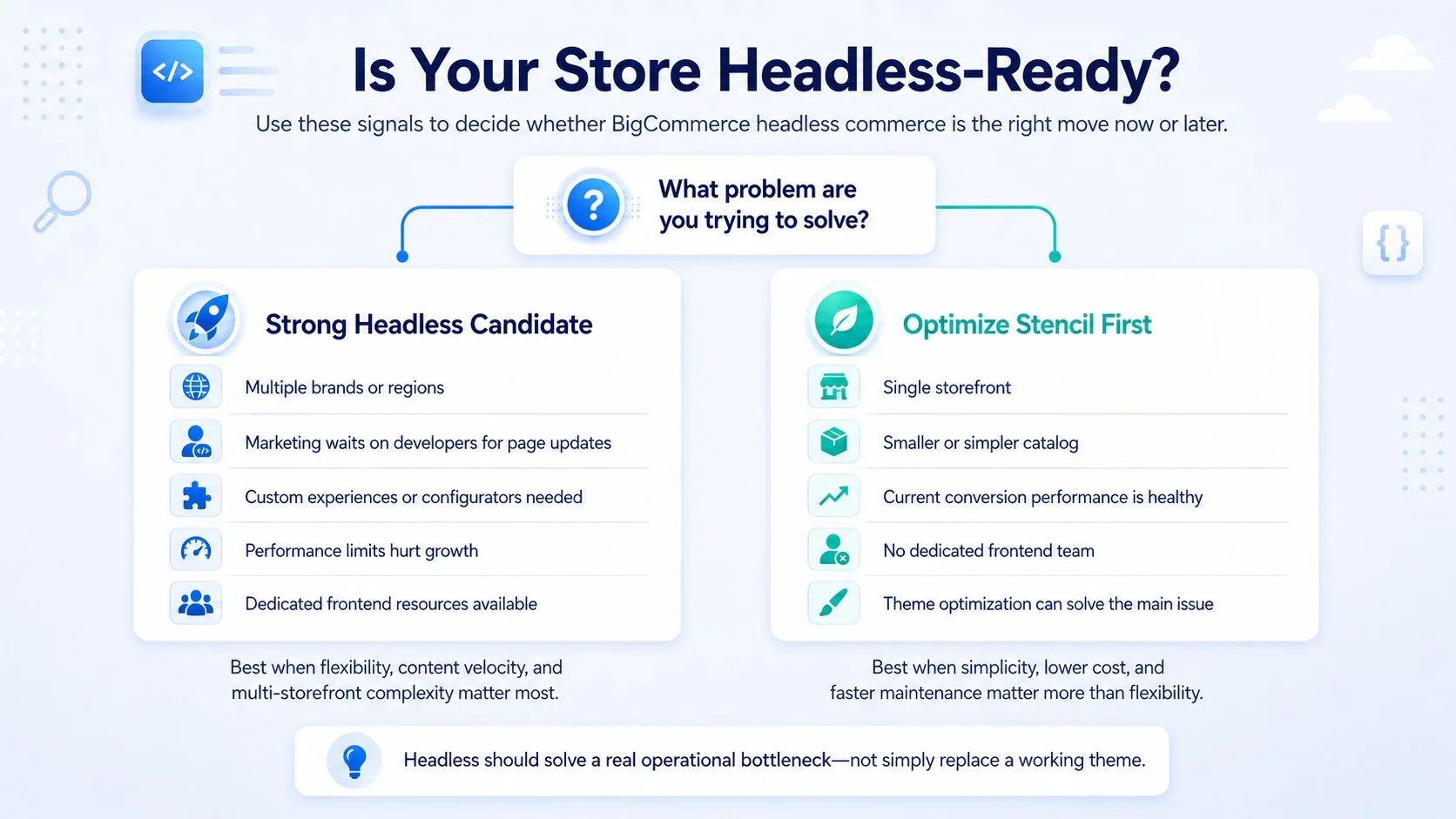
Consider headless BigCommerce commerce if your marketing team is bottlenecked waiting on developers for content changes, or if you’re running multiple storefronts off one catalog.
It’s also worth considering if page speed on the current Stencil theme is costing conversions, or if you need frontend experiences (AR product viewers, custom configurators) that templated themes can’t support.
Signals You Should Wait
If your catalog is under 500 SKUs, your team is small, and your current storefront converts well, the added engineering overhead of headless BigCommerce development usually isn’t worth it yet. Native BigCommerce with a well-optimized Stencil theme covers most needs below roughly $2-3M in annual revenue.
Headless also introduces new failure points: a broken API call can take down the storefront in ways a monolithic theme wouldn’t, so your team needs the capacity to monitor and maintain a more distributed system.
| Store Profile | Headless Fit |
| Under $1M revenue, single storefront | Native Stencil, optimize existing theme |
| $2M+ revenue, content-heavy marketing team | Strong headless candidate |
| Multi-brand or multi-region catalog | Strong headless candidate (Multi-Storefront) |
| High SKU count with custom configurators | Strong headless candidate |
| Small team, no dedicated frontend developers | Native Stencil, revisit later |
Now that we’ve covered readiness signals, it’s worth looking at what the switch costs in practice, since that’s usually what determines timing more than technical fit alone.
Cost and Timeline Considerations
Most merchants don’t build these in-house; picking the right BigCommerce app development partner affects both the timeline and the final cost more than any single technical decision.
A mid-complexity headless BigCommerce commerce build, standard catalog, one custom checkout, one CMS integration, typically runs 8-12 weeks and lands in the $40,000-$90,000 range depending on agency rates and region. Enterprise builds with B2B pricing tiers, multiple storefronts, and ERP integrations can extend past 16 weeks.
Ongoing maintenance costs more than a Stencil theme too, since you’re now maintaining a separate codebase, hosting infrastructure (often Vercel or Netlify), and CMS subscription on top of your BigCommerce plan.
Key Takeaways
- BigCommerce’s native API coverage makes it one of the more accessible platforms for a phased or full headless build
- Headless pays off most clearly past $2-3M in revenue, multi-storefront setups, or when content velocity is the bottleneck
- Budget 8-16 weeks and $40,000-$100,000+ depending on catalog complexity and checkout customization
- A missing CMS decision early in planning is the most common source of scope creep later
- Smaller catalogs typically get better ROI from optimizing the existing Stencil theme first
Conclusion
Going headless with BigCommerce solves a specific problem: slow content velocity and template limitations on a platform that already has the API depth to support a custom frontend without losing commerce functionality.
It’s not a default upgrade path for every store, but for merchants past the readiness signals above, BigCommerce headless commerce delivers measurably faster pages and a frontend that isn’t constrained by theme architecture.
If you’re weighing whether your catalog and team are ready for the switch, explore our headless eCommerce solutions or talk to our team about a scoped assessment before committing to a full rebuild.
Frequently Asked Questions
What Is BigCommerce Headless Commerce?
BigCommerce headless commerce separates the storefront (frontend) from BigCommerce’s commerce engine (backend), connecting them through APIs. The frontend can be built in any framework while BigCommerce continues managing products, orders, and checkout logic behind the scenes.
Is BigCommerce a Good Platform for Headless Development?
Yes. Headless commerce BigCommerce implementations benefit from a native REST and GraphQL API layer covering catalog, cart, and checkout functionality, so headless BigCommerce development doesn’t require workarounds to access core commerce features that other platforms sometimes need custom middleware for.
How Much Does BigCommerce Headless Commerce Development Cost?
Most mid-complexity builds range from $40,000 to $90,000 and take 8-12 weeks. Enterprise builds with B2B pricing, multiple storefronts, or heavy ERP integration typically exceed $100,000 and 16 weeks, depending on scope and agency rates.
Do I Need a Separate CMS for BigCommerce Headless CMS Needs?
Yes, BigCommerce doesn’t include a native headless CMS. Most teams pair it with Contentful, Builder.io, or Sanity, chosen based on whether marketing needs visual page building or developers need strict content modeling.
Can I Migrate to Headless Without Losing Existing Product Data?
Yes. Because headless builds pull from the same Catalog and Checkout APIs that power BigCommerce’s native storefront, product data, customer accounts, and order history stay intact. Only the presentation layer changes.