Executive Summary
A multi-store Magento merchant needed different storefronts to follow different tax policies while continuing to use one shared product catalog. More than 30 websites and store views operated from the same Magento installation, with the same SKUs sold across multiple storefronts. Most storefronts followed a California-based tax requirement, while one storefront followed a Georgia-based requirement.
Magento’s standard tax configuration could calculate the required rates, but product tax classes belonged to shared products and tax rules were global. This meant the merchant could not cleanly assign different tax behavior to the same SKU depending on which website was processing the order.
Folio3 eCommerce developed a custom Magento module that introduced website-specific product tax class behavior during tax calculation. Products remain unchanged in the shared catalog, while eligible products are evaluated using the tax class configured for the current website. The solution allows each storefront to follow its required tax policy while preserving centralized catalog management, existing Magento tax rules, product exemptions, ERP integrations, and Magento’s native checkout tax calculation process.
The Problem
The business needed to address several tax and architecture questions that Magento’s standard shared product tax configuration could not resolve.
How can different Magento websites apply different tax policies to the same shared products?
The same SKU could be sold across California-based and Georgia-based storefronts. The Georgia storefront needed to apply the merchant’s 6% Georgia rule when applicable, while the California storefronts needed to apply the merchant’s 7.25% California rule. Because the product itself was shared, assigning a different product tax class to the same SKU for each website was not practical.
How can the merchant prevent one website’s tax rules from affecting another storefront?
Magento tax rules are global. If California and Georgia tax rules referenced the same shared product tax class, a rule intended for one group of storefronts could potentially be evaluated on another storefront when the customer’s taxable jurisdiction matched that rule. The merchant needed a website boundary that Magento’s standard product tax configuration did not provide.
How can the business keep one shared product catalog while supporting website-specific tax behavior?
Duplicating products simply to assign different tax classes would undermine the benefits of the existing multi-store architecture. With more than 30 websites and store views, separate products would increase complexity across inventory, pricing, imports, catalog maintenance, and ERP synchronization.
How can intentionally tax-exempt products remain exempt?
Not every product should automatically receive the website-specific tax class. Products explicitly assigned to None or another specialized tax class needed to preserve that classification rather than being converted into taxable products by the website override.
How can newly imported products receive the correct tax treatment?
Product imports could contain a default or blank tax class. The merchant needed eligible products to receive the appropriate website treatment without requiring tax classes to be rewritten by the import process or synchronized differently for each website.
How can the solution continue using Magento’s existing tax calculation process?
Tax affects checkout totals, orders, invoices, and reporting. Replacing Magento’s tax engine with an external calculation layer would introduce additional complexity and create the risk of inconsistent tax calculations across different parts of the platform.
How can website-specific tax calculations remain isolated when Magento processes multiple stores?
Magento can process multiple websites within the same PHP process during operations such as cron jobs, indexers, and emails. Once tax behavior depends on website identity, cached tax information must also respect that context so one website’s calculation does not incorrectly influence another.
How can the customization fail safely when the tax configuration is incompatible?
Certain Magento configurations make tax class substitution unsafe, particularly scenarios involving shipping tax classes or prices configured as including tax. The solution needed to fall back to Magento’s original product tax class rather than making assumptions that could produce incorrect totals.
The Solution
Folio3 eCommerce implemented a custom Magento module that introduces website-scoped product tax class configuration while continuing to use Magento’s native tax engine. Instead of changing product records, the module changes the product tax class presented to Magento during tax calculation for qualifying products. Magento then performs its normal calculation using the customer tax class, effective product tax class, configured tax rules, and tax rates.
Website-Specific Tax Configuration
We introduced a configuration under:

The setting operates specifically at Website scope.
This allows the California-based websites to use a product tax class associated with the merchant’s California 7.2% rule while the Georgia-based website uses a class associated with the Georgia 6% rule.
| Website configuration | What it controls |
| Website product tax class | Determines which product tax class qualifying products present to Magento during tax calculation. |
| California websites | Uses the class associated with the merchant’s California tax rule. |
| Georgia website | Uses the class associated with the merchant’s Georgia tax rule. |
| Website scope | Keeps the tax-class override isolated to the applicable Magento website. |
| Default product class | Identifies normal taxable products that are eligible for substitution. |
| Specialized tax classes | Remain unchanged so explicit exemptions and special tax treatments are preserved. |
Tax Class Substitution During Calculation
Products continue using Magento’s normal product tax classes in the catalog. When Magento prepares a tax calculation for an eligible product, the module checks the current website and substitutes the default product tax class with the tax class configured for that website.
For example, the same shared SKU is evaluated differently depending on the storefront:
- California storefront: California product tax class applied, California tax rule used
- Georgia storefront: Georgia product tax class applied, Georgia tax rule used
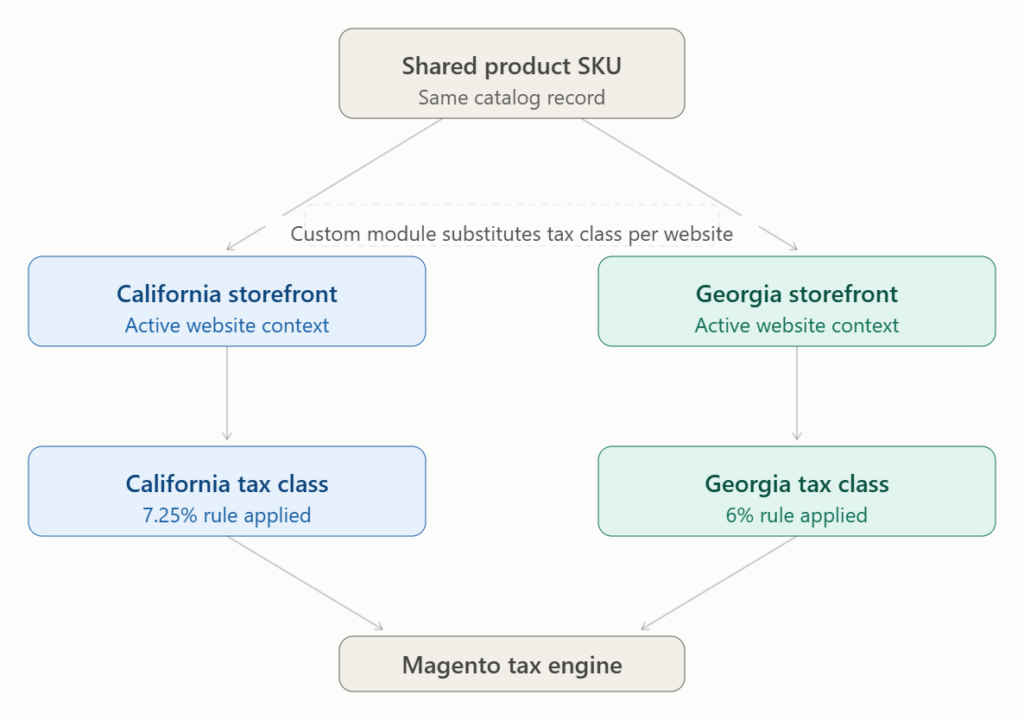
Magento’s existing tax engine then performs the actual calculation. Nothing is written back to the product record. The substitution exists only during tax calculation.
Preserving Exempt and Special Products
The override is deliberately limited to eligible products. Products using Magento’s normal default product tax class can receive the website-specific substitution. Products explicitly assigned to None or another merchant-defined tax class retain their existing classification. This prevents the website override from accidentally making intentionally exempt products taxable. The solution also accounts for imported products with blank tax classes. When a website override is active, an eligible blank class can use the configured website class, while an explicit None remains non-taxable.
Shared Catalog and Integration Workflow
The customization does not duplicate products or rewrite their tax classes. The same product continues to be managed centrally and sold across multiple websites. Product imports and ERP integrations therefore do not need to maintain separate website-specific tax classes for the same SKU. For an environment containing more than 30 websites and store views, this preserves the operational advantages of centralized product management.
Website-Aware Tax Context
Because the effective tax class now depends on the Magento website, the website identity must also be considered in the relevant tax calculation context. Magento can process multiple websites within the same PHP process during cron jobs, indexers, emails, and other operations. The implementation therefore accounts for website context so California and Georgia calculations do not incorrectly share tax-rate cache information.
Safe Fallback Behavior
The module applies the website override only when substitution can be performed reliably. The override is not applied when a shipping tax class is configured, because Magento can carry shipping’s tax class through the same calculation field, making it unsafe to assume that every request represents a product. The override is also refused when catalog or shipping prices are configured as including tax. Invalid tax classes or configuration at an incorrect scope also cause the customization to fall back to the product’s existing tax class. This means Magento’s original behavior remains the fallback instead of the module guessing how an ambiguous calculation should be handled.
Customer Benefits
Correct tax behavior by storefront. Each Magento website can present the appropriate product tax class during calculation, allowing California-based and Georgia-based storefronts to follow their respective merchant-defined policies.
Shared catalog remains intact. The merchant does not need separate copies of products simply because storefronts require different tax treatment. The same SKU can continue to be centrally maintained and sold across multiple websites.
Lower catalog management complexity. Avoiding duplicate products reduces unnecessary complexity across product maintenance, inventory, pricing, imports, and integrations. This becomes particularly important when more than 30 websites and store views operate from the same Magento installation.
Existing Magento tax functionality is preserved. Magento continues to perform the actual tax calculation using its existing tax classes, rules, and rates. The customization introduces the missing website context rather than replacing the tax engine.
Product exemptions remain protected. Products intentionally assigned to None or another specialized tax class retain that treatment. The website-specific configuration does not automatically turn exempt products into taxable products.
Simpler product onboarding. New products using the normal default tax class can automatically receive the appropriate website treatment during tax calculation. The merchant does not need to maintain separate website-specific versions of those products.
Fewer changes to ERP and product imports. Website-specific tax treatment does not need to be written to the shared product record. Existing product imports and ERP synchronization can continue operating against the centralized catalog without introducing separate tax class values for each storefront.
Better isolation between storefronts. Website context is incorporated into the relevant tax calculation behavior so a California storefront does not inadvertently inherit the Georgia storefront’s tax treatment, or vice versa.
Safer behavior under incompatible configurations. When Magento’s configuration makes tax class substitution unreliable, the module falls back to the product’s existing tax class. This avoids guessing at tax treatment in scenarios where the override could affect calculation accuracy.
Lower architectural overhead. The merchant avoids building a separate tax engine or maintaining a large workaround around duplicated catalogs. The customization addresses the missing scope directly: the business requirement varies by website, so website context is introduced at the point where Magento evaluates product tax treatment.
FAQs
Q: Why could the merchant not simply create separate product tax classes?
A: The same products were shared across multiple Magento websites. A shared SKU could not reliably hold a California-specific product tax class on one website and a Georgia-specific class on another without changing the shared catalog model.
Q: Why were additional Magento tax rules not enough?
A: Magento tax rules are global. Adding additional rules would not create the missing website boundary when those rules continued to reference shared product tax classes.
Q: Does the solution change the tax class stored on the product?
A: No. Products remain unchanged in the catalog. The website-specific tax class is substituted only during tax calculation for qualifying products.
Q: Can the same SKU have different tax behavior on different storefronts?
A: Yes. An eligible shared SKU can be evaluated using the California class on a California-based website and the Georgia class on the Georgia-based website.
Q: What happens to products configured as tax exempt?
A: Products explicitly assigned to None or another specialized tax class retain that classification. The website override is designed not to replace intentional exemptions.
Q: What happens when an imported product has a blank tax class?
A: When the website override is active, an eligible blank tax class can use the configured website-specific class. An explicit None remains non-taxable.
Q: Does the solution replace Magento’s tax engine?
A: No. Magento’s existing tax rules and rates continue to perform the actual tax calculation. The customization changes only the product tax class presented to the calculation process when appropriate.
Q: Do product imports or ERP integrations need to maintain different tax classes for each website?
A: No. Website-specific behavior occurs during tax calculation rather than being written back to the product, so the shared catalog and its integrations can remain centralized.
Q: What happens if the website-specific override cannot be applied safely?
A: Magento falls back to the product’s existing tax class. This can occur when the tax configuration makes substitution unreliable, such as certain shipping tax or tax-inclusive pricing scenarios.
Q: Why is website context important for tax caching?
A: Magento can process multiple websites in the same PHP process. Because the effective tax class depends on the website, the relevant calculation context must distinguish between websites to prevent one storefront’s tax information from being incorrectly reused for another.
Q: Will Magento Admin tax previews always show the website-specific result?
A: Not necessarily. Admin tax previews may show the product’s original class because the customization is intended for storefront calculations. The storefront checkout is the relevant context for determining the tax charged to the customer.
People Also Ask
- How do you apply different tax rates to the same product across multiple Magento storefronts?
- Can Magento handle state-specific tax rules for shared SKUs without duplicating the product catalog?
- Which agencies build custom Magento tax modules for multi-store and multi-region ecommerce operations?
- How do you keep tax-exempt products exempt when applying website-specific tax overrides in Magento?
- How do you prevent Magento tax caching from mixing tax calculations across multiple websites in the same PHP process?