Managing different prices for different customers shouldn’t feel like guessing work. If you’re running a B2B store, wholesale operation, or multi-tier retail business on BigCommerce, you’ve probably hit that wall where one price doesn’t fit all customers. BigCommerce price lists solve exactly that problem by letting you create custom pricing for specific customer groups without manually adjusting every product.
This guide walks you through the complete BigCommerce price lists setup process, how customer groups work with pricing tiers, and the documentation you need to implement dynamic pricing strategies that actually scale with your business.
Summary
- What price lists are: Custom pricing layers that override base product prices for specific customer segments
- How customer groups connect: Assign price lists to customer groups to automate who sees which prices
- Setup requirements: Product catalog structure, customer segmentation strategy, and admin configuration steps
- Common use cases: B2B wholesale pricing, VIP discounts, regional pricing, and volume-based tiers
- Best practices: Maintaining pricing consistency, testing before launch, and monitoring performance impact
What Are BigCommerce Price Lists?
BigCommerce price lists are pricing rule sets that let you assign different prices to different customer segments without changing your base product prices. Think of them as pricing overlays that sit on top of your standard catalog.
When a customer logs in, BigCommerce automatically displays the prices from their assigned price list instead of the default catalog price. This happens in real-time across product pages, category listings, search results, and checkout without requiring manual price adjustments or duplicate products.
The system supports both fixed prices and percentage-based discounts, giving you flexibility in how you structure pricing tiers. You can apply price lists at the product variant level, which means different SKUs within the same product can have unique pricing rules based on size, color, or other variant attributes.
| Feature | Capability | Limitation |
| Price types | Fixed amount, percentage discount | Cannot combine both types in single list |
| Product coverage | Individual SKUs, bulk upload | Must be applied manually or via CSV |
| Customer assignment | Via customer groups | One price list per customer at a time |
| Currency support | Multi-currency compatible | Prices must be set per currency |
How Price Lists Differ from Standard Discounts
Standard promotions and coupon codes apply temporary reductions that customers see at checkout. BigCommerce price lists customer groups functionality works differently by replacing the displayed price from the moment a customer views a product.
This distinction matters for B2B buyers who need to see their contracted prices upfront rather than calculating discounts mentally. Price lists also persist across sessions and don’t require customers to remember or enter codes, which reduces friction in the purchasing process for wholesale operations.
Setting Up Customer Groups in BigCommerce
Customer groups form the foundation of your pricing strategy. Before creating price lists, you need to segment your customers into logical groups that reflect how you want to price your products.
Navigate to Customers > Customer Groups in your BigCommerce admin panel.
Click Create a Customer Group and define your group with a clear name that reflects the pricing tier like “Wholesale Buyers” or “VIP Customers.”
You can create unlimited customer groups, but most businesses start with three to five core segments. Each group can have one active price list assigned, though customers can belong to only one group at a time.
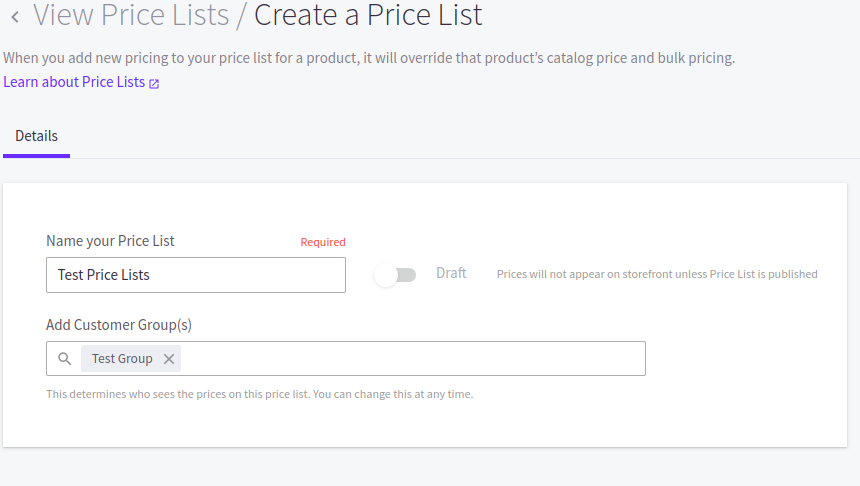
Customer Group Configuration Steps
Define your group name and internal ID for reference in reports and integrations. The group name appears in admin interfaces but not to customers, so use descriptive labels that your team understands.
Set customer assignment rules either manually or through automated criteria. Manual assignment works best when you approve each wholesale account individually. Automated rules help when you want customers to self-select into groups during registration based on form fields like business type or annual revenue.
Configure group-specific settings, including tax exemptions, payment methods, and shipping rules that align with your pricing structure. B2B customers often need net payment terms or tax certificates that retail customers don’t require.
| Group Type | Typical Use Case | Price List Strategy |
| Retail | Standard consumers | Base catalog pricing |
| Wholesale Tier 1 | Small business buyers | 15-25% discount |
| Wholesale Tier 2 | Large volume buyers | 30-40% discount |
| VIP/Loyalty | High-value repeat customers | Exclusive product access + 10% discount |
Now that we’ve covered customer group foundations, let’s look at how to build the actual price lists that connect to these segments.
Creating and Managing BigCommerce Price Lists
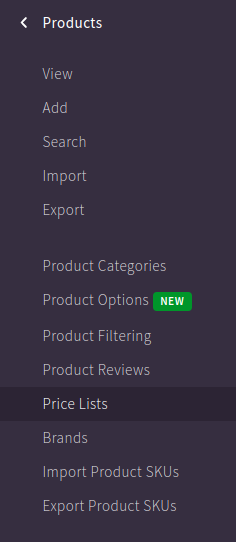
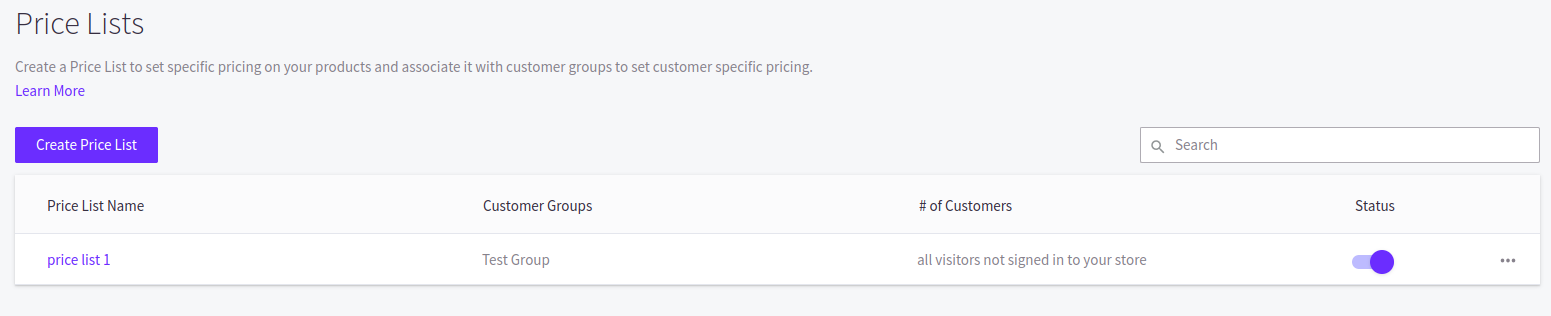
Access the price list interface through Products > Price Lists in your BigCommerce control panel. Click Create Price List to start building your first custom pricing layer.
Name your price list with clear labels that match your customer groups for easy reference. If you’re creating a wholesale price list, name it something like “Wholesale Tier 1 Pricing” rather than generic labels like “Price List A.”
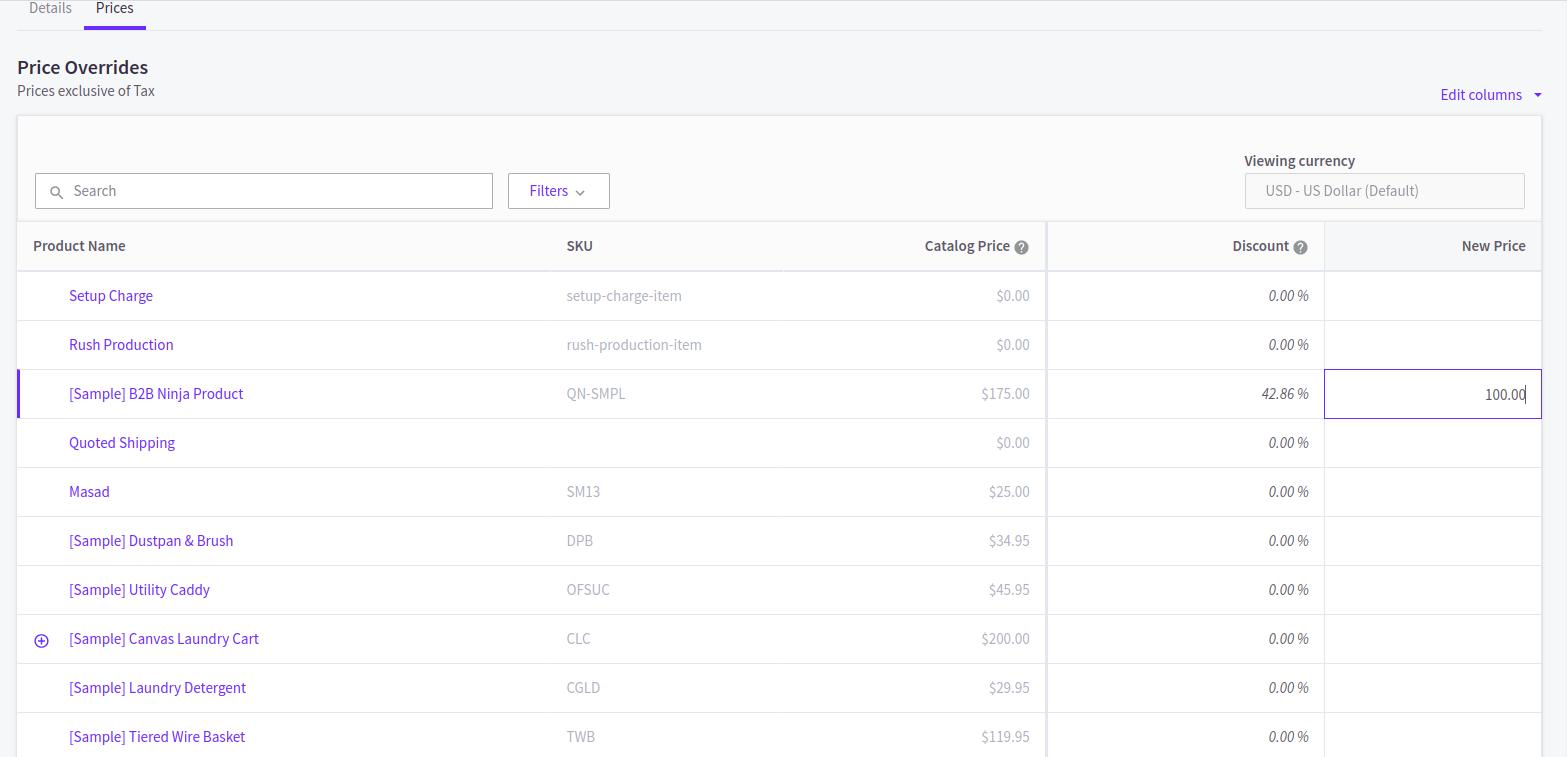
Choose whether your price list will use fixed prices or percentage discounts. Fixed pricing gives you exact control over margins and works well for products with complex cost structures. Percentage discounts simplify management when you want consistent markup reductions across your entire catalog.
Adding Products to Price Lists
You have two methods for adding products: individual product selection or bulk CSV upload. Individual selection works for small catalogs or when you’re testing price list functionality with a subset of products.
For larger catalogs, export your product list as CSV, add pricing columns, and re-upload. The CSV method saves hours of manual entry and reduces errors when managing hundreds or thousands of SKUs.
Each price list entry requires the product SKU, variant ID if applicable, and your new price or discount percentage. You can apply different pricing to each variant, which gives you flexibility for products sold in multiple sizes or configurations.
Assigning Price Lists to Customer Groups
After building your price list, connect it to the appropriate customer group. Go back to Customers > Customer Groups, select your target group, and choose your price list from the dropdown menu.
Only one price list can be active per customer group at any time. If you need to test new pricing, create a separate test customer group rather than modifying live price lists that active customers currently see.
Changes take effect immediately after saving, so customers will see updated pricing on their next page load. Clear your cache and test thoroughly before assigning price lists to large customer segments to avoid pricing errors that could cost revenue or customer trust.
BigCommerce Price Lists Documentation and API Access
BigCommerce provides comprehensive API documentation for developers who need programmatic access to price list management. The Price Lists API lets you create, update, and delete price lists without using the admin interface.
API access becomes critical when you’re managing dynamic pricing based on external data sources like ERP systems or real-time inventory levels. You can sync pricing updates automatically rather than manually uploading CSV files every time costs change.
The REST API endpoints support bulk operations, which means you can update thousands of SKU prices in a single request. Authentication uses standard OAuth tokens that you generate from your store’s API account settings.
Key API Endpoints:
– GET /v3/pricelists – Retrieve all price lists
– POST /v3/pricelists – Create new price list
– PUT /v3/pricelists/{id} – Update existing price list
– DELETE /v3/pricelists/{id} – Remove price list
– POST /v3/pricelists/{id}/records – Add products to price list
Documentation for BigCommerce price lists API includes rate limits, request formatting, and error response codes. Most operations are limited to 150 requests per 30 seconds, so build queuing logic into any automated sync processes.
Integration Considerations
Connect your price lists to middleware or iPaaS platforms when you need to synchronize pricing across multiple systems. Popular integration platforms like Folio3’s BigCommerce solutions support pre-built connectors that handle authentication and data mapping.
ERP integration ensures your price lists reflect current cost structures and margin requirements without manual updates. When your procurement costs change, automated workflows can adjust customer pricing across all relevant price lists based on your markup rules.
| Integration Type | Primary Benefit | Implementation Complexity |
| ERP sync | Real-time cost-based pricing | High – requires mapping |
| CRM connection | Customer tier automation | Medium – depends on CRM |
| Inventory system | Stock-level pricing rules | Medium – API required |
| Accounting software | Margin validation | Low – basic data sync |
Common Price List Use Cases and Strategies
B2B wholesale operations represent the most common use case for BigCommerce price lists and customer groups. Manufacturers and distributors use tiered pricing based on order volume commitments or annual purchase agreements.
Regional pricing strategies help businesses comply with local market conditions or competitive pressures. You might charge different prices in high-cost urban markets versus rural areas, or adjust for currency fluctuations in international segments.
VIP and loyalty programs reward repeat customers with exclusive pricing access. Rather than running temporary promotions, you give your best customers permanent discounts that make them feel valued and reduce their likelihood of shopping with competitors.
Volume-Based Pricing Tiers
Create multiple customer groups based on purchase volume thresholds. New accounts start in your entry-level tier, and you manually or automatically promote them to higher tiers as their cumulative purchases grow.
This approach incentivizes larger orders and customer retention since buyers know they’ll unlock better pricing by concentrating purchases with your store. Track customer purchase history and send notifications when they’re close to qualifying for the next tier.
Seasonal and Event-Based Pricing
Some businesses create temporary price lists for specific events like trade shows or seasonal buying windows. You activate these lists only during the event period by assigning them to a customer group, then switch back to standard pricing afterward.
This strategy works well for industries with predictable buying cycles like fashion, where you might offer early access pricing to wholesale buyers before retail season starts.
Moving beyond basic use cases, let’s examine the technical setup details that ensure your price lists work correctly across your entire store.
Technical Setup and Testing Best Practices
Start with a staging environment or test customer group before rolling price lists out to your full customer base. Create a test account in each customer group and verify that prices display correctly across all pages, cart, and checkout.
Test edge cases like products on sale, bundled products, and items with minimum quantities. Price lists should override sale prices in most configurations, but verify this matches your business rules before customers see conflicting prices.
Check mobile responsiveness since many B2B buyers research products on mobile devices before placing orders. Pricing display should be clear and consistent across device types without layout breaks or missing price information.
Performance and SEO Considerations
Price lists add minimal performance overhead since BigCommerce caches pricing calculations. However, stores with thousands of price list records and frequent updates may notice slight delays in admin interfaces.
From an SEO perspective, price lists don’t create duplicate content issues since only logged-in customers see custom pricing. Search engines crawl your base catalog prices, which remain consistent regardless of how many price lists you create.
Monitor your site speed after implementing price lists using tools like Google PageSpeed Insights. If you notice degradation, review your price list structure and consider consolidating overlapping lists or optimizing variant-level pricing rules.
Maintaining Pricing Consistency
Establish clear processes for who can create and modify price lists in your organization. Uncontrolled access leads to pricing errors, margin erosion, and customer confusion when different team members make conflicting updates.
Document your pricing strategy, including margin requirements, competitive positioning, and approval workflows. When your team understands the reasoning behind pricing tiers, they make better decisions about when to create exceptions or adjust price lists.
Audit your price lists quarterly to identify outdated pricing, unused customer groups, or opportunities to simplify your structure. Many stores start with complex pricing schemes, then realize simpler tiers work better after analyzing actual customer behavior and order patterns.
Troubleshooting Common Price List Issues
Customers not seeing custom prices usually indicate incorrect customer group assignment or missing SKUs in your price list. Verify the customer account shows the correct group in admin, and confirm every product they’re viewing has a price list entry.
Price list overrides not applying often relates to variant-level pricing. If you set pricing at the parent product level but customers select variants, those variants need individual price list entries to display custom pricing.
Currency conversion issues appear when running multi-currency stores without setting price list values for each currency. Don’t assume BigCommerce will automatically convert prices—set explicit amounts in every currency you support.
Admin Interface Limitations
The native BigCommerce admin interface doesn’t support bulk editing of existing price list records. If you need to adjust hundreds of prices simultaneously, you must export to CSV, modify values, delete existing records, and re-upload.
You also can’t schedule price list changes in advance through the admin panel. Price lists activate immediately upon assignment to customer groups, so plan timing carefully around business hours to avoid customer-facing issues.
For complex pricing needs that exceed native functionality, consider custom development or third-party apps that extend BigCommerce price lists documentation with additional automation and scheduling capabilities.
Key Takeaways
- Price lists let you show different prices to different customer segments without duplicating products or manually adjusting catalogs
- Customer groups form the connection layer between buyers and their assigned pricing, with each group supporting one active price list
- Setup requires clear customer segmentation strategy, complete SKU coverage in price lists, and thorough testing before launch
- API access enables automated pricing updates synchronized with ERP, inventory, or CRM systems for dynamic pricing strategies
- Regular audits and documentation prevent pricing errors while ensuring your structure scales with business growth
Conclusion
BigCommerce price lists give you the pricing flexibility that multi-tier businesses need without the operational headaches of managing multiple storefronts or manual price adjustments. When you combine customer groups with well-structured price lists, you create personalized buying experiences that match what B2B buyers expect while maintaining full control over margins and profitability.
The setup requires initial planning and testing, but the long-term efficiency gains and customer satisfaction improvements justify the investment for any business serving multiple customer segments with different pricing needs.
Ready to implement custom pricing for your BigCommerce store? Talk to our BigCommerce experts to discuss your pricing strategy and technical setup requirements.

Frequently Asked Questions
Can I Assign Multiple Price Lists to One Customer?
No, each customer can only have one active price list at a time through their customer group assignment. If you need layered discounting, use percentage-based price lists combined with promotion rules that stack on top of base custom pricing.
Do Price Lists Work With BigCommerce Promotions?
Yes, price lists and promotions can work together, but behavior depends on your promotion settings. Typically, promotions apply after price list adjustments, giving additional discounts on already-reduced custom pricing. Test combinations thoroughly to ensure desired stacking behavior.
How Often Can I Update Price List Values?
You can update price lists as frequently as needed with no technical restrictions. However, frequent changes confuse customers and complicate margin tracking. Most businesses update pricing monthly or quarterly aligned with cost changes and competitive analysis cycles.
Can Customers See Multiple Price List Options?
No, customers only see pricing from their assigned customer group’s active price list. This prevents confusion and maintains pricing confidentiality across different wholesale or VIP tiers. If customers need pricing for different scenarios, they must contact sales teams.
What Happens When I Delete a Price List?
Deleting a price list immediately reverts affected customers to seeing base catalog prices. Customers won’t see any prices beyond standard catalog values, which may expose retail pricing to wholesale accounts. Always assign a replacement price list before deleting active lists.
Do Price Lists Support Bulk Product Assignment?
Yes, CSV upload supports bulk assignment of thousands of products to price lists simultaneously. Export your product catalog, add pricing columns, and re-upload through the admin interface. This saves significant time compared to individual product selection for large catalogs.
Can I Use Price Lists for International Customers?
Yes, but you must set explicit prices for each currency you support rather than relying on automatic conversion. Create separate price list entries with appropriate currency values to ensure international customers see correct localized pricing without conversion miscalculations.
How Do Price Lists Affect Store Performance?
BigCommerce caches price list calculations, so performance impact is minimal for most stores. Very large catalogs with thousands of price list records may see slight admin interface delays, but customer-facing pages maintain normal speed with proper caching configuration.