![The Ultimate Guide How to Upgrade Magento 2 to the Latest Version [2025]](https://ecommerce.folio3.com/blog/wp-content/uploads/2025/10/The-Ultimate-Guide-How-to-Upgrade-Magento-2-to-the-Latest-Version-2025.jpg "The Ultimate Guide How to Upgrade Magento 2 to the Latest Version [2025]")
Staying competitive in today’s e-commerce landscape requires keeping your platform current with the latest features, security patches, and performance improvements.
A Magento 2 upgrade is not just a technical necessity—it’s a strategic business decision that significantly impacts your store’s security, performance, and customer experience.
Understanding when and how to upgrade Magento becomes crucial for maintaining a competitive edge in the evolving digital marketplace.
This comprehensive guide explores everything you need to know about the Magento 2 upgrade process, from understanding different version features to executing a seamless migration to the latest Magento version.
Whether you’re running an older version or looking to stay current, this article provides the insights and step-by-step guidance you need.
Understanding the Latest Magento Version: What’s New in 2025
Magento 2.4.8: The Current Latest Magento Version
Released on April 8, 2025, Magento 2.4.8 represents the latest version of Magento and brings substantial improvements across security, performance, and functionality.
This release addresses over 497 core issues and introduces groundbreaking features essential for modern e-commerce operations.
Key Features of Magento 2.4.8:
- Security Enhancements: Duo Security 2FA upgraded to Web SDK v4, new CLI commands for encryption key management, and strengthened OTP security with updated default values. Multiple fixes protect against XSS and remote code execution vulnerabilities.
- Performance Optimizations: Default indexer mode now set to “Update by Schedule” reduces production load. Improved product save speed in admin panel, optimized caching and reindexing performance, and enhanced GraphQL and REST API performance for bulk operations.
- Technology Stack Updates: Support for PHP 8.4 enables faster execution, while PHP 8.1 support is discontinued. OpenSearch is now the default search engine, with extended database compatibility for MySQL 8.4 LTS and MariaDB 11.4 LTS. Composer 2.5.x support enables efficient dependency resolution.
- AI-Powered Merchandising: One of the most exciting features in the latest Magento version is AI-powered merchandising with 13 types of product recommendations drawing from customer behavior, trending products, and visual similarity matching.
- Development Improvements: TinyMCE upgraded from 5 to 7.3.0, library replacements from jQuery/fileUploader to Uppy, PHPUnit 10 compatibility, and support for Google Maps API version 3.56.
Magento 2.4.7: Still Supported and Feature-Rich
Version 2.4.7 (latest patch 2.4.7-p7, August 2025) remains fully supported with robust features including PHP 8.2 and 8.3 support, enhanced B2B features with seller-initiated quotes and line item discounts, improved GraphQL performance, and continuous security enhancements.
Why Upgrade Magento? Critical Benefits
Security: Protecting Your Business and Customers
Security vulnerabilities pose the most significant risk to outdated installations.
When you upgrade to Magento 2, you gain access to critical security patches protecting against emerging cyber threats.
With over 150,000 websites using Magento, the platform remains an attractive target for cybercriminals.
The 2025 security patch schedule includes releases on June 10, August 12, and October 14, covering versions 2.4.5 through 2.4.8.
Each Magento upgrade ensures compliance with PCI DSS standards, GDPR data protection requirements, and other regional e-commerce regulations.
Regular upgrades demonstrate your commitment to protecting customer information and maintaining trust. If you’re planning an update, partnering with professional Magento 2 upgrade services can ensure the process is secure, compliant, and performance-optimized.
Performance: Speed Equals Revenue
Every second of page load time impacts conversion rates.
When you update Magento 2 to the latest version, you benefit from faster load times through optimized code execution, improved caching mechanisms, and efficient database queries.
Studies show that a one-second delay in page response can reduce conversions by 7%.
The latest Magento version improves Google’s Core Web Vitals, directly impacting search rankings and potentially boosting organic search visibility.
Access to New Features
Each Magento upgrade introduces features enhancing both merchant capabilities and customer experience, including AI-powered merchandising tools, improved GraphQL and REST APIs for better integrations, modern development tools with upgraded frameworks, and enhanced admin interfaces reducing time on routine tasks.
Long-Term Viability and Support
Running an unsupported version means no new security patches, diminished extension compatibility, and limited community support.
When you upgrade Magento, you ensure compatibility with latest extensions and position your business to adopt emerging e-commerce trends quickly.
How to Check Your Current Magento Version
Method 1: Using the Admin Panel
- Log in to your Magento Admin Panel
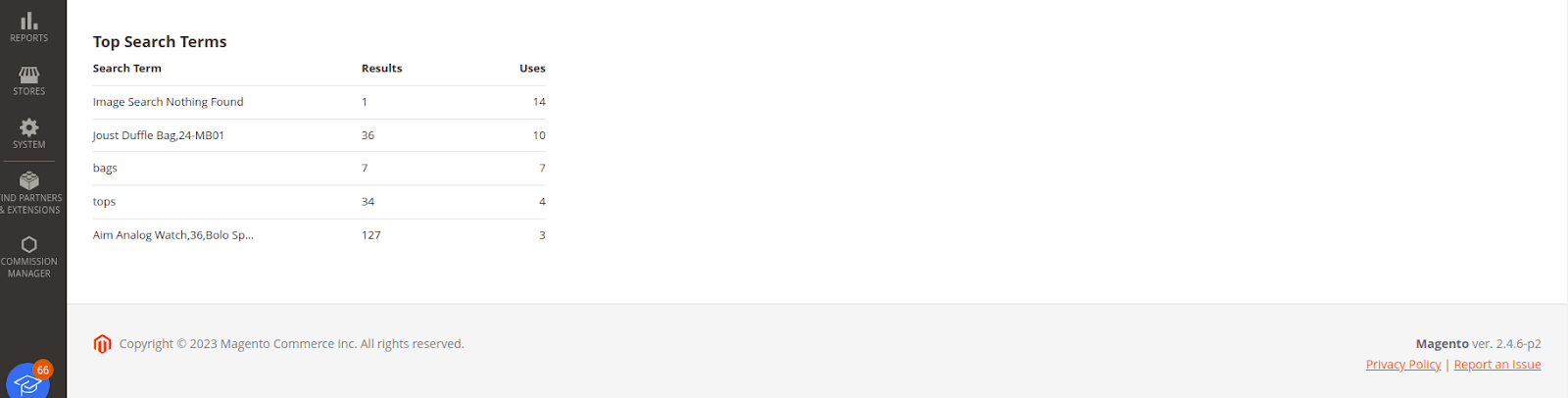
- Scroll to the bottom of any admin page
- View the version in the footer (e.g., “Magento ver. 2.4.6”)
Method 2: Using Command Line

bash
cd /path/to/magento/root

php bin/magento --version
Method 3: Checking the Composer File

Navigate to your Magento root directory, open composer.json, and find the version in the “require” section under “magento/product-community-edition”.
Complete Magento 2 Upgrade Guide: Step-by-Step
Pre-Upgrade Preparation
Critical Warning: Always perform complete backups before starting any upgrade process.
1. Assess Your Current Environment
Review Current Configuration: Document all custom configurations, theme settings, extension dependencies, and payment gateway integrations.
Check Server Requirements for Magento 2.4.8:
- PHP 8.2, 8.3, or 8.4
- MySQL 8.0 or MariaDB 11.4 LTS
- Elasticsearch 8.8.x or OpenSearch 2.x
- Redis 7.0 or higher
- Composer 2.5.x
- Apache 2.4 or Nginx 1.x
Extension Compatibility Check: Contact vendors to confirm compatibility with your target version and check Magento Marketplace for updated versions.
2. Create Comprehensive Backups
Create complete copies of your Magento installation directory, export the entire database, and back up app/etc/env.php and app/etc/config.php files separately.
3. Set Up a Testing Environment
Clone your production environment to staging, import database backup, and test the complete upgrade procedure before affecting your live store.
Step-by-Step Upgrade Process
Step 1: Access Your Server and Enable Maintenance Mode

bash

ssh [email protected]

cd /var/www/html/magento2

php bin/magento maintenance:enable
Step 2: Disable Cron Jobs

bash

php bin/magento cron:remove
Step 3: Backup composer.json

bash

cp composer.json composer.json.backup
Step 4: Update Composer Dependencies

bash

composer self-update

composer clear-cache

composer require magento/product-community-edition=2.4.8 --no-update

composer update
Step 5: Run Setup Upgrade

bash

php bin/magento setup:upgrade
Step 6: Verify the New Magento Version

bash php bin/magento --version Step 7: Recompile Codebash php bin/magento setup:di:compile

Step 8: Deploy Static Content
bash

php bin/magento setup:static-content:deploy -f
Step 9: Reindex Data

bash

php bin/magento indexer:reindex
Step 10: Clear Caches

bash

php bin/magento cache:flush

php bin/magento cache:clean
Step 11: Reinstall Cron Jobs

bash

php bin/magento cron:install
Step 12: Disable Maintenance Mode

bash

php bin/magento maintenance:disable
Step 13: Comprehensive Testing
Test frontend (product pages, checkout, customer accounts, mobile responsiveness) and backend (admin panel, product creation, order processing, extension functionality).
Step 14: Update Custom Code and Extensions
Review custom modules for compatibility, install latest extension versions, and update theme code for new Magento features.
Common Upgrade Challenges and Solutions
- Extension Incompatibility: Check with vendors before upgrading, test in staging, consider alternatives for abandoned extensions.
- Custom Code Breaks: Review release notes for deprecated features, update code to current best practices, hire experienced developers if needed.
- Data Migration Issues: Test in staging first, ensure sufficient database permissions, back up at multiple stages.
- Performance Degradation: Reindex all data, clear all caches, optimize database tables, implement full-page caching.
- Frontend Display Issues: Deploy static content with force flag, clear browser cache, verify theme compatibility.
Best Practices for Maintaining Your Magento Store
Establish Regular Update Schedule
- Apply Security Patches Promptly: When Adobe releases security patches, apply within 48 hours. Subscribe to Adobe’s security bulletins for immediate notifications.
- Plan Minor Updates Quarterly: Schedule time to apply patch updates (e.g., 2.4.7-p1 to 2.4.7-p2) including bug fixes and security improvements.
- Schedule Major Upgrades Annually: Plan major version upgrades during slow business periods, allowing 4-6 weeks for planning, testing, and execution.
Maintain Documentation
Keep detailed records of configuration changes, custom code, and third-party extensions. Track extension versions and vendors.
Document all customizations including purpose, affected files, and modification dates.
Work with Experienced Professionals
Hire Adobe Certified Magento Developers who understand platform intricacies. Consider managed Magento hosting for infrastructure updates and performance optimization. Leverage agency expertise from hundreds of upgrades.
Implement Continuous Monitoring
Set up performance monitoring tools (New Relic, Datadog, ELK stack) with alerts for degradation. Track customer experience metrics including bounce rates, cart abandonment, and conversion rates. Conduct quarterly security audits and run automated weekly scans.
Conclusion: Making Your Magento 2 Upgrade a Success
Successfully executing a Magento 2 upgrade requires careful planning, thorough testing, and attention to detail.
The benefits—enhanced security, improved performance, access to new features, and long-term viability—far outweigh the effort invested.
The latest Magento version (2.4.8) offers AI-powered merchandising, enhanced security measures, and significant performance improvements.
Whether running 2.4.3, 2.4.6, or older versions, upgrading to Magento 2 latest release positions your business for sustained growth.
Key principles: Always backup before upgrading, test in staging thoroughly, update extensions and custom code, apply security patches promptly, monitor performance continuously, and plan regular maintenance.
By following these guidelines and staying current with the latest Magento version, you’ll ensure your e-commerce store remains secure, performs optimally, and delivers exceptional shopping experiences that drive revenue growth and customer loyalty.
Don’t wait until your version reaches end-of-life—start planning your next upgrade to Magento 2 today.
Frequently Asked Questions
How do I upgrade my Magento version?
To upgrade your Magento version, follow this process: Create complete backups of files and database.
- Access server via SSH and enable maintenance mode using php bin/magento maintenance:enable.
- Update Composer dependencies by running composer require magento/product-community-edition=[target-version] –no-update followed by composer update.
- Execute setup upgrade with php bin/magento setup:upgrade, recompile code using php bin/magento setup:di:compile, deploy static content, reindex data, clear caches, and disable maintenance mode.
Always test the Magento 2 upgrade in staging before production.
How to upgrade Magento 2.4.3 to 2.4.6?
To upgrade Magento from 2.4.3 to 2.4.6, backup your store and database.
The check server meets 2.4.6 requirements (PHP 8.1 or 8.2, MySQL 8.0, Elasticsearch 7.17 or 8.x).
Enable maintenance mode and update Composer: composer require magento/product-community-edition=2.4.6 –no-update && composer update.
Run php bin/magento setup:upgrade to update database schema. Verify all extensions are compatible with 2.4.6.
After completing the upgrade to Magento 2.4.6, recompile code, deploy static content, reindex, and test thoroughly.
How to upgrade to Magento 2.4.8?
Upgrading to Magento 2.4.8, the latest Magento version, requires server requirements: PHP 8.2-8.4, MySQL 8.0 or MariaDB 11.4, and OpenSearch 2.x or Elasticsearch 8.8.x. After backing up, enable maintenance mode and use Composer: composer require magento/product-community-edition=2.4.8 –no-update && composer update.
Run setup upgrade, recompile code, and deploy static content.
The 2.4.8 Magento upgrade introduces OpenSearch as the default search engine. Update all extensions to 2.4.8-compatible versions.
Test AI-powered merchandising features and upgraded TinyMCE 7.3 editor for modern e-commerce operations.
How to upgrade to Magento 2.4.7?
To upgrade to Magento 2.4.7 (currently at patch 2.4.7-p7), backup your store and verify server supports PHP 8.2 or 8.3, MySQL 8.0+, and Elasticsearch 7.17 or 8.x.
Enable maintenance mode and update via Composer: composer require magento/product-community-edition=2.4.7 –no-update && composer update.
Execute php bin/magento setup: upgrade to apply database changes.
The 2.4.7 Magento upgrade includes significant B2B enhancements—test quote functionality, seller-initiated quotes, and line item discounts.
After the upgrade to Magento 2.4.7, recompile code, deploy static content, and verify GraphQL improvements in staging.