Managing recurring revenue through subscriptions can transform your WooCommerce store’s cash flow, but choosing the right subscription plugin for WooCommerce determines whether you’ll automate billing seamlessly or face constant payment failures and customer churn.
This guide walks through selecting, configuring, and optimizing a WooCommerce subscription plugin for your store, covering feature comparisons, setup workflows, and strategies to reduce involuntary churn while scaling predictable revenue.
Summary
- Plugin comparison framework covering core features, pricing tiers, and technical requirements across leading subscription for WooCommerce solutions
- Step-by-step implementation from installation through payment gateway configuration and subscription product creation
- Retention strategies including dunning management, billing cycle optimization, and customer communication workflows
- Integration requirements for accounting systems, CRM platforms, and analytics tools to support subscription business operations
Understanding WooCommerce Subscription Plugins
A subscription plugin for WooCommerce automates recurring billing by charging customers at defined intervals without requiring manual payment processing. These plugins handle payment collection, renewal notifications, subscription pauses, and cancellation workflows while integrating with your existing payment gateways.
Core Functionality Requirements
Every functional WooCommerce subscription solution must support variable billing frequencies (weekly, monthly, annual), proration for mid-cycle changes, and automatic retry logic for failed payments. Beyond baseline features, evaluate plugins based on your specific business model requirements.
The best WooCommerce subscription plugins distinguish themselves through flexible trial configurations, comprehensive dunning management systems, secure WooCommerce login for customers portals, and robust developer APIs that support custom integrations. Your choice should align with both current operational needs and planned scaling requirements.
Key Features to Evaluate
| Feature Category | Must-Have Capabilities | Advanced Options |
| Billing Flexibility | Multiple billing cycles, proration support | Usage-based billing, tiered pricing |
| Payment Recovery | Basic retry logic, email notifications | Smart retry scheduling, payment method updates |
| Customer Management | Pause/resume options, self-service portal | Upgrade/downgrade flows, gift subscriptions |
| Technical Integration | REST API access, webhook support | GraphQL endpoints, real-time sync |
Manual subscription management creates operational bottlenecks as your subscriber base grows. Automated workflows reduce support overhead while improving renewal rates through timely communication and flexible self-service options.
Top WooCommerce Subscription Plugins Compared
Several established solutions dominate the WooCommerce subscriptions plugin market, each offering distinct feature sets and pricing structures suited to different business scales and technical requirements.
WooCommerce Subscriptions (Official Extension)
The official WooCommerce subscription plugin from Automattic provides comprehensive subscription management directly integrated with WooCommerce core. This native solution supports variable subscriptions, synchronized renewals across multiple products, and built-in compatibility with major payment gateways.
Pricing starts at $199 annually for a single site license, scaling to $599 for 25 sites. The plugin includes automatic payment retries, manual renewal orders, and customer-facing subscription management through the My Account dashboard.
Technical advantages: Direct WooCommerce core integration ensures compatibility with updates, extensive developer documentation supports customization, and the active extension ecosystem provides complementary add-ons for specific use cases.
YITH WooCommerce Subscription
YITH offers a cost-effective alternative focused on straightforward subscription management without complex feature bloat. The plugin handles essential recurring billing functions while maintaining simpler configuration workflows than enterprise-focused competitors.
| Comparison Point | WooCommerce Subscriptions | YITH Subscription | Sumo Subscriptions |
| Starting Price | $199/year | $149/year | $69/year |
| Trial Periods | Yes (flexible) | Yes (limited) | Yes |
| Payment Recovery | Advanced dunning | Basic retry | Manual only |
| API Access | Full REST API | Limited | None |
Pricing begins at $149 annually, positioning YITH as a mid-market option for stores prioritizing cost efficiency over advanced automation features. The plugin supports standard billing cycles and basic customer management but lacks sophisticated dunning workflows.
Sumo Subscriptions
Sumo provides budget-conscious stores with fundamental subscription capabilities at entry-level pricing. Starting at $69 annually, this option suits small businesses testing subscription models before committing to premium solutions.
Feature limitations include restricted payment gateway compatibility, basic renewal management, and minimal automation options. Consider Sumo for simple subscription offerings with low transaction volumes where manual intervention remains feasible.
Now that we’ve compared core solutions, let’s examine the implementation process for launching subscription products in your store.
Setting Up Your WooCommerce Subscription Plugin
Successful subscription implementation requires systematic configuration across multiple WooCommerce components, from plugin installation through payment gateway integration and product creation workflows.
Installation and Initial Configuration
Begin by installing your chosen WooCommerce subscriptions plugin through the WordPress admin dashboard. Navigate to Plugins > Add New, search for your selected solution, and complete the installation process with activation.
Access plugin settings through WooCommerce > Settings > Subscriptions to configure global subscription behaviors. For comprehensive setup guidance, see our complete WooCommerce subscriptions implementation guide. Key initial settings include:
- Billing cycle defaults: Establish standard renewal periods for your subscription products (monthly, quarterly, annual) to maintain consistency across offerings.
- Payment retry schedules: Configure automatic retry attempts for failed payments, spacing attempts across 3-7 days to maximize recovery without appearing aggressive.
- Customer notification templates: Customize email templates for renewal reminders, payment failures, and subscription status changes to match your brand voice.
Payment Gateway Configuration
Payment gateway selection directly impacts subscription success rates since gateway-level support for recurring billing reduces payment failures and simplifies PCI compliance requirements.
Stripe and PayPal currently offer the most robust subscription support within WooCommerce ecosystems. Both gateways handle tokenization automatically, enabling secure recurring charges without storing sensitive payment data on your server.
Stripe configuration steps:
- Install WooCommerce Stripe Payment Gateway from the extensions marketplace
- Connect your Stripe account through WooCommerce > Settings > Payments
- Enable saved payment methods to support subscription renewals
- Configure webhook endpoints for real-time payment status updates
| Payment Gateway | Subscription Support | Setup Complexity | Transaction Fees |
| Stripe | Native recurring billing | Low | 2.9% + $0.30 |
| PayPal | Reference transactions | Medium | 2.9% + $0.30 |
| Authorize.net | CIM required | High | 2.9% + $0.30 |
| Square | Basic support | Low | 2.9% + $0.30 |
Gateway choice affects more than transaction processing—consider customer preferences in your target market and whether your gateway supports the subscription management features your plugin requires.
Creating Subscription Products
Transform standard WooCommerce products into subscription offerings by enabling subscription settings during product creation. Navigate to Products > Add New and configure the following subscription-specific fields:
- Subscription pricing: Define the billing amount and frequency (for example, $29 every month or $299 annually). Consider psychological pricing principles when setting recurring amounts.
- Sign-up fees: Add one-time charges to the initial subscription purchase to offset onboarding costs or create premium entry tiers. Sign-up fees appear as separate line items during checkout.
- Trial periods: Offer free or discounted trial periods to reduce purchase friction for new subscribers. Configure trial length (7 days, 14 days, 30 days) based on your product’s value demonstration timeline.
- Subscription length: Set finite subscription terms (for example, 12 months) or allow indefinite renewals until cancellation. Fixed-term subscriptions work well for seasonal offerings or contract-based services.
After configuring subscription parameters, test the complete purchase and renewal workflow in a staging environment before launching to production customers. Consider implementing WooCommerce one page checkout to reduce subscription purchase friction.
Let’s explore optimization strategies for improving subscription retention and revenue performance.
Optimizing Subscription Performance and Retention
Converting customers to subscription models represents only the initial step—long-term profitability depends on minimizing churn through proactive retention strategies and operational optimizations.
Dunning Management and Payment Recovery
Payment failures account for 20-40% of involuntary churn in subscription businesses, making dunning management your highest-impact retention lever. The best woocommerce subscription plugins include configurable dunning workflows that automate recovery attempts.
- Smart retry scheduling: Space payment retry attempts strategically rather than attempting immediate reprocessing. Initial retry after 3 days, second attempt after 7 days, and final attempt after 14 days balances persistence with customer experience.
- Payment method update prompts: Automatically email customers requesting payment method updates when cards approach expiration dates or after multiple failed charges. Include direct links to account management pages to reduce friction.
- Grace periods: Maintain service access for 5-7 days after payment failure while pursuing recovery, preventing abrupt service interruption that damages customer relationships and complicates reactivation.
Flexible Billing Options
Offering subscription flexibility improves retention by accommodating changing customer circumstances without forcing complete cancellation.
Configure pause functionality allowing temporary subscription holds for 1-3 months without losing subscription history or requiring new sign-ups upon resumption. This option reduces churn during seasonal slowdowns or temporary budget constraints.
- Upgrade and downgrade paths: Enable mid-cycle plan changes with automatic proration calculations. When customers upgrade, charge the prorated difference immediately; when downgrading, apply credits to subsequent renewal cycles.
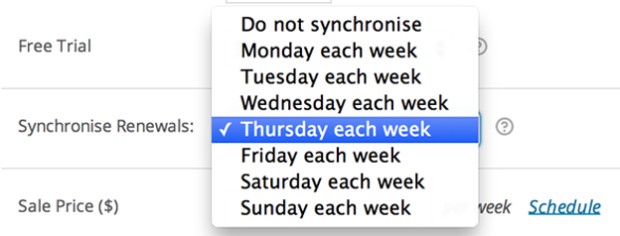
- Billing date modifications: Allow customers to shift renewal dates to align with cash flow cycles (for example, moving from mid-month to month-end billing). This simple accommodation prevents cancellations driven by payment timing mismatches.
These retention strategies connect directly to your subscription plugin’s technical capabilities—verify your chosen solution supports the flexibility your business model requires.
Analytics and Reporting
Track subscription health metrics through dedicated reporting dashboards that surface actionable insights for business optimization decisions.
Key metrics to monitor:
Monitor monthly recurring revenue (MRR) trends to track overall business growth, breaking down MRR by product tier and customer cohort. Calculate customer lifetime value (LTV) by dividing average subscription length by monthly subscription value to inform acquisition spending limits.
Track churn rate monthly, separating voluntary cancellations from involuntary payment failures to identify appropriate intervention strategies. Voluntary churn rates above 5-7% monthly signal product-market fit issues or competitive pressures requiring strategic responses.
If your WooCommerce plugin subscription lacks robust analytics, integrate dedicated subscription analytics platforms like ProfitWell or Baremetrics through API connections for comprehensive business intelligence.
Integrating Subscriptions With Your Business Operations
Subscription revenue models require operational integration beyond your WooCommerce store through WordPress ecommerce development services to support accounting, customer success, and analytical requirements.
Accounting System Integration
Automated revenue recognition becomes critical as subscription volume scales, requiring integration between your WooCommerce subscription plugin and accounting platforms like QuickBooks or Xero.
Configure automated journal entries that recognize subscription revenue according to GAAP or IFRS standards, deferring revenue across service periods rather than recognizing full amounts at initial charge. This compliance requirement affects financial reporting accuracy and tax obligations.
Sync customer records bidirectionally to maintain unified customer data across systems, preventing reconciliation errors and supporting accurate customer lifetime value calculations. Tools like Zapier bridge WooCommerce and accounting platforms when native integrations aren’t available.
Customer Relationship Management
CRM integration enables customer success teams to access subscription status, billing history, and product usage data within unified customer profiles. This visibility supports proactive retention interventions and identifies expansion opportunities.
Trigger automated workflows based on subscription events—for example, assigning high-value customers to dedicated account managers upon exceeding specified MRR thresholds or flagging at-risk subscriptions showing declining engagement for outreach.
Connect your subscription for WooCommerce setup with email marketing platforms to segment subscribers by product tier, billing status, and engagement level. Targeted communication based on subscription data improves upsell conversion rates and reduces voluntary churn through relevant content delivery.
Advanced Subscription Strategies
Beyond basic recurring billing, sophisticated WooCommerce subscription implementations leverage advanced features to maximize revenue per customer and operational efficiency.
Variable and Usage-Based Billing
Variable subscriptions combine fixed base fees with usage-based charges calculated monthly based on consumption metrics. This hybrid model suits services with predictable core costs but variable resource consumption.
Implement usage-based billing by tracking consumption through custom integrations or third-party metering platforms, then programmatically adjusting subscription line items before each renewal. This approach requires you to hire WooCommerce developers but aligns pricing directly with customer value realization.
Subscription Bundles and Product Families
Create subscription product families offering tiered value propositions (Basic, Professional, Enterprise) with progressively expanded feature sets. Clear differentiation between tiers simplifies customer decision-making while establishing natural upgrade paths as needs evolve.
Bundle complementary products within single subscription offerings to increase perceived value and average order value. For example, combine software access with implementation support and priority customer success resources at premium pricing tiers.
Gift Subscriptions and Promotional Offers
Enable gift subscription purchases allowing customers to prepay subscription access for recipients. This feature expands addressable markets during gift-giving seasons while introducing new users to your subscription products.
Configure promotional pricing for initial subscription periods (for example, first 3 months at 50% discount) to reduce purchase friction, ensuring automated reversion to standard pricing after promotional periods expire.
For stores requiring extensive customization beyond standard plugin capabilities, consider working with WordPress development services specialists to build tailored subscription workflows matching your exact business requirements.
Common Subscription Management Challenges
Understanding typical subscription business challenges allows proactive mitigation through proper configuration and operational planning.
Failed Payment Handling
Despite dunning automation, some payment failures require manual intervention when automatic retries exhaust without resolution. Establish clear escalation workflows defining when customer success teams should contact customers directly versus allowing automated cancellation processes to complete.
Document common payment failure reasons (expired cards, insufficient funds, changed card numbers) and create templated outreach messages for each scenario. Personalized intervention improves recovery rates compared to generic automated emails.
Proration Complexity
Mid-cycle subscription changes create proration calculations that confuse customers when unexpected charges or credits appear. Set clear customer expectations by showing proration preview before confirming upgrades or downgrades.
Consider simplifying proration by only allowing plan changes at renewal dates rather than mid-cycle, eliminating calculation complexity at the cost of reduced flexibility. This tradeoff depends on your specific business model and competitive positioning.
Regulatory Compliance
Subscription billing faces increasing regulatory scrutiny around transparency, cancellation friction, and renewal notification requirements. Verify your WooCommerce subscription plugin implementation complies with regulations in your operating jurisdictions.
The FTC’s “negative option rule” requires clear disclosure of subscription terms, easy cancellation access, and affirmative consent before charging. GDPR adds data handling requirements affecting subscriber information storage and processing in European markets.
Key Takeaways
- Select subscription plugins based on required billing flexibility, dunning capabilities, and integration options rather than price alone
- Configure payment gateway-level recurring billing support to improve authorization rates and reduce payment failures
- Implement proactive dunning workflows with strategic retry scheduling to recover 20-40% of failed payments before voluntary cancellation
- Monitor subscription health metrics including MRR trends, churn rates, and customer lifetime value to identify optimization opportunities
- Integrate subscription data with accounting and CRM systems for accurate revenue recognition and proactive customer success interventions
Conclusion
Implementing a WooCommerce subscription plugin transforms one-time transactions into predictable recurring revenue, but success depends on selecting solutions that match your operational requirements and configuring retention workflows that minimize involuntary churn.
Focus on payment recovery automation, flexible customer self-service options, and comprehensive business intelligence to scale subscription revenue while maintaining operational efficiency. The right subscription plugin for WooCommerce provides the technical foundation, but ongoing optimization determines long-term profitability.
Ready to launch or optimize your subscription business? Connect with our WooCommerce development company to design custom subscription workflows aligned with your specific business model.
FAQs
What Is the Difference Between WooCommerce Subscriptions and Membership Plugins?
Subscription plugins handle recurring billing and payment collection automatically, while membership plugins manage content access and user permissions. Subscriptions focus on automated revenue collection across any product type, whereas memberships restrict content to paying members. Many businesses combine both plugins to bill members automatically while controlling access to exclusive content.
Can I Migrate Existing Customers to a Subscription Model?
Yes, but manual migration requires contacting customers for payment authorization since you cannot automatically charge stored payment methods without consent. Create migration offers incentivizing subscription conversion, such as discounted first-year pricing or bonus features. Export customer lists and use email campaigns explaining subscription benefits and simplified purchasing before requesting payment method entry for recurring billing.
How Do I Handle Subscription Refunds and Cancellations?
Configure cancellation workflows allowing immediate termination or end-of-period cancellation based on your business model and customer expectations. Most plugins disable access immediately upon cancellation, but you can maintain service through the paid period. Process refunds through WooCommerce’s standard refund interface, which automatically cancels associated subscriptions. Document refund policies clearly during checkout to prevent disputes.
Which Payment Gateways Work Best With WooCommerce Subscription Plugins?
Stripe and PayPal offer the most reliable subscription support with automatic tokenization, strong authentication, and comprehensive dunning features. Authorize.net requires additional Customer Information Manager (CIM) configuration but provides enterprise-grade reliability. Square supports basic subscriptions with limitations on advanced features. Choose gateways based on target market preferences and required subscription management capabilities beyond transaction processing alone.
How Do I Reduce Subscription Churn Rates?
Implement smart dunning workflows recovering failed payments before cancellation, offer flexible pause options reducing permanent cancellations during temporary budget constraints, and monitor engagement metrics identifying at-risk customers for proactive outreach. Send renewal reminders five days before charges preventing surprise billing, update payment methods proactively before expiration, and create clear upgrade paths showing expanded value at higher tiers.
Can I Offer Free Trials Without Collecting Payment Information?
Most WooCommerce subscription plugins require payment method entry during trial sign-up to enable automatic conversion at trial end. Collecting payment information upfront significantly improves conversion rates compared to requiring entry after trials conclude. Configure trial lengths appropriately for your product’s value demonstration timeline, and communicate trial end dates clearly through automated email sequences preventing surprise charges.