Selling on Amazon can be a lucrative opportunity for businesses looking to expand their reach and tap into a massive customer base.
However, if you’re a new seller, then creating a seller central account and selling your products on Amazon can be a bit of a complex process.
Fortunately, BigCommerce offers a powerful platform that can help businesses sell on Amazon with ease, and leveraging bigcommerce app development can further enhance integration capabilities and streamline your operations.
In this blog, we will discuss the approaches and benefits of BigCommerce Amazon integration using BigCommerce’s built-in way or using Feedonomics, and the requirements for getting started.
We will also provide a step-by-step guide to BigCommerce Amazon integration as well using both approaches.
Whether you’re a seasoned e-commerce professional or just getting started, this guide will provide you with the information to succeed on Amazon with BigCommerce.
- According to Statista, Amazon hit 514 Billion dollars in revenue worldwide last year.
- Repricerexpress states that Amazon has 45% of the eCommerce market share in the USA.
- Investing.com stated that Amazon has around 1.2 million employees.
Benefits of BigCommerce Amazon Integration
Centralized Inventory Management
With BigCommerce, merchants can manage their inventory across multiple sales channels, including Amazon.
This centralized inventory management helps merchants to avoid overselling and underselling, which can lead to lost sales and customer dissatisfaction.
By keeping track of inventory levels in real-time, merchants can ensure that they always have enough stock to fulfill orders.
Automated Order Fulfillment
BigCommerce can use automated order fulfillment for Amazon orders, which means that merchants can process and ship their Amazon orders directly from the BigCommerce platform.
This automation helps merchants to save time and reduce the risk of errors.
Otherwise, the automation only would have been possible by a BigCommerce development services provider which has mastery in BigCommerce headless commerce, or if you choose to hire dedicated bigcommerce developer to implement these custom solutions efficiently.
By automating the order fulfillment process, merchants can focus on other aspects of their business.
Multi-Channel Selling
BigCommerce provides support for multi-channel selling, which means that merchants can sell on Amazon and other marketplaces, as well as their own website.
This multi-channel selling approach helps merchants to reach a wider audience and increase their sales.
By selling on multiple channels, merchants can diversify their revenue streams and reduce their reliance on any one sales channel.
Advanced Reporting
BigCommerce has advanced reporting and analytics, which can help merchants to track their
Amazon sales performance and make data-driven decisions to improve their sales.
By analyzing sales data, merchants can identify trends and opportunities to optimize their Amazon sales strategy.
You can also use any BigCommerce integration services to integrate third-party web analytics tools as well like Google Analytics, for better results.
Approach # 1: BigCommerce Amazon Integration
Requirements For Amazon BigCommerce Integration
If you’re considering selling on Amazon with BigCommerce, there are several requirements that you’ll need to meet to get started.
These requirements are broken down into three categories: Merchant Setup, Products, and BigCommerce Store.
Requirements for Merchant Setup
To sell on Amazon with BigCommerce, you’ll need to have a professional seller central account on Amazon.
You may also need an Amazon MWS developer account, which will allow you to integrate your BigCommerce store with Amazon’s marketplace.
Finally, you’ll need a BigCommerce store owner account, which will give you access to the BigCommerce platform and its integration capabilities.
Requirements for Products
To sell products on Amazon, they must be eligible for sale on the platform. This means that they must comply with Amazon’s product policies and guidelines, which cover everything from product descriptions to packaging and labeling requirements. Additionally, each product must have a unique identifier.
Requirements for BigCommerce Store
Your BigCommerce store must meet several requirements to integrate with Amazon. First, it should be on the latest version of the BigCommerce platform and use the Stencil framework. You’ll also need to have a valid SSL certificate installed for your website, which will ensure that your customers’ data is secure.
Your store should be live and accepting orders, and you should have an established payment gateway and shipping carrier in place.
Meeting these requirements is essential to selling on Amazon with BigCommerce.
By ensuring that you meet these requirements, you can set yourself up for success and start selling your products to Amazon’s massive customer base.
Step-By-Step Guide To BigCommerce Amazon Marketplace Integration
Here is a step-by-step guide to BigCommerce Amazon marketplace integration:
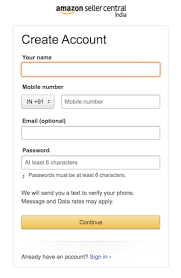
Step Number 1: Amazon Seller Account
Sign up for a seller central account on Amazon. You will need to provide basic information, including your name, mobile number, and email.
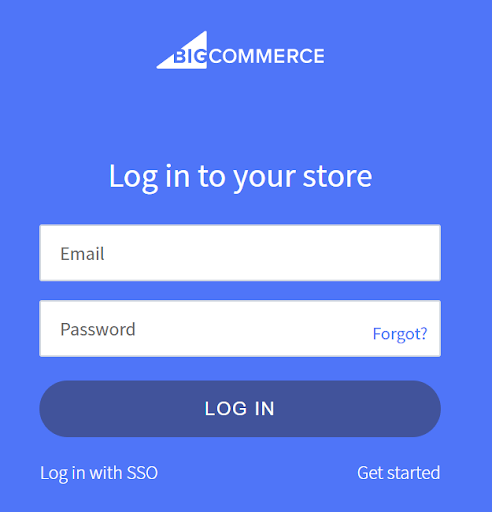
Step Number 2: BigCommerce Login
Sign up or log in to your existing BigCommerce account.
Step Number 3: Channel Manager
In your BigCommerce dashboard, click on the channel manager. It will open up another list of channels.

Step Number 4: Select Amazon
You will see a list of options to channel; simply click on Amazon.
Step Number 5: Listing Categories
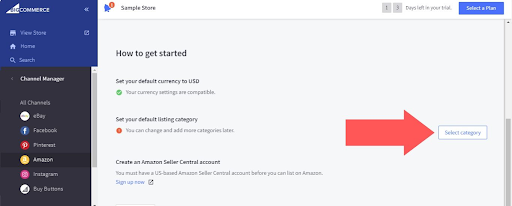
After clicking on Amazon from the list, you will see a “Select Category” button on the right side of the “Set your default category” option. Click on the button and choose the categories you want to sell on Amazon, and it will sync the products in those categories with Amazon.
Step Number 6: Connecting
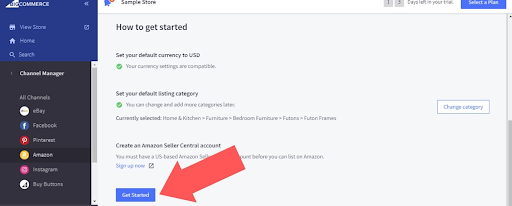
Scroll down a little now, and you will see a button called “Get started”. Click it, and it will open up a prompt where you will see a button called “Connect” right in front of Amazon. Click on it, and it will take you to the AWS login page.
Step Number 7: Finalizing
Log in to your AWS central account. As soon as you log in, Amazon will show you a prompt asking for permission to connect with Bigcommerce. Click on “Agree,” and your Amazon account will be connected with BigCommerce.
Step Number 8: Tracking Sales
Once your products are listed, you can manage and track your sales through the Amazon seller dashboard.
That’s it. Now you can efficiently run your Amazon store on BigCommerce, manage all your inventory, and order from BigCommerce’s powerful tools.
If you get stuck at any point, you can contact BigCommerce support and maintenance services to
Approach # 2: Using Feedonomics
As a leading data feed management platform, Feedonomics streamlines product listing, catalog optimization, data protection, and more for the top shopping destinations around the world.
Feedonomics has experts who help you manage and execute platform integrations, data implementation, and error resolution:
- Divide your feed into A/B test groups to see which product titles, images, and descriptions perform best.
- Import and combine data from multiple sources within the Feedonomics platform.
- Sync product data on a frequent schedule to keep listings up-to-date.
- Manage orders from different marketplaces within a single platform.
Spend more time selling and less time troubleshooting unexpected errors. Feedonomics helps protect your data, prevent issues before they occur, and find solutions quickly when problems arise.
- Data governance rules to stop exports or send alerts when we detect issues like incorrect data for key attributes (i.e. pricing, inventory).
- Inventory buffer and allocation rules to prevent overselling and protect your seller rating.
- Order monitoring and alerts to help your team correct any potential issues.
Conclusion
In summary, utilizing BigCommerce to sell on Amazon or by using Feedonomics presents a significant opportunity for businesses seeking expansion and revenue growth. Through harnessing the robust platform of BigCommerce and its seamless integration with Amazon, businesses can streamline their operations, enhance their product listings, and tap into a vast customer pool.
Nevertheless, it’s crucial to adhere to Amazon’s selling requirements and adopt industry best practices to ensure success. By meeting these standards, businesses can position themselves for sustained growth and profitability in the long run. Whether embarking on the journey or aiming to elevate existing Amazon sales, BigCommerce equips businesses with the necessary tools and support for achieving their goals and thriving in the competitive e-commerce landscape.
Frequently Asked Questions (FAQs)
1. Do I need a Professional Amazon Seller Account to integrate with BigCommerce?
Yes, BigCommerce Amazon integration requires a Professional Amazon Seller Account, not an Individual account. The Professional account costs $39.99 per month but provides access to Amazon’s API and bulk listing tools necessary for the integration to work. Additionally, you’ll need Amazon MWS (Marketplace Web Service) developer credentials to establish the connection between your BigCommerce store and Amazon marketplace.
2. How long does it take to complete the BigCommerce Amazon integration?
The technical integration process itself can be completed in 15-30 minutes if you have all the requirements in place. However, the entire setup including account verification, product listing approval, and category mapping may take 24-48 hours. Amazon needs to review and approve your product listings, which can vary depending on the categories you’re selling in. Some restricted categories may require additional documentation and take longer to get approved.
3. Will my inventory automatically sync between BigCommerce and Amazon?
Yes, one of the key benefits of BigCommerce Amazon integration is real-time inventory synchronization. When a product sells on either platform, the inventory is automatically updated across both channels to prevent overselling. However, it’s important to note that there may be a slight delay (typically a few minutes) in sync time. For high-volume sellers, using Feedonomics can provide more robust inventory management with buffer rules to further protect against overselling scenarios.
4. What’s the difference between using BigCommerce’s built-in integration and Feedonomics?
BigCommerce’s built-in integration is ideal for small to medium-sized businesses with straightforward product catalogs and provides basic listing, inventory management, and order fulfillment capabilities at no additional cost. Feedonomics, on the other hand, is a premium solution better suited for larger businesses or those with complex catalogs. It offers advanced features like A/B testing for product listings, multi-source data imports, sophisticated data governance rules, and dedicated support from integration experts. Choose Feedonomics if you’re managing multiple marketplaces, have complex product data requirements, or need advanced optimization tools.
5. Can I fulfill Amazon orders using my own shipping methods, or do I need to use FBA?
You have the flexibility to choose either Fulfillment by Merchant (FBM) or Fulfillment by Amazon (FBA). With BigCommerce’s automated order fulfillment feature, you can process and ship Amazon orders directly from your BigCommerce platform using your own shipping carriers and methods (FBM). Alternatively, you can opt for FBA where Amazon handles storage, packing, and shipping. Many sellers use a hybrid approach, fulfilling some products themselves while using FBA for others. Your BigCommerce store should have an established shipping carrier integration regardless of which fulfillment method you choose.