A slow or unfamiliar checkout is one of the fastest ways to lose a sale you already won. Roughly 1 in 5 cart abandonments trace back to payment issues, whether that’s a missing local payment method, a gateway that redirects off-site, or a checkout that simply feels untrustworthy.
BigCommerce payment integration is how you close that gap. This guide walks through the top gateway options, what setup actually involves, the security requirements you can’t skip, and how to build a custom integration if the built-in options don’t cover your business model.
Summary
- BigCommerce supports 65+ payment gateways natively, but the “best” one depends on your average order value, geography, and whether you need recurring billing
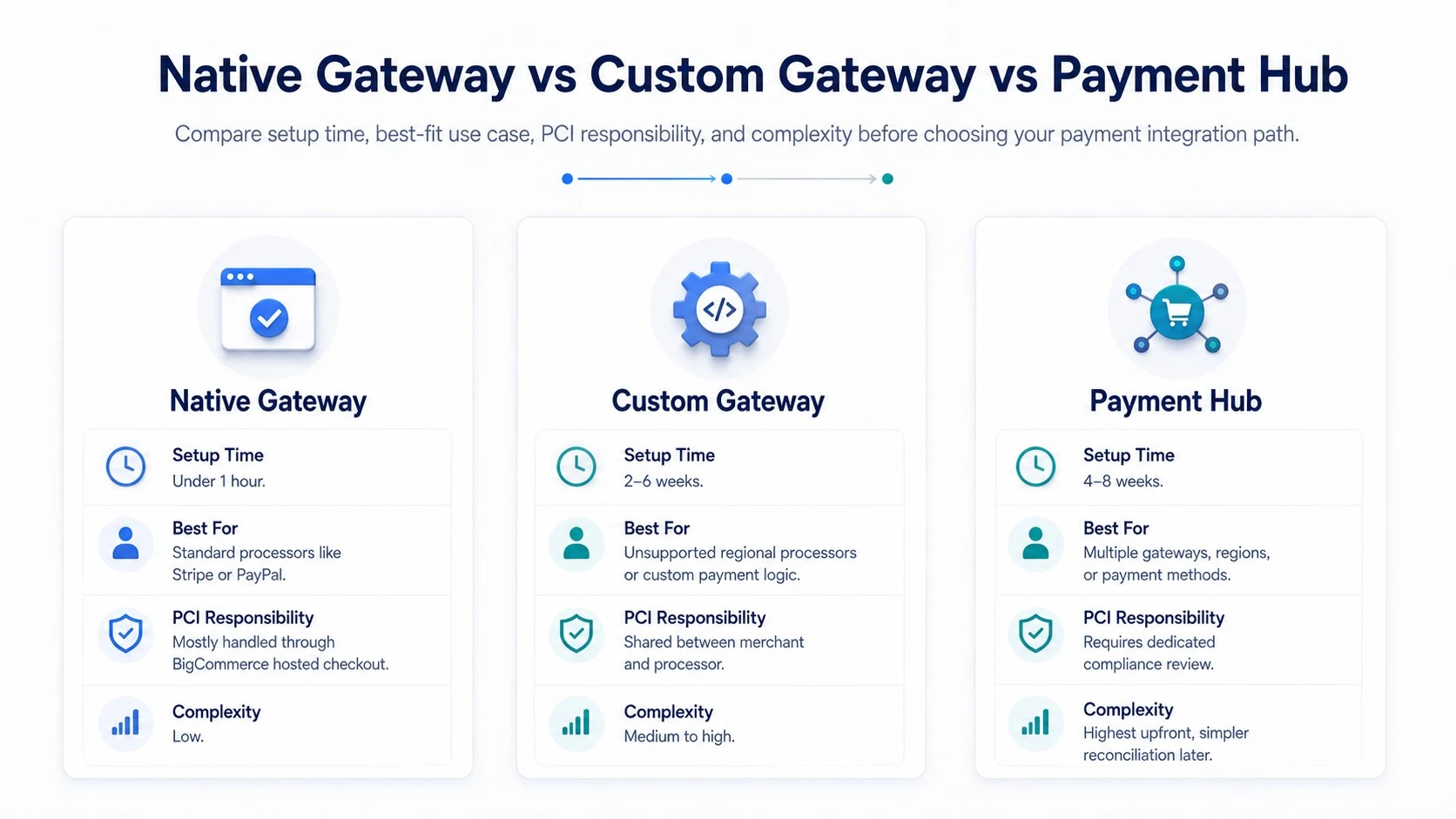
- Native gateway connections take under an hour to configure; custom gateway integrations typically run 2-6 weeks depending on API complexity
- PCI DSS compliance is largely handled by BigCommerce’s hosted checkout, but custom integrations shift more of that responsibility onto your team
- Stripe and PayPal cover the broadest use cases; Authorize.Net and Braintree suit merchants needing more granular fraud controls
- A Payment Hub approach, routing multiple gateways through one integration layer, reduces reconciliation work for merchants running several payment methods at once
- Failed or declined transactions should trigger automatic retry logic; without it, recoverable revenue gets lost silently
Understanding BigCommerce Payment Integration
BigCommerce payment integration connects your store’s checkout to a payment processor that authorizes and captures customer payments. BigCommerce itself doesn’t process payments, it routes transactions through a connected gateway, which handles the actual authorization, settlement, and fraud checks.
If you’re still evaluating the platform overall, our BigCommerce development services overview covers how payments fit into the broader build.
Native vs. Custom Gateway Connections
Most merchants use a native integration: BigCommerce’s control panel lists supported gateways, and connecting one is mostly a matter of entering API credentials.
Custom bigcommerce payment gateway integration comes into play when your business needs a processor BigCommerce doesn’t natively support, or when you need payment logic (like split payments across vendors in a marketplace model) that off-the-shelf gateways don’t handle.
How Transactions Flow Through the System
When a customer checks out, BigCommerce sends an authorization request to the connected gateway. The gateway validates the card or payment method, runs fraud checks, and returns an approval or decline.
On approval, BigCommerce records the order and the gateway either captures funds immediately or holds authorization until you manually capture, useful for stores that ship before charging.
Best Payment Gateway for BigCommerce: Comparing Top Options
1. Stripe
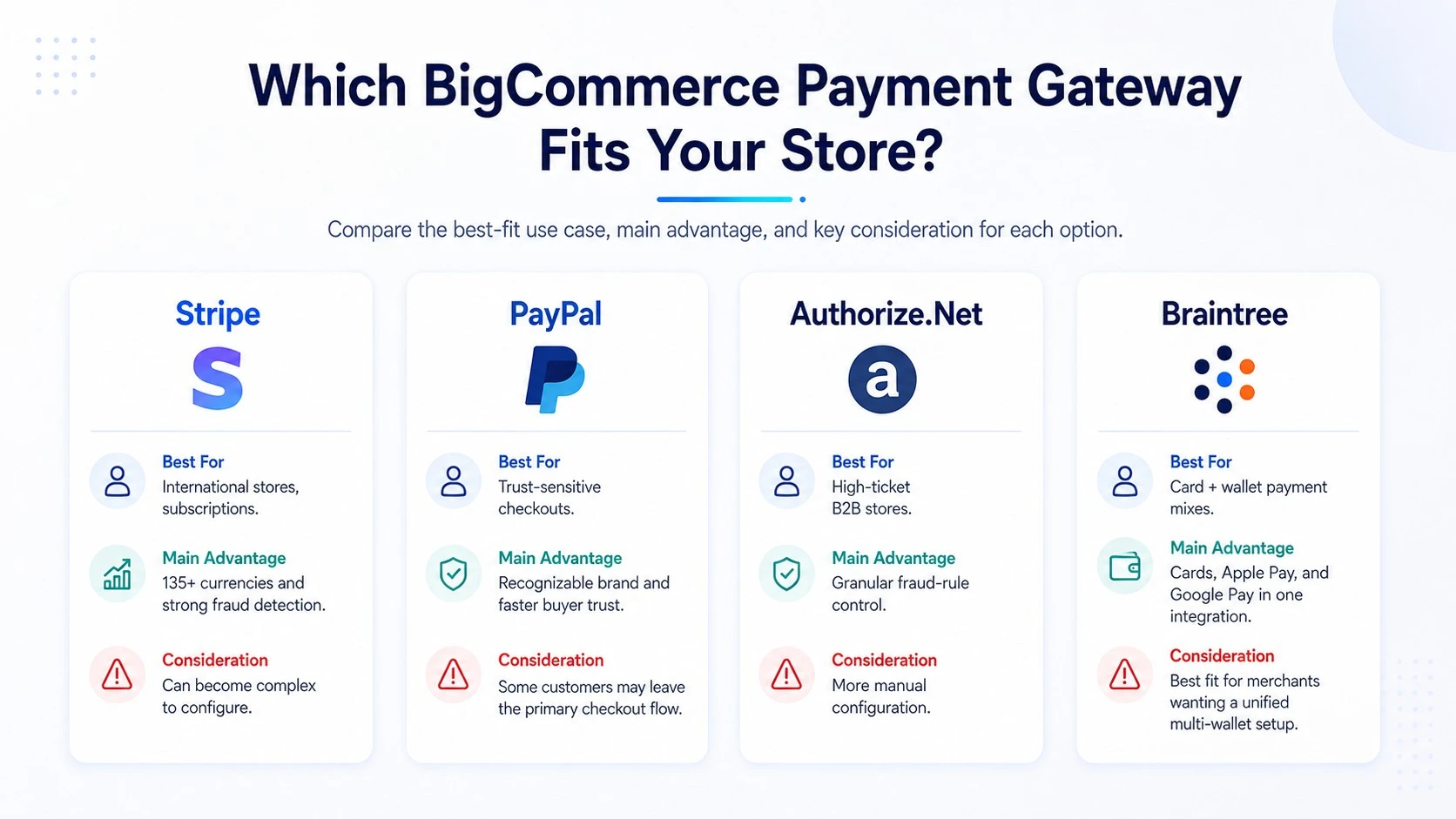
Stripe integrates natively and supports over 135 currencies, making it a strong default for stores selling internationally. Its Radar fraud detection uses machine learning trained across Stripe’s full transaction volume, which tends to outperform rules-based fraud tools for catching novel fraud patterns.
2. PayPal and PayPal Checkout
PayPal remains one of the highest-trust payment brands among US and UK shoppers, and offering it as an option, even alongside another primary gateway, measurably reduces checkout abandonment for buyers who don’t want to enter card details directly.
3. Authorize.Net
Authorize.Net suits merchants who want granular control over fraud rules (velocity limits, IP filtering, AVS/CVV thresholds) rather than relying entirely on an automated system. It’s a common choice for higher-ticket B2B storefronts where a small number of large transactions justify manual review workflows.
4. Braintree
Owned by PayPal but operating as a separate gateway, Braintree supports both card payments and digital wallets (Apple Pay, Google Pay) under one integration, which simplifies checkout for stores wanting multiple payment methods without stacking separate SDKs.
| Gateway | Best For | Notable Feature |
| Stripe | International stores, subscriptions | 135+ currencies, ML fraud detection |
| PayPal | Trust-sensitive checkouts | Widely recognized brand, one-click pay |
| Authorize.Net | High-ticket B2B | Manual fraud rule configuration |
| Braintree | Multi-wallet checkout | Card + Apple Pay + Google Pay in one SDK |
Now that we’ve compared the main options, the next question is what actually goes into connecting one.
BigCommerce Payment Gateway Integration: Setup Steps
Step 1: Choose and Enable a Gateway
From the BigCommerce control panel, navigate to Store Setup > Payments, and select from the list of supported providers. Most native gateways need only an API key and secret to activate.
Step 2: Configure Transaction Settings
Decide between auto-capture (funds taken immediately) and authorize-only (funds held, captured on fulfillment).
This choice matters more than merchants often assume: authorize-only reduces refund volume for pre-order or made-to-order products, since you’re not charging until you’re ready to ship.
Step 3: Test in Sandbox Mode
Every major gateway offers sandbox credentials. Run test transactions covering successful payments, declines, and partial refunds before going live.
Skipping this step is the most common cause of post-launch checkout failures.
Step 4: Enable 3D Secure and Fraud Tools
For stores selling into the EU or UK, Strong Customer Authentication (SCA) requirements make 3D Secure close to mandatory. Enable it at the gateway level, not just BigCommerce’s settings, since some fraud tools only activate when both layers are configured together.
Step 5: Go Live and Monitor
After launch, monitor decline rates for the first two weeks. A decline rate above 10-15% often signals a fraud filter set too aggressively, blocking legitimate transactions along with fraudulent ones.
Custom BigCommerce Payment Gateway Integration
When You Need One
Custom integration makes sense when you’re working with a regional processor BigCommerce doesn’t list natively, running a marketplace model requiring split payouts, or connecting payment data into an ERP for reconciliation that off-the-shelf gateways don’t support.
Stores with a physical retail presence face a related decision with in-person payments; our guide to BigCommerce Square integration covers syncing POS transactions with the same order data.
What the Build Involves
A custom integration typically uses BigCommerce’s Payments API to register a custom payment method, then handles authorization, capture, and refund logic against the processor’s own API.
Expect 2-6 weeks depending on whether the processor has a well-documented SDK or requires raw REST calls, and budget extra time for PCI scope review since custom integrations can shift compliance responsibility away from BigCommerce’s hosted checkout.
Payment Hub Approach for Multi-Gateway Stores
Merchants running several payment methods, say, a primary card processor plus region-specific alternatives, often consolidate through a payment hub layer that routes transactions to the right gateway and centralizes reconciliation.
This adds setup complexity upfront but cuts the accounting overhead of reconciling multiple gateway dashboards separately every month.
| Integration Type | Setup Time | PCI Responsibility |
| Native gateway (Stripe, PayPal) | Under 1 hour | Mostly handled by BigCommerce hosted checkout |
| Custom single gateway | 2-6 weeks | Shared between merchant and processor |
| Payment hub (multi-gateway) | 4-8 weeks | Shared, requires dedicated compliance review |
Security and Compliance Requirements
PCI DSS Basics
Any store processing card payments needs PCI DSS compliance. Using BigCommerce’s hosted checkout with a native gateway keeps you in a lower compliance tier (SAQ A), since card data never touches your servers.
Custom integrations that handle raw card data directly push you into a stricter tier requiring more extensive documentation and quarterly scans.
Fraud Prevention Layers
Beyond the gateway’s built-in fraud tools, add AVS (Address Verification Service) and CVV matching as a baseline. For higher-risk categories (electronics, gift cards, digital goods), velocity checks that flag multiple orders from the same card within a short window catch a meaningful share of fraud that single-transaction checks miss.
Key Takeaways
- Native gateway integrations are fast to set up; custom integrations take weeks and shift more PCI responsibility onto your team
- Match the gateway to your business model: Stripe for international/subscription, PayPal for trust, Authorize.Net for B2B fraud control
- Auto-capture versus authorize-only settings directly affect refund volume for pre-order and made-to-order businesses
- 3D Secure needs configuration at both the gateway and BigCommerce level for EU/UK sales
- Multi-gateway stores benefit from a payment hub approach once reconciliation across dashboards becomes a monthly time sink
Conclusion
Getting BigCommerce payment integration right comes down to matching the gateway to how your business actually sells, then configuring capture settings, fraud tools, and compliance scope deliberately rather than accepting defaults.
Whether you need a fast native setup or a custom integration for a processor BigCommerce doesn’t list, the setup steps above cover what to check before going live.
For a deeper look at platform-wide options before you commit to one gateway, our guide to BigCommerce payment gateways compares the full list BigCommerce supports, and our BigCommerce development services team can help scope a custom integration if your setup needs one.
Frequently Asked Questions
What Is BigCommerce Payment Integration?
BigCommerce payment integration connects your store’s checkout to a payment gateway that authorizes and processes customer transactions. BigCommerce routes the payment request to the connected gateway, which handles authorization, fraud checks, and settlement.
What Is the Best Payment Gateway for BigCommerce?
There isn’t one universal answer. Stripe suits international and subscription-based stores, PayPal helps trust-sensitive checkouts, and Authorize.Net fits B2B stores needing manual fraud rule control. The right choice depends on order value, geography, and payment method mix.
How Long Does BigCommerce Payment Gateway Integration Take?
Native gateway connections take under an hour to configure. Custom BigCommerce payment gateway integration, needed for unsupported processors or marketplace payment splitting, typically takes 2-6 weeks depending on API complexity.
Is BigCommerce PCI Compliant by Default?
BigCommerce’s hosted checkout keeps most merchants in the lowest PCI compliance tier (SAQ A) since card data doesn’t touch your servers. Custom integrations that process raw card data directly require a stricter compliance tier.
Can I Use Multiple Payment Gateways on One BigCommerce Store?
Yes. Many stores run a primary gateway alongside regional or alternative payment methods. For three or more gateways, a payment hub approach that centralizes routing and reconciliation reduces the accounting overhead of managing separate dashboards.